Best Print on Demand Sites for Artists: Marketplaces vs Your Own Store
A fair guide for illustrators and photographers who want to sell art on products without holding stock. It compares artist marketplaces with print partners for your own store, covers file rules and IP terms, and shows how to protect your work.
If you make art and want to sell it on prints, cards, mugs or shirts without buying stock, you have two routes. You can list your art on a marketplace that already has shoppers, or you can run your own store and connect a print partner. This guide compares the main options for illustrators and photographers, says who each one suits, and explains what to check about files, ownership and copyright before you upload anything.
The short answer: use a marketplace to get seen, use your own store when you want control, and read each platform's own terms before you commit. Platforms change their rules often, so every detail below comes from the platform's own pages. Open the links before you rely on a detail.
Two kinds of site, and why the difference matters
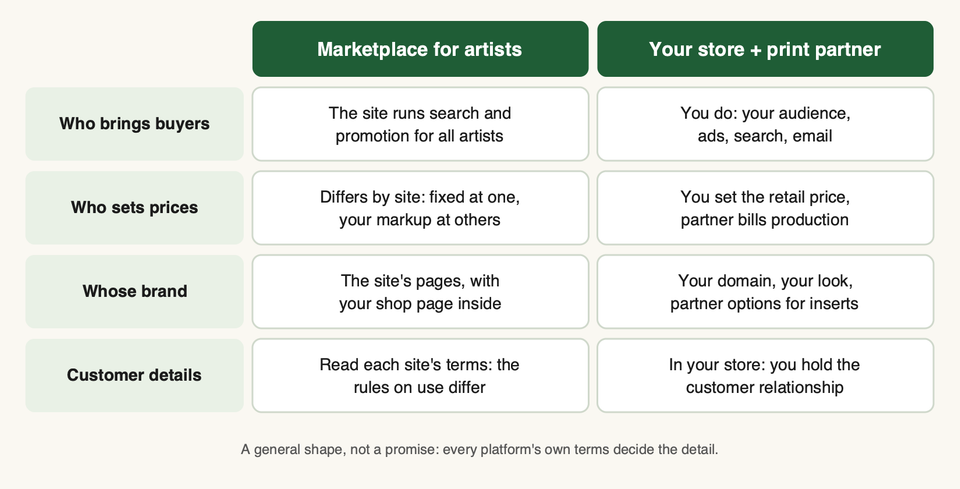
People say "print on demand" for two different things.
A marketplace for artists is a shop that already has visitors. You upload your art, pick products and the site lists them next to everyone else's work. The site prints, ships and handles customer service. Society6, Threadless and Fine Art America are in this group.
A print partner has no shoppers of its own. You build a store (on Shopify, Etsy and similar) and connect the partner. When someone orders from you, the partner prints and ships under your brand. Printful, Printify, Gelato and Prodigi are in this group.
If you are new to the model, our guide on what print on demand is covers the basics.
At a glance
| Site | Type | Prices | Where you sell |
|---|---|---|---|
| Society6 | Marketplace, by application | Set by Society6 | Your shop page on Society6 |
| Threadless | Marketplace and Artist Shops | Your own, or managed by Threadless | Threadless, plus your Artist Shop |
| Fine Art America (Pixels) | Marketplace plus tools | Base price plus your markup | Their site, or your own site and store |
| Printful | Print partner | You set retail prices | Your store |
| Printify | Print partner | You set retail prices | Your store |
| Gelato | Print partner | You set retail prices | Your store |
| Prodigi | Print partner | Your call, per its site | Your store, API or order form |
Marketplaces where artists list
Society6
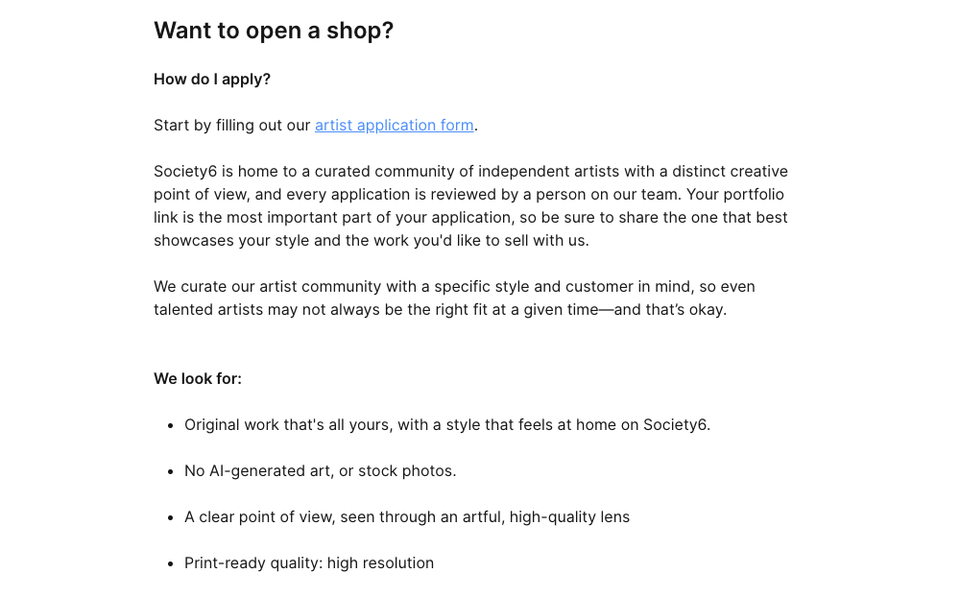
How it works. You apply. Society6's help page says every application is reviewed by a person and that your portfolio link matters most. It says it looks for original work and states "No AI-generated art, or stock photos". Approved artists then submit designs, and each new design goes through a curator review before it is published. Society6 says the wait can be up to 30 business days. After you submit, you cannot edit the image, title or tags yourself. You also have to switch on the products you want for each design before you submit.
Pricing, brand and customers. Society6 set standard prices across products in 2025 and removed artists' ability to set their own markup. It says it handles marketing, manufacturing, shipping and customer support. The pages we read do not say you receive buyer details, so assume you do not.
Files and IP. We did not find an artist file spec on the pages we read, beyond "print-ready quality: high resolution". On IP, Society6 says it has a zero tolerance policy for infringement and that designs are removed for copyright, trademark or publicity-rights problems. Its curators may also decline public domain content that does not fit the brand.
Pick this if you want your art in front of an existing audience, you are happy with fixed pricing and a small fixed markup per product (its pricing page gives a different rate by product type), and you do not need to own the customer.
Skip this if you want to set your own prices, edit listings freely or use AI-assisted art.
Sources: how to become an artist, pricing change, submission process, removed designs.
Threadless Artist Shops
How it works. You open an Artist Shop on Threadless, upload a design and choose products. Its help page lists apparel, home goods and accessories, with wall art covered in its file guide. You confirm you have the right to sell the image and that it follows its safety and anti-hate policy before products go live.
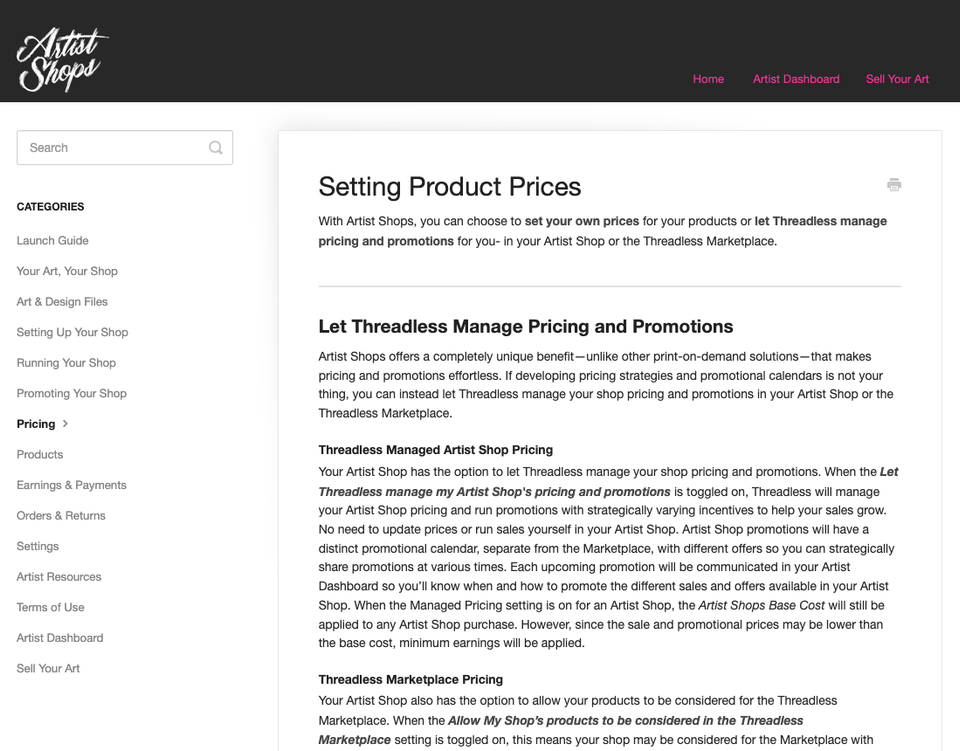
Pricing. This is where Threadless is unusual. You can set your own prices: each product has a base cost, and what you charge above it is your profit. Or you can let Threadless manage pricing and promotions. Its help pages say shops are opted into managed pricing and into marketplace consideration by default, so check your settings on day one. Marketplace pricing is set by Threadless, and being chosen for the marketplace is not guaranteed.
Customers. Order details show in your dashboard. Its terms say Threadless may share customer information such as email and shipping address. They also say a buyer's details may only be used for marketing communications related to your Artist Shop, and not for unsolicited commercial messages or unauthorised transactions. Read that section of the terms before you email anyone.
Files. The upload minimum is 2,000 by 2,000 pixels, as JPG or PNG. Its design file guide recommends 4,200 by 4,800 pixels at 300 ppi as a transparent PNG for apparel, and its size table lists much larger files for wall art.
IP. Its terms say you keep your copyright and other ownership rights. There is one exception: in a themed design challenge, the third-party sponsor may require ownership of every entry. It also says it may modify artwork as needed to prepare it for a product. Read the rules of any challenge before you enter.
Pick this if you want a storefront with a built-in marketplace and the choice between setting prices yourself or handing that to the platform.
Skip this if you want full control of pricing and will not check the managed-pricing and marketplace settings yourself.
Fine Art America and Pixels
How it works. Fine Art America describes itself as an online art marketplace and print-on-demand company. On its sell page you open an account, upload images, pick products and set your prices. It lists canvas, framed, metal, acrylic and wood prints, posters, greeting cards, home decor and apparel, among others. It also says it sells digital downloads and that you can sell originals without a commission, with buyers emailing you directly from your profile.
Pricing, brand and customers. It sets a base price for each product, and the markup you add is what you earn. It says it handles fulfilment and customer service. Its sell page also describes branded web stores, a cart you can paste into your own site, and a Shopify connection, so it works as both a marketplace and a print partner. Which of those tools you have access to can depend on your membership, so check what you get before you plan around them.
Files and IP. We did not find a file spec on the sell page. Its terms page describes how copyright complaints are handled, but we did not find an artist licence summary on the pages we read. Read the artist terms inside your account before you upload.
Pick this if you want a large catalogue of wall art and framing, plus the option to sell on your own site later.
Skip this if you want a tightly curated marketplace. It is open to join, and the site gives two different figures for its artist count (hundreds of thousands in some places, millions in others), so standing out takes work.
Marketplaces we could not read
Redbubble, Displate and Zazzle are well-known artist marketplaces. When we tried their help and artist pages, they returned a bot check, and we do not get past those. So we have not described their rules, prices, file specs or IP terms, and you should not take our silence as approval or criticism.
If you are considering one, open its own artist help pages and answer these before you upload:
- Can anyone join, or is it by application?
- Who sets the final price, and what do you keep per sale?
- What file size and format does it ask for?
- What licence do you grant, and can you remove a design later?
- What does it say about AI-generated art?
- Can you also sell the same art on your own site?
- Who owns the buyer's details?
Etsy with a print partner
Etsy is not a print partner. It is a marketplace where you open your own shop and connect one. The Shopify listings for Printful and Printify show Etsy under "Works with", and Gelato's help centre has an Etsy integration section. Etsy has its own rules for print-on-demand sellers, including disclosure of who makes the item. We cover them in our Etsy print on demand guide.
Print partners for your own store
Printful
How it works. You connect a store, add products with your art, and Printful prints and ships. Its print on demand page walks through design, store setup, adding products, billing and ordering samples, and says there are no order minimums. For art, its wall art range includes posters, framed posters, canvas prints and metal prints.
Pricing, brand and customers. You run the store, so you set retail prices. The Shopify listing mentions custom branding with packaging, pack-ins and packing slips. In its terms, you confirm you have the right to pass your customers' personal data to Printful to fulfil orders, which tells you who holds the customer relationship: you do.
Files. Its help centre sat behind a bot check when we tried, so we did not read its file guidance. Check it before you upload large prints.
IP. The terms summary says what you upload stays yours and you are responsible for it. The licence you grant Printful is wide: non-exclusive, worldwide, royalty-free, irrevocable, sub-licensable and perpetual, to run the service and to promote it or your store. Its IP policy also describes a registry that rights holders can use to flag their own designs, and says no system can catch every misuse.
Pick this if you want a large catalogue, a well-known name and one place to handle both art and other products.
Skip this if you want to choose between independent print providers for each product. Whatever you pick, order a sample of the exact paper or product first.
Printify
How it works. Printify sends your order to one of its network of print providers. The Shopify listing lists wall art among its product groups, a free plan and a mockup generator. It says it works with Etsy, Squarespace, Wix, TikTok and others, and it lists white-label shipping.
Pricing, brand and customers. You set retail prices in your own store. The listing shows a free plan and a paid plan with product discounts. We are not quoting prices because they change.
Files, IP and the catch. Printify's own site was behind a bot check when we tried, so we could only read its Shopify listing. Because several providers sit behind one name, the print quality, price and shipping for the same poster can differ by provider. We recommend ordering a sample of the exact product and provider you plan to sell. Read its IP policy in your account.
Pick this if you want to compare several providers on cost and location for the same product.
Skip this if you want one maker and one set of file rules for every order.
Gelato
How it works. Gelato produces through a network of local production hubs in many countries. Its help centre lists wall art as posters, framed posters, canvases, museum-quality paper and more. The Shopify listing says it is free to install, with a free trial, and works with Etsy, Wix, WooCommerce, Squarespace and Amazon.
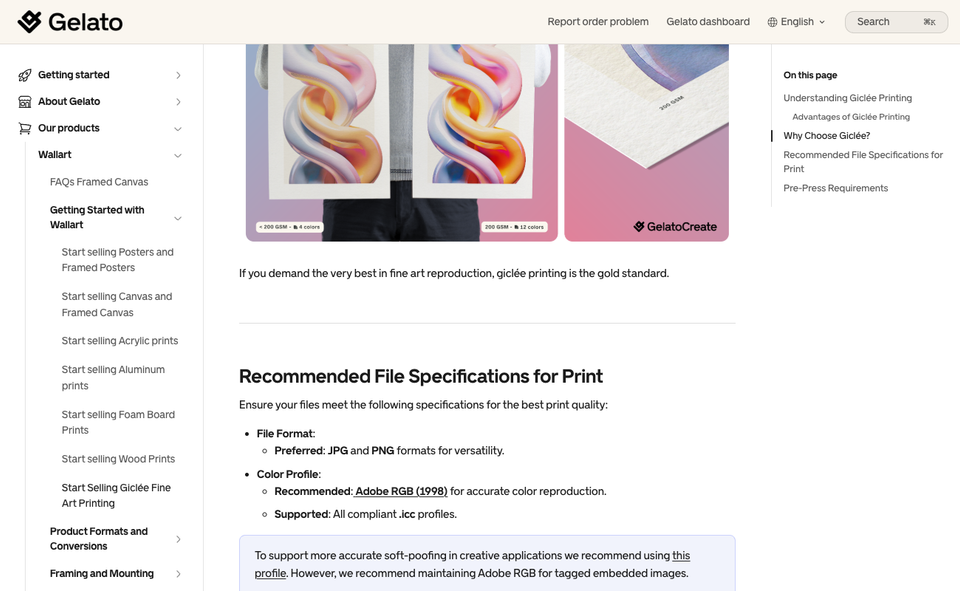
Files. This is the best-documented part for artists. In its giclée guide, Gelato prefers JPG or PNG, recommends Adobe RGB (1998), and asks for at least 300 dpi at the final print size. Its poster guide says a minimum of 150 dpi at print size works, with 300 dpi ideal. It also warns that neon and out-of-gamut colours are converted to CMYK, and that archival paper has a slightly yellow tone that shows on pale pastels.
Pricing, brand and customers. You sell through your own store, so you set the price and hold the buyer relationship. Gelato's custom packaging section covers labels and inserts with your logo.
IP. Read the terms inside your account. We did not review its IP policy.
Pick this if you sell fine art prints and want published colour and paper notes you can design around.
Skip this if you want to compare several independent makers for one product. Gelato is one network, so it will not give you that view. Check which products your region can order.
Prodigi
How it works. Prodigi's site says you can connect a store, use its print API or use an order form, and that which products you sell, where you sell and for how much is your call. Its prints and posters page groups fine art prints, photo prints, posters and specialist prints, described as loved by artists, photographers and creatives.
Integrations: check this first. Its home page lists Etsy, Shopify, WooCommerce, Squarespace, Wix and BigCommerce. But its Shopify App Store listing currently says "This app is not currently available on the Shopify App Store". Ask Prodigi how it connects to Shopify today before you plan around it.
Files, IP and customers. We did not read its file spec or IP terms, because we could not find them on the pages we opened. Because you run the store, you own the buyer relationship.
Pick this if you sell fine art or photo prints and want a print partner that builds its range around them.
Skip this if you want a one-click Shopify install.
File prep that saves a bad first order
The platforms that publish file rules all ask for big, clean files, and they differ on the detail.
- Start large. Threadless takes files of 2,000 by 2,000 pixels but recommends far bigger ones for wall art, and Gelato asks for 300 dpi at the final size for giclée.
- Check the colour space. Gelato recommends Adobe RGB (1998) for giclée and warns that neon colours get converted to CMYK. Bright screen colours can print duller.
- Keep layered originals. Different products need different crops and placements, and some partners ask for a template per product.
- Order a sample. Printful's own setup steps include sampling. Look at the paper, the colour and the edges before you put your name on it.
- Use the exact print size. A file that is fine for an 8-inch card can be soft on a large poster.
Protecting your art
This section is general information from official sources, not legal advice. If a dispute starts or you want a licence checked, ask a lawyer who works with creators.
You get copyright automatically. The US Copyright Office says a work is protected the moment it is created and fixed in a form you can perceive, and that registration is generally voluntary. GOV.UK says the same for the UK: protection is automatic, you do not pay a fee and there is no register of copyright works there. GOV.UK adds that illustration and photography count as original artistic work.
Registering still helps in the US. The Copyright Office says you must register to bring an infringement lawsuit over a US work. It also says registered works may be eligible for statutory damages and attorney's fees, and that early registration is treated as prima facie evidence in court. It lists group registration options for photographs, which can help photographers with large archives. Mailing a copy to yourself, sometimes called "poor man's copyright", is not a substitute, the Office says.
A copyright notice is optional. GOV.UK says you can add the © symbol, your name and the year, and that marking the work or not does not change your protection.
Watermarks. We did not find an official source to cite on watermarks, so this is our judgement. Keep them on social previews and portfolio images. Do not put one in the file you upload for printing, because print partners print the file you give them.
Read the licence you grant. Every platform asks for a licence to show and print your work. Check these points in the terms:
- Is the licence exclusive or non-exclusive?
- Can it be ended, and what happens to the copies already published?
- Can the platform change your artwork to fit a product?
- Can it use your art to promote itself or you, and does it say so?
- Do contests or challenges change who owns the entry?
- What happens when someone reports your design as infringing, and how do you reply?
Threadless, for example, says you keep ownership but that challenge sponsors may require it. Printful's licence is irrevocable and perpetual, though the summary says your content stays yours. Neither is wrong. Both are the sort of clause worth reading before you click accept.
If someone copies your work. Printful has an IP registry that rights holders can use, and Society6 says it removes designs after a rights-holder notice. Check each platform's own reporting steps. GOV.UK says you are responsible for defending your own copyright in the UK. Keep dated originals, work files and early exports so you can show how you made the piece.
How to choose
A few rules of thumb from reading these pages:
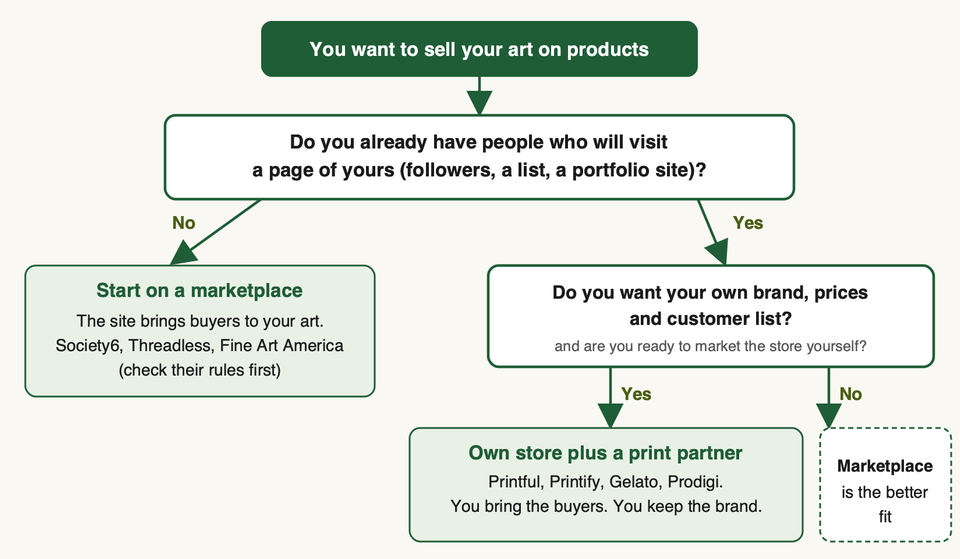
- No audience yet? Start on a marketplace. A store with no visitors earns nothing, and you can still build a following from there.
- Want control of price and customer? Use your own store with a partner. Our guide to Shopify print on demand apps lists the options, and setting up a Shopify store covers the first steps.
- Mostly selling fine art prints or photography? Look first at partners with art paper and finishing options, such as Gelato and Prodigi, and compare Printful's wall art range.
- Want shirts and merch more than prints? Compare the t-shirt-focused platforms in our Teespring alternatives guide.
- Not sure? Use both. Keep the same master files and check each platform's rules on exclusivity, because the pages we read did not all say.
FAQ
Can I sell art on products without holding any stock?
Yes. Each item is made after the order. Marketplaces and print partners both work this way.
Should I start on a marketplace or my own store?
See the decision chart above. In short: no audience, start on a marketplace; an audience and a wish for control, use your own store.
Do I keep the copyright to my art?
On the platforms whose terms we read, yes, but you grant a licence so they can print and show it. See the licence checklist above.
What resolution do I need?
It depends on the platform and product. See the file prep section above, and check the platform's current guidance.
Do these sites accept AI-generated art?
Society6's application page says it does not want AI-generated art or stock photos. We could not read the rules of every site, so check each one. If you use AI tools in your work, say so honestly when a form asks.
Do I have to register my copyright?
Not to hold it. The US and UK differences are in the copyright section above.
Is a watermark enough to protect my art?
No. It does not replace clear terms or a record of your original files.
Can I sell the same art on more than one site?
Often yes, but check each site's terms for exclusivity and any challenge or contest rules first. The pages we read did not all state it. Threadless's terms say Artist Shop artwork is sold on the Threadless website only and is not passed to third-party retailers unless you agree otherwise.
If you want help connecting a store to a print partner, choosing products or fixing product pages, talk to us.