What Is Print on Demand? How It Works and Whether It Is Worth It
Print on demand means a partner prints and ships each product only after a customer orders it. Here is how an order flows, how it differs from dropshipping and bulk printing, what to check before you launch, and the honest limits.
Print on demand is a way to sell custom products without holding stock. You supply the design, a partner prints it on a blank item after someone buys, and the partner ships it to your customer. This guide explains how it works step by step, what it is not, where to sell, what to check before you launch and where it can go wrong, so you can decide if it fits you.
What is print on demand?
Shopify describes print on demand as a model where products such as clothing, accessories or home décor are designed by the seller and produced by a supplier once an order is received. The supplier prints, packs and ships the product, so the seller does not buy or manage inventory. You can read their version in Shopify's print on demand guide.
Printful makes the same point from the supplier side. It calls print on demand a fulfilment method and business model where products are only printed after they are ordered, with no inventory and no minimums, as described on Printful's print on demand page.
Two ideas sit inside that definition.
- The design is yours. The partner supplies the blank product, the printing and the shipping. You supply the artwork, the brand, the store and the customers.
- Payment comes first. Nothing is made until a customer has paid. That is why the upfront cost is low, and also why you have less control later.
How does a print on demand order work?
Here is one order from click to doorstep.
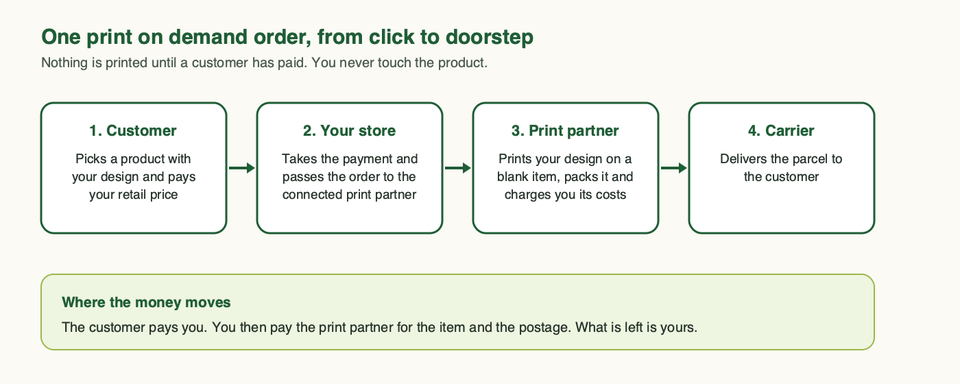
- You create a design and choose a product. Most print on demand apps give you a catalogue of blank items and a tool to place your artwork on them.
- You list it in your store. You write the description, set the price and add images. The partner's tools usually generate mockups for this.
- A customer buys. They pay your retail price at your checkout.
- The order goes to the partner. If your store is connected to the partner's app, this happens automatically.
- The partner prints, packs and ships. Shopify notes that, depending on the service, customers may also be able to send returns back to the partner.
- You pay the partner. Printful says it charges for fulfilment and shipping after the customer has placed and paid for the order. Printify's Shopify listing says the same: product and shipping costs are billed only when a sale is made.
Your income is what the customer paid minus what the partner charged you, minus your other costs such as payment fees and marketing. We come back to that squeeze in the risks section.
How is print on demand different from dropshipping and bulk printing?
The three models get mixed up, so it helps to see them side by side.
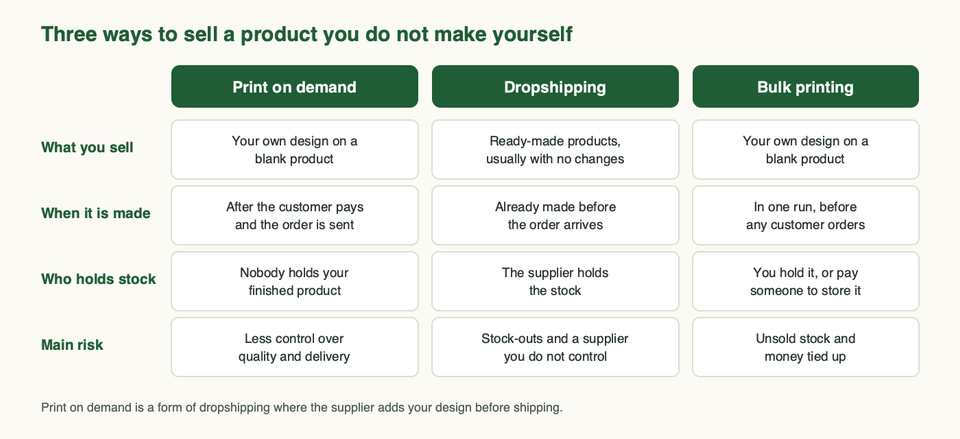
| Print on demand | Dropshipping | Bulk printing | |
|---|---|---|---|
| What you sell | Your design on a blank product | Ready-made products, usually unchanged | Your design on a blank product |
| When it is made | After the customer pays | Before the order arrives | In one run, before any orders |
| Who holds stock | Nobody holds your finished product | The supplier | You, or a storage service |
| Main risk | Less control over quality and delivery | Stock-outs and supplier reliability | Unsold stock |
Shopify actually calls print on demand a dropshipping business model. The difference is in the product. Printful explains it this way: in dropshipping you usually sell ready-made products that are sent on without changes, while in print on demand the item is customised with your design before it ships. Its print on demand versus dropshipping comparison also points to a practical cost of print on demand: because every item is made after the order, fulfilment can take a little longer than shipping something already on a shelf.
Bulk printing is the old way. You order a run of printed items, pay for them upfront and store them. Unit costs fall when you buy more at once, which is the flip side of Shopify's point that print on demand costs more per item because you are not buying in bulk. But you carry the stock risk. If you want to compare print on demand with products that arrive ready-made, our guide to dropshipping apps for Shopify covers that side. Bulk printing is our name for the old way of printing a run up front, not a Shopify term.
Pick print on demand if you have a design or brand idea to test and do not want to buy stock first. Skip it if you already know a product will sell in volume and you care more about unit cost and delivery control than about low risk.
What can you sell with print on demand?
Printful's comparison page lists the usual categories: clothing, hats, footwear and bags, wall art such as posters and canvases, home décor such as towels and blankets, drinkware such as mugs and bottles, tech accessories such as phone cases, stationery such as notebooks and cards, and pet accessories. Shopify's guide adds books and, separately, downloadable designs sold as digital products.
Printing methods matter more than the product list. A partner may offer printed items, embroidery or all-over printing, and the method changes how a design looks and what it can reproduce. Printful, for example, treats embroidery as its own technique. Shopify warns that print on demand services are often unable to handle complex design requests. A simple, bold design usually survives printing better than a detailed one.
Start with one product type. A t-shirt tells you how a partner handles sizing, colours and print quality. You can add mugs or posters after that.
Where can you sell print on demand products?
You have two main routes, and many sellers end up using both.
Your own store. On Shopify, you install a print on demand app, create products and let the app pass orders to the partner. Shopify's help centre lists print on demand apps alongside Shopify Collective and dropshipping apps as ways to source products. The upside is control of your brand, your customer list, your pricing and your checkout. The cost is that you have to bring the traffic. We cover the apps in print on demand apps for Shopify, and the store itself in how to set up a Shopify store.
Marketplaces. Printful lists Etsy, eBay and Amazon alongside Shopify and WooCommerce as places it connects to. Printify's Shopify listing names Etsy, Amazon, eBay, Wix, Squarespace and TikTok. Gelato says it connects to Shopify, Etsy and WooCommerce. A marketplace brings shoppers who are already looking, but you follow its rules, and those rules differ. Etsy is the clearest example, and it deserves its own section below. For a full walkthrough, read print on demand on Etsy.
Pick your own store if you want a brand you control and will do the marketing. Pick a marketplace if you want to test a design in front of existing shoppers. Skip a marketplace as your only channel if one policy change could end your whole business.
Which print partner should you choose?
This post is about the model, not a ranking, but these three names come up most, so here is what their own pages say and where each can fit.
| Printful | Printify | Gelato | |
|---|---|---|---|
| How it works | Printful fulfils orders through its own network | A network of independent print providers you can choose between | Produces locally through a network of production hubs |
| Stores it connects to | Shopify, Etsy, WooCommerce, eBay, Amazon and more | Shopify, Etsy, Amazon, eBay, Wix, Squarespace, TikTok | Shopify, Etsy, WooCommerce and more |
| Branding | White-label packaging with no Printful branding | White label shipping listed | Private labels and custom packaging listed |
| Worth checking | Where your orders ship from | Which provider you pick for each product | Whether a local hub covers your market |
- Printful says most orders are fulfilled in two to five business days, depending on product and location. It also says the delivery estimate is not a guarantee. Pick it if you want one supplier with a fixed process. Skip it if you want to compare many providers product by product.
- Printify works as a network of print providers, so you pick a provider per product. Its Shopify listing mentions a mockup generator, design tools and a free plan to install. Pick it if you want choice between providers on price, quality and location. Skip it if you want one supplier to answer for everything.
- Gelato says it produces locally through a network of production hubs. Pick it if most of your customers are in regions it covers. Skip it if your market sits outside its network.
Treat each partner's own claims as claims. Samples, covered next, are how you check them.
What should you check before you launch?
This is the part most beginner guides rush. Work through it before you spend on ads.
Order samples first
Shopify's advice is to order samples through your own store so you test the whole shopping experience, from browsing to delivery. It adds that some services, Printful among them, offer a sample discount. Samples also give you real photos for your store. Check the print, the colour, the fit, the packaging and how long the parcel took.
Look at where orders ship from
Printful's shipping information says that if an order ships from a facility in a different region from the delivery address, the customer may have to pay handling or customs fees on arrival, and it suggests choosing products fulfilled close to your customers. A cheap item that costs the customer extra at the door is a refund waiting to happen. Look at the ship-from locations on every product before you list it.
Check delivery times and say so on your site
Print on demand is made to order, so it is slower than shelf stock. Write your delivery times on the product page, not just in the footer, and match them to what the partner states. If a customer is surprised by the wait, they blame you, not the partner.
Decide how much of your brand shows
Printful says it offers white-label fulfilment, so the packaging shows your business and not its own. Printify and Gelato list white label or private label options. Check what each partner includes by default, what needs setting up and whether branded inserts or packing slips cost extra.
Do not use other people's brands, characters or art
Print on demand does not change who owns an image. The seller is responsible for having the rights. Etsy's intellectual property policy says sellers must ensure they hold all necessary rights to their content and are not infringing anyone's rights, and that Etsy can disable listings, shops or accounts. The same logic applies on your own store: the responsibility for the artwork is yours there too.
Trademarks need particular care. The US Patent and Trademark Office explains that trademark rights attach to a word or logo as used with specific goods or services, and that rights can arise from use, not only registration. A slogan or name on a shirt might look harmless, and still belong to someone else. When in doubt, use your own artwork and your own words, and check names before you print them. For anything valuable, ask an IP lawyer.
Know the platform rules
Each channel has its own rules, and they are not the same.
- Etsy: Etsy's Creativity Standards put print on demand under "designed by a seller": original designs made with a production partner. Sellers must disclose the partner and give accurate ship-from information. Check Etsy's current production-partner help page before you list.
- Your own store has fewer channel rules, but you still need clear shipping, returns and privacy pages. Check what your payment provider and print partner allow before launch.
- Any partner has its own terms and content rules. Read them before you upload a design, not after an order fails.
What are the real risks and limits?
Print on demand removes stock risk and adds other risks. Shopify lists the main ones plainly: a higher cost per item because you are not buying in bulk, limited control over shipping, and constraints on how custom a design can be.
- Thin margins. You pay the partner's price for the item and the shipping, then your own fees and marketing come out of what is left. A product that looks fine at your price can become hard to profit from once ads are added. Work out the full cost of one order before you set a price, using each partner's current price list.
- Quality you do not see. You never handle the parcel. Quality can vary by product, partner and print method, so keep ordering samples now and then.
- Delivery you do not control. Production, carrier and customs all sit outside your hands. Printful says delivery estimates are estimates, not guarantees.
- Thin differentiation. Anyone can put a design on a standard blank. What sets you apart is the design, the niche and the brand, not the product.
- Platform dependence. If you sell only on a marketplace, its rules and fees decide your future.
- Returns and refunds. Shopify notes that, depending on the service, customers may be able to send returns back to the partner. Read the partner's return policy before you promise yours.
Print on demand is a low-risk way to test an idea. It is not a low-effort way to build a business.
What does a good first week look like?
You are not trying to make sales in week one. You are trying to build a store you would buy from.
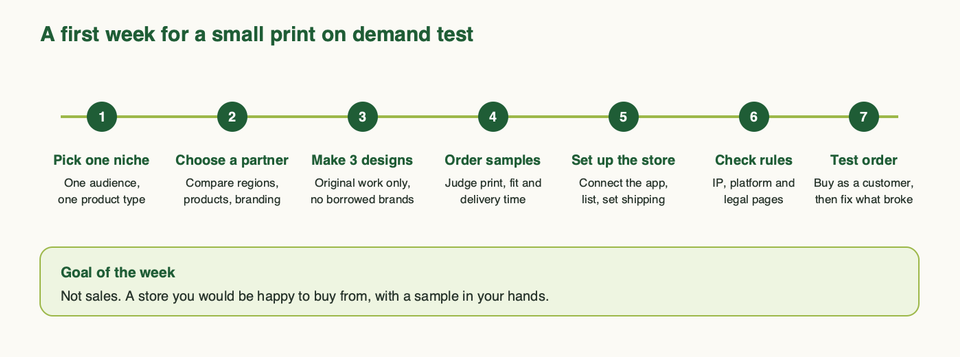
- Day 1: pick one niche. One audience and one product type. "Everything for everyone" is not a niche.
- Day 2: choose a partner. Compare regions, product options, branding and shipping for your customers, using the partners' own pages.
- Day 3: make three designs. Original artwork and your own words. No borrowed characters or brand names.
- Day 4: order samples. Place the order through your store so you test the real flow, as Shopify advises.
- Day 5: set up the store. Connect the app, list the products, write the delivery times and set shipping.
- Day 6: check the rules. Go through the pre-launch checks above.
- Day 7: place a test order as a customer and fix whatever feels wrong. Then, when the samples arrive, decide whether you would be proud to sell them.
If you do only two things before launch, order samples and check where each product ships from. Everything else can be fixed later; a bad parcel cannot.
If you want a second pair of eyes on the store setup or the print partner connection, talk to us.
Frequently asked questions
Is print on demand worth it for a beginner?
It can be, if you treat it as a low-cost test and not a shortcut. You avoid buying stock, which lowers the risk of starting. You still have to find a niche, create designs people want and market them. Shopify says success depends on design quality, niche, marketing and differentiation, and that how much you earn depends on your market, your sale price, your partner's fees and your order volume.
Do I need to buy any inventory?
No. The partner prints the product after the order and ships it. You pay for samples and for the store itself, and you pay the partner's costs only when a sale is made, according to Printful and Printify.
Who ships the order and who handles returns?
The print partner prints, packs and ships. Read each partner's return policy before you write yours.
Is print on demand the same as dropshipping?
Not quite. Shopify calls print on demand a dropshipping model, but the difference is in the product. In dropshipping you usually sell ready-made items. In print on demand the item is customised with your design before it ships.
Can I put someone else's logo, character or quote on a product?
Not unless you have the rights. The seller is responsible for the rights to the content, and platforms such as Etsy can remove listings or shops for infringement. Use your own work.
Can I sell print on demand on Etsy?
Yes, if you follow Etsy's rules. Etsy accepts original designs produced by a production partner, and requires you to disclose the partner and show accurate ship-from information. It does not accept resold items or other people's work. See our guide to print on demand on Etsy.
Which products are best to start with?
Start with one simple product, such as a t-shirt or a mug, with a bold design. Complex designs are harder to reproduce, and Shopify warns that partners are often unable to handle them. Add products after your samples show what a partner does well.
How long does delivery take?
It depends on the partner, the product and the destination. Printful says most orders are fulfilled in two to five business days and that the delivery estimate is not a guarantee. Because each item is made to order, plan for slower delivery than shelf stock, and put your delivery times on the product page.