Etsy Print on Demand: How It Works, the Rules and When to Move On
How print on demand works on Etsy, which of Etsy's rules apply, how Printful, Printify and Gelato connect, what to check before you list, and when your own Shopify store makes more sense.

Print on demand is allowed on Etsy, with one condition that matters more than any other: the design must be yours (or your buyer's own text or image), and you must say openly that a partner makes the item. This guide explains how that works, how the main providers connect, what to check before your first listing, and when an Etsy-only shop stops being enough.
Everything about Etsy's rules below comes from Etsy's own policy and help pages. Etsy changes these pages, so open the links before you rely on a detail.
How print on demand works on Etsy
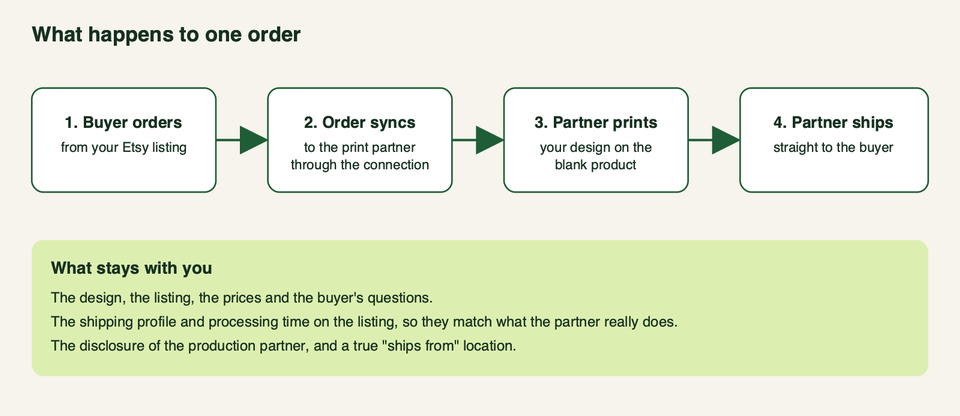
You make a design. A print partner puts it on a blank product only after someone orders, then ships it to the buyer. You hold no stock. The partner connects to your Etsy shop, so listings go out from the partner's tool and orders flow back to it.
Etsy has its own name for the partner: a production partner. Its help page defines it as a company or individual, not part of your shop, that physically produces items from your own original designs. Print-on-demand services are on its list of examples, and it names Printful, Printify and Gooten.
Etsy's rules for print on demand sellers
Etsy sorts every item into one of four groups in its Creativity Standards: made by a seller, designed by a seller, handpicked by a seller, and sourced by a seller. Print on demand sits in two of them.
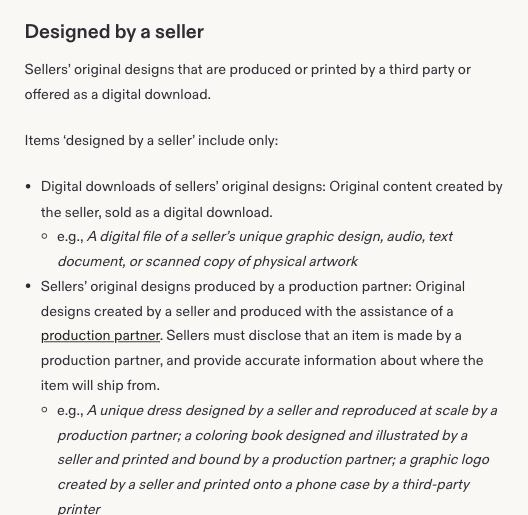
- Designed by a seller. Your original design, produced by a production partner. Etsy says you must disclose that a production partner makes the item and give accurate information about where it ships from.
- Sourced by a seller. This covers items made from a buyer's own text or image, produced by a production partner. Etsy's example is a t-shirt, hat or neon sign that the buyer personalises.
Three things fall outside those groups, and they trip up many new sellers:
- Other people's work. Etsy lists "a bundle, collection, scan, or PDF of someone else's work" as not qualifying as designed by a seller.
- Ready-made products. In its drop shipping and reselling article, Etsy says print-on-demand services are fine for your original design or the buyer's customisation. Using one to sell products you did not design and buyers did not personalise breaks the rules.
- Blank goods. The Creativity Standards say resold blank items that are ready to use, such as blank t-shirts, hats or tumblers, do not count as sourced by a seller.
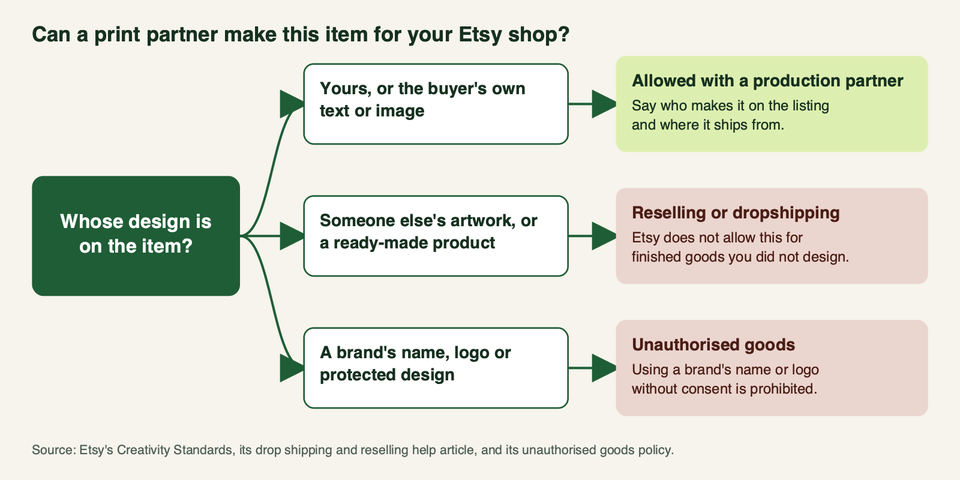
The Seller Policy adds the consequences. Etsy may remove listings that break its policies, and it may suspend or end an account for violations. Listing fees are not refunded for removed listings (see Etsy's Fees & Payments Policy for how fees work). It also asks for an accurate account of how an item was made, by whom, and where it ships from.
What the disclosure looks like
Etsy's production partner help page explains that you add the partner on Etsy.com (you cannot add a new one in the Etsy Seller app), then pick it on each listing. Buyers can see your partners in your shop's About section. After you add a partner, Etsy tells you to update the listing's shipping location if the item ships from the partner's site, and to fill in your About section with how you design and create your items.
How Printful, Printify and Gelato connect to Etsy
All three work the same way at a high level: you authorise the provider to reach your Etsy shop, choose a product, add your artwork, and publish. Differences show up in the details.
| Provider | How the Etsy connection starts | Etsy specifics from its own pages | Also works with |
|---|---|---|---|
| Printful | Sign in and authorise Printful to access your shop, then pick products and set up listings | Design Maker for artwork, a personalisation tool, orders shipped under your brand. Its comparison table says live shipping rates are not offered | Shopify, Amazon, eBay, Etsy, Storenvy (its Shopify App Store listing) |
| Printify | Open Manage my stores, choose Connect and Etsy, sign in and grant access | Sends shipping profiles to Etsy on publish. Cannot create the Etsy production partner for you | Shopify, Amazon, eBay, Etsy, Squarespace, TikTok, Wix (its Shopify App Store listing) |
| Gelato | Connect your store, then publish products from Gelato | Routes each order to a nearby print provider in its network and offers a personalisation tool for Etsy listings | Shopify, WooCommerce and others (its Etsy page) |
Sources for the table: Printful's Etsy page, Printify's connection guide, Printify's shipping guide for Etsy, Gelato's Etsy page, and the Shopify App Store listings for Printful and Printify.
The Printify trap worth knowing about
Printify's Creative Standards article says it cannot create the production partner in your Etsy account while publishing. If a partner named "Printify" already exists in your account, it assigns it automatically and adds a "Designed by" note with your shop name to the listing. If not, the listing defaults to "Made by seller" and you must edit it by hand. Printify's suspension article adds that, for its sellers, the most common cause of a suspension is not adding Printify as a production partner and not describing their own role in the listings.
So the first listing deserves a manual check. Open it in Etsy, look at who made it, and fix it before anyone can order.
Choosing between them
- Pick Printful if you want one tool for artwork, products and personalisation, and you are happy that it does not offer live shipping rates on Etsy.
- Skip Printful if you need live shipping rates at the time of checkout.
- Pick Printify if you want a connection that sets up Etsy shipping profiles for you and you will do the one-time production partner setup in Etsy yourself.
- Skip Printify if your Etsy shop is not set to US dollars and you do not want to build your own shipping profiles, since its guide says non-USD shops need manual profiles.
- Pick Gelato if local production close to the buyer matters for your market, and you want to check which products are made in which country in its catalogue.
- Skip Gelato if your product is outside the 48 categories its Etsy page lists, and check its catalogue for where each product is made.
Printify's own guide notes that selling in another currency means creating manual shipping profiles, otherwise the US dollar number is shown in your shop's currency. That matters for UK and EU shops.
What to check before you list
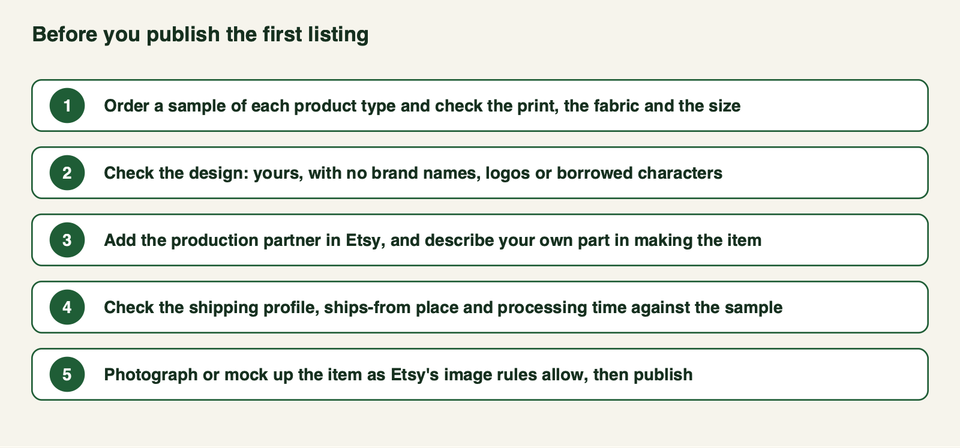
Order samples
Order one of each product type you plan to sell. Check the print, the fabric or material, the size against any size chart you will publish, and how long the parcel takes to arrive. A sample is the only way to know what your buyer will hold. It also gives you honest photos to compare against any mockup.
Check the design for trademark and copyright trouble
Etsy's Unauthorized or Counterfeit Goods Policy prohibits items that use a brand's name, logo or protected design without the owner's consent. Its Intellectual Property Policy says sellers are responsible for having all necessary rights to their content, and that Etsy ends selling privileges for repeat infringement in appropriate cases.
For slogans and names, the US Patent and Trademark Office explains that a trademark protects how a word, phrase or design is used with specific goods or services, and that you gain rights by using a mark even without registering it. In plain terms: a phrase that looks harmless may still be someone's mark for clothing. Search the trademark database of every country you sell into before you print a catchphrase on a shirt. For anything borderline, ask a lawyer who handles trademarks. We cannot give legal advice. Start with the USPTO's trademark basics.
AI-generated art is covered in the same Creativity Standards: Etsy allows seller-prompted AI creations in the "designed by a seller" group, and says you must disclose AI use in the listing description.
Set the production partner correctly
Do this once, and again for any new partner. Add the partner on Etsy.com, attach it to each listing, and describe your own role. Printify's guide shows the choices Etsy offers when you create a partner, including that you design everything yourself and that the partner makes the item.
Match the shipping profile to reality
The Seller Policy asks you to honour your shipping and processing times, so promise only what the sample showed you can keep. Etsy also tells you to update shipping locations when an item ships from a partner's site. Printify says its Etsy connection creates processing profiles of typically three to five business days, and suggests you review your order processing schedule in Etsy's delivery settings. Whichever provider you use, compare what your listing promises with what the sample did.
Photos and mockups
Etsy's listing image rules are specific. If you design original artwork that a partner prints onto a base item such as a t-shirt or mug, a stock photo mockup is allowed to show the finished product. If you design a unique item such as clothing or a book that a partner manufactures, use a real photo of the physical item. For personalised items, your first image must show a finished, customised item, not a blank product or placeholder text such as "Your Text Here". Computer-generated mockups can go in the other images.
When to move from Etsy to your own Shopify store
Etsy is a marketplace with its own rules, and it can remove listings or suspend a shop. That is a fair price for access to its buyers. For some sellers it becomes a limit. Signs that you are ready to add your own store:
- You depend on one policy page. A change to the Creativity Standards or a flagged listing can stop sales. A second channel reduces that risk.
- You cannot build an email list from your buyers. The Seller Policy says information you receive from a buyer may only be used for Etsy-related communications or Etsy-facilitated transactions, and you may not add an Etsy member to your mailing list without the buyer's consent. On your own store, people sign up on your terms.
- Your products or brand outgrow the Etsy format. Bundles, subscriptions, a brand-led site and your own content all need a store you control.
- You want to sell something outside Etsy's four groups. A product you hold a licence for, but did not design, is a case Etsy's rules may not fit. Check the licence and the rules of the channel you pick before you list it.
Moving does not have to mean leaving. You can keep the Etsy shop for discovery and add a Shopify store for repeat buyers. Both Printful and Printify list Etsy and Shopify as places they work, so the same designs can usually go to both.
If you are weighing this up, read our guide to print on demand apps for Shopify, then set up your Shopify store and look at how Shopify charges a percentage of sales so you compare the costs from the platforms' own pages. If you would like a second pair of eyes on the move, or on a store that needs to look like a brand, talk to us.
Frequently asked questions
Is print on demand allowed on Etsy?
Yes, for your own original designs and for items your buyer personalises with their own text or image. Etsy's drop shipping and reselling article says a print-on-demand service is fine under those conditions and not fine for products you did not design and buyers did not personalise.
Do I have to tell buyers that a partner makes the item?
Yes. Etsy requires sellers using production assistance to share that on the applicable listings, and to give accurate information about where the item ships from. Buyers can also see your partners in your shop's About section.
Can I sell a design I bought or downloaded?
Not on its own. Etsy's Creativity Standards say a bundle, collection, scan or PDF of someone else's work does not qualify as designed by a seller. If a licence from the owner lets you do it, check Etsy's rules and the licence terms first, and keep a copy of both.
Can I use stock photos or provider mockups in my listing?
Sometimes. Etsy allows a stock photo mockup when you made an original design that a partner prints onto a base item such as a mug or t-shirt. For personalised items the first image must show a finished, customised example. For a unique item like furniture or a book made by a partner, use a real photo.
Why did my Printify listing say "Made by seller"?
Printify's Creative Standards article says that happens when no production partner called "Printify" exists in your Etsy account yet. Add it in Etsy once, and edit the listing so it shows another company made it. Later listings from Printify then pick it up automatically.
Which provider should I choose?
If you need live shipping rates, not Printful. If your shop is not in US dollars, plan manual shipping profiles with Printify. Start with Gelato if your buyers are far from the US and your product is in its catalogue. Order one sample from your top two and compare the finished item.
Can I use the same print partner on Etsy and on Shopify?
Printful and Printify both list Shopify and Etsy among the platforms they work with, per their own Shopify App Store listings, and Gelato says it connects to Shopify, Etsy and WooCommerce. Set up each channel's connection separately and check shipping on each.
What happens if Etsy suspends my shop?
Printify's suspension article says suspensions are not always about products: Etsy may also suspend a shop for an overdue bill, missing tax or bank details, incomplete verification or repeated policy violations. Check your email, including spam, for Etsy's message and follow its reinstatement steps.