Best Upsell Apps for Shopify, and Where to Use Them
A plain guide to upsell, cross-sell and bundle tools for Shopify. We start with what Shopify gives you for free, then compare six apps, show where each type of offer belongs, and cover checkout limits, speed, testing and fair-selling rules.

Most stores do not need five upsell apps. They need one or two offers in the right place, a way to check that the offers help, and a checkout that still works. This guide covers what Shopify already does for free, six apps worth a look, where each type of offer belongs, and the limits that catch people out. App listings and plan rules change, so always confirm on the listing before you install.
The plain answer: start with Shopify's free tools, add one app for the one job you cannot do for free, and test it against a group of shoppers who do not see the offer.
Upsell, cross-sell and bundle: what is what
These words get mixed up, and the tools are built around them.
- Upsell: offer a better or bigger version of what the shopper is already buying.
- Cross-sell: offer something that goes with it, such as a cleanser next to a moisturiser.
- Bundle: sell a set of products as one unit, often at a small discount.
- Quantity break: a lower price per unit when someone buys more of the same item.
- Post-purchase offer: a one-click extra shown after payment, added to the order that was just paid.
Each one belongs in a different place on your store. That is more important than which app you pick.
Start with what Shopify gives you
Shopify Bundles (free)
Shopify's own Bundles app is free. It lets you create fixed bundles and multipacks from the Shopify admin. Shoppers can pick variants such as size or colour inside the bundle, and stock stays in sync so you do not oversell. Shopify's help pages say it works on all plans, and that bundles can be sold on the Online Store, Shop and Shopify POS channels.
The limits are real. They are set out on Shopify's help pages for Shopify Bundles and for bundle eligibility and considerations:
- It does not do mix-and-match bundles. For those you need a third-party app.
- Bundles cannot be sold with subscriptions, pre-orders or try-before-you-buy.
- A bundle cannot contain another bundle, and bundles do not support import, export or bulk editing.
- If the price of a component changes, the bundle price does not update by itself. You change it by hand.
- Discounts have to target the bundle product itself. Selecting only the component products does not work.
- Your store needs an upgraded checkout. Stores still using
checkout.liquidcustomisations cannot sell bundles.
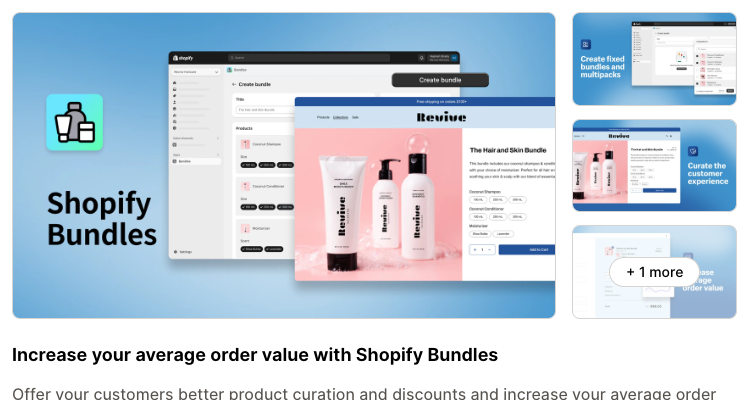
Pick this if you sell fixed sets or multipacks and want no monthly app cost and no theme code. Skip it if you need shoppers to build their own box, you sell on subscription, or your prices change often.
Product recommendations in Search & Discovery (free)
Shopify's free Search & Discovery app lets you add related and complementary products on product pages. Shopify's help page on recommendations lists the rules worth knowing:
- Your theme must have a complementary products section and a product recommendations section, and you must add them to the product page.
- You can pick up to 10 complementary and up to 10 related products per product, or let Shopify generate them.
- A product will not show if it is sold out, unlisted, priced at zero, a gift card, unpublished, or already in the visitor's cart.
- Shopify's own advice is to choose add-ons that are lower or equal in cost to the main product.
The listing talks about product detail pages. We did not find cart, checkout or post-purchase offers described on it.
Pick this if your theme already has the sections and you want a free baseline. Skip it if you want offers in the cart or after payment, or want to test offers against each other.
Discounts
Shopify's built-in Buy X get Y discounts work as simple cross-sell incentives, for example a free hat with any T-shirt. Two details matter. The free item is never added to the cart for the shopper, so they have to add it themselves. And Buy X get Y discounts made in the admin do not apply on the post-purchase page.
Checkout and post-purchase tools for developers
Apps can add offers to checkout through checkout extensions. Shopify's product offers documentation separates two kinds. Pre-purchase offers sit inside checkout. Post-purchase offers appear after the order is confirmed but before the Thank you page. We cover the plan limits for both below, because they decide what an app can actually do for you.
Where each type of offer belongs
The same offer works or fails depending on where it appears. This is our judgement, based on how shoppers move through a store, and the plan limits are from Shopify's documentation.
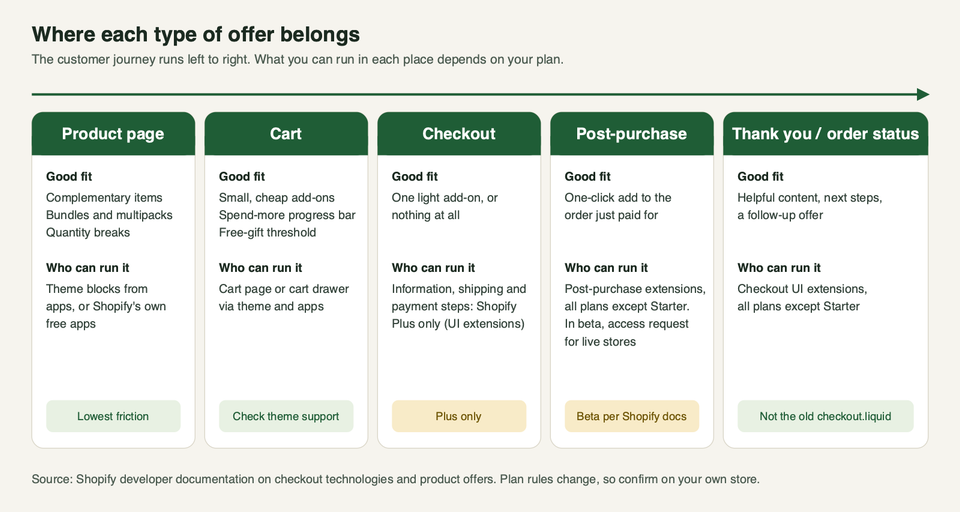
- Product page: the shopper is still deciding. Complementary items, bundles and quantity breaks fit here because they help the choice rather than interrupt it.
- Cart: the shopper has decided. Keep offers small and cheap: a travel size, a refill, a progress bar towards free shipping. Our guide to free shipping on Shopify covers how to set the threshold that a progress bar points at.
- Checkout: the shopper is typing in an address or a card. Anything that adds steps or pushes the total up risks the sale. One light add-on is the most we would try. Nothing is also a fine answer.
- Post-purchase: the payment is done, so the offer cannot make them abandon the order. It still has to be relevant and clearly priced.
- Thank you page: useful for content and next steps. Treat any offer here as a bonus, not the plan.
Six apps worth shortlisting
We picked these from the Shopify App Store. All six showed a Built for Shopify badge on their listings when we opened them. That badge matters for speed, as we explain later. We list what each app says it does, plus our view on who it suits. We did not install them on a live store for this guide, so we are not reporting results.
| App | Main job | Placements the listing names | Free option on the listing |
|---|---|---|---|
| One Click Upsell (Zipify OCU) | Post-purchase and all-round upsells | Product page, cart, checkout (Plus), post-purchase, thank you | Free for development stores only; paid tiers on live stores |
| Frequently Bought Together (Code Black Belt) | Bundle-style recommendations | Product and cart pages | Free plan |
| Candy Rack | Upsells, quantity breaks, cart drawer | Product page, cart, checkout, post-purchase | Free for development stores only; paid tiers on live stores |
| Upsell & Cross Sell (Aheadworks) | Recommendations in many places | Product, cart, checkout, order status, thank you, post-purchase | Free plan, limited |
| Easy Bundles (Skai Lama) | Mix-and-match and build-a-box bundles | Bundle builder (the listing does not list placements) | Free to install, capped |
| Also Bought (Code Black Belt) | Order-history recommendations | Product and cart pages | Free trial only |
One Click Upsell (Zipify OCU)
The listing describes one app that covers one-click post-purchase offers, product page offers, pre-purchase offers, a slide cart, checkout offers on Shopify Plus, and thank-you page offers. It also lists A/B testing, targeting by product, cart value and customer tags, and AI-picked offers. Its plans are based on the upsell revenue the app earns rather than your order count. Read the pricing section on the listing to see whether that suits you.
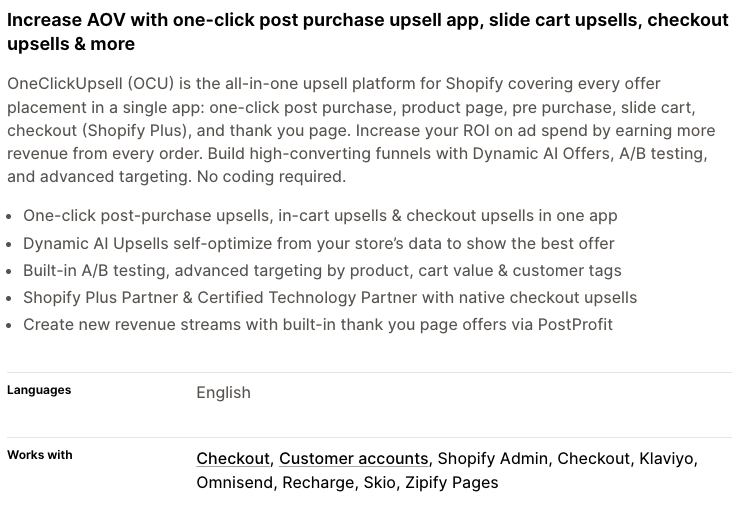
Pick this if you want post-purchase offers plus cart and product page offers, with testing, in one tool. Skip it if you only need a simple bundle block. A broad app means more settings to manage and more places for offers to pile up.
Frequently Bought Together (Code Black Belt)
The listing is about the familiar "bought together" block. It offers AI or manual recommendations with one-click add to cart, four discount types (percentage, fixed, free item or free shipping), star ratings from several review apps, and a widget for product and cart pages. The free plan limits you to a small number of manual bundles.
Pick this if you want a classic bundle-with-discount block on product pages and nothing more. Skip it if you want post-purchase offers or a build-your-own-box builder.
Candy Rack
The listing names offers in seven placements, including product page, cart, checkout and post-purchase. It adds volume bundles and quantity breaks, an AI mode that can use Google Gemini to pick products, A/B testing through Intelligems, and a built-in cart drawer with a rewards bar. Plans follow your store's monthly order volume.
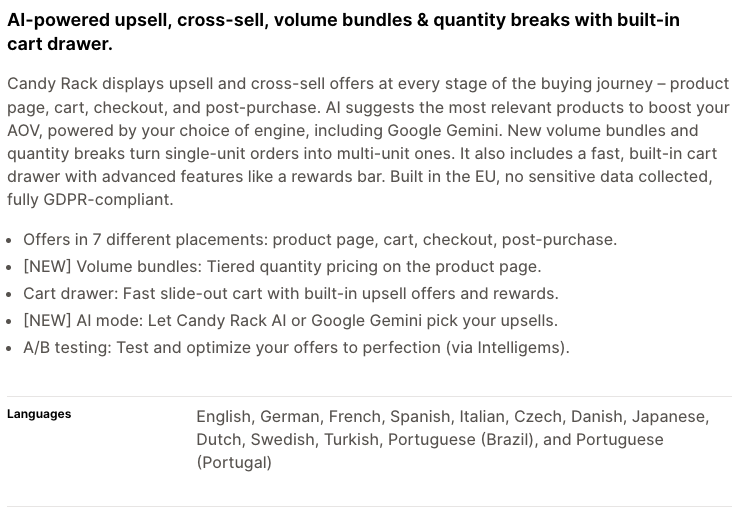
Pick this if you want quantity breaks and cart offers from one app and are happy to use its cart drawer. Skip it if your theme's cart drawer is heavily customised or you already use another cart app. Two drawers fighting each other is a common mess.
Upsell & Cross Sell (Aheadworks)
The listing names eight places for offers: product pages, cart, checkout, order status, thank you and post-purchase pages among them. It also lists frequently bought together, bundles and quantity breaks. The free plan covers fewer locations and caps monthly recommendation clicks, according to the listing.
Pick this if you want recommendations in many places, including the order status page. Skip it if you want one simple block. Eight places is a lot of ways to annoy a shopper.
Easy Bundles (Skai Lama)
The listing covers fixed-price bundles, mix and match, build a box, tiered discounts, subscription bundles, free gifts, inventory sync with 3PLs, POS selling and multi-currency. The free plan is capped by bundle sales, and the listing says it does not apply to Shopify Plus and Advanced plans.
Pick this if shoppers should build their own set, which Shopify's free app cannot do. Skip it if a fixed multipack is enough, or if you are on Advanced or Plus and were counting on the free plan.
Also Bought (Code Black Belt)
The listing describes a "customers who bought this also bought" engine that learns from your order history. It shows on product and cart pages, with automatic, manual, last-seen and collection-based recommendation types. It lists a free trial, and we did not see a free plan.
Pick this if you have enough order history for the engine to learn from and want recommendations rather than bundles. Skip it if your catalogue is small or new, or you want bundle discounts and post-purchase offers.
Names we left out
Rebuy, ReConvert and AfterSell are well known. When we opened their App Store listings, each said the app was not currently available on the Shopify App Store and pointed to the vendor for support. They may still be sold directly, and we did not look into that. If you use one already, ask the vendor how your install is supported.
Checkout extensibility: the limits that catch people out
This is where most upsell plans go wrong, so read it before you pick an app. Everything here comes from Shopify's checkout technologies page, its product offers page and its checkout overview.
- Pre-purchase offers inside checkout are a Plus feature. Checkout UI extensions on the information, shipping and payment steps are only for stores on Shopify Plus. If an app lists checkout offers and you are not on Plus, expect that part not to work.
- Thank you and order status extensions are available on all plans except Shopify Starter.
- Post-purchase extensions are in beta. Shopify's page says they work freely on a development store, but to use them on a live store the developer must request access. They are available on all plans except Starter.
- The old way is gone. Shopify says
checkout.liquidis unsupported on the information, shipping and payment steps. On the Thank you and order status pages it ended on 28 August 2025, and script tags on those pages ended for non-Plus stores on 26 August 2026. An older upsell app that relied on those will no longer work. - Shopify Scripts are deprecated. Shopify's bundles help page says Scripts were deactivated as of 30 June 2026. If your old discounts were Scripts, they need rebuilding with Shopify Functions.
- Post-purchase offers hold fulfilment. Shopify holds fulfilment on orders in a post-purchase flow. The hold ends when the customer reaches the order status page, or one hour after checkout if they never finish. Tell your warehouse team.
- Bundles and subscriptions do not mix. Shopify says bundles cannot be sold with selling plans. If you run subscriptions, see our guide to subscription apps.
If your checkout still carries old customisations, the upgrade is the first job, before any upsell app. We do this kind of work, and you can get in touch if you want a second pair of eyes before you change a live checkout.
The speed cost
Every upsell app adds scripts, and scripts cost speed. We have not measured these six apps, so we will not rank them. Here is what we can say with sources.
Shopify's Built for Shopify requirements say an app must not lower a storefront's Lighthouse performance score by more than ten points. That is a ceiling, not a promise of no impact. Ten points on a store that scored 70 is a real drop.
Shopify's documentation on theme app extensions says app embeds can load scripts only on specific pages. An app that loads everywhere for an offer that shows on one page is worth questioning.
A simple routine before you commit:
- Test your product page and cart with the app off. Note the scores and how the page feels.
- Install the app, set up one offer, and test the same pages again.
- Compare. If the loss is large, ask the vendor which scripts load where, or choose another app.
- Remove old apps fully, and check that no leftover code stays in your theme afterwards.
Our theme performance guide covers how to measure and fix this properly.
How to know if an offer works
App dashboards report "revenue from upsells". That figure counts orders the shopper might have made anyway. It does not tell you what the offer added.
- Use a holdout. Show the offer to most visitors and hide it from a random group. Compare the two groups, not this month against last month. Before-and-after comparisons are muddied by sales, ad campaigns and seasons.
- Judge more than order value. Average order value can rise while conversion falls. Look at revenue per visitor, conversion rate, refunds and returns, and profit after the discount.
- Change one thing at a time. Two new offers at once means you cannot tell which one did it.
- Run it long enough. Cover full weeks, and wait until you have a decent number of orders in each group before you call a result.
- Use the app's testing tool if it has one. OCU and Candy Rack list A/B testing, and Candy Rack names Intelligems for it. Check how the split works before you trust the numbers.
If the test shows no gain, that is useful. You save the app fee and keep a cleaner store.
Keep your offers fair
Pushy upsells win a sale and lose a customer. In some places they also break the law. This is general information, not legal advice. Ask a lawyer if you sell into the UK, EU or US at scale.
UK. Under regulation 40 of the Consumer Contracts Regulations 2013, an extra payment is only payable if you got the shopper's express consent before they were bound by the contract. Consent does not count if it is inferred from them not changing a default option, such as a pre-ticked box. The CMA's guidance on unfair commercial practices covers the Digital Markets, Competition and Consumers Act 2024. It lists pressure selling as always unfair and gives the example of a countdown clock that restarts when it hits zero. It also says that showing a headline price and adding mandatory charges later, known as drip pricing, is prohibited. The CMA's earlier paper on online choice architecture explains how design choices can steer shoppers against their interest.
US. The Restore Online Shoppers' Confidence Act covers some of this. If an offer signs the shopper up to a recurring charge, section 8403 requires clear disclosure of the material terms before you take billing details, express informed consent, and a simple way to stop the charges. If a third party sells to your customer right after checkout, section 8402 adds more rules.
In practice, that means:
- No pre-ticked boxes for add-ons.
- A decline button as easy to see and press as the accept button.
- The price, quantity and any recurring charge shown plainly on the offer.
- No fake countdowns, fake stock warnings or made-up "other people are viewing this".
- Offers that make sense for what is in the basket.
How to choose
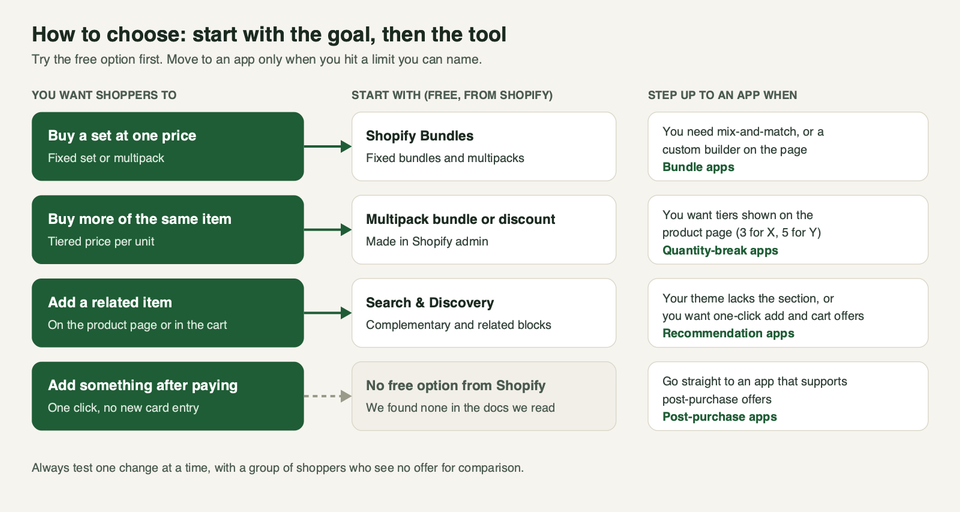
A short path through it:
- Name the goal. Bigger baskets, more units per order, or more items per customer? Each points to a different tool.
- Try the free tool first. Shopify Bundles for fixed sets. Search & Discovery for product page recommendations. A Buy X get Y discount for a simple incentive.
- Add one app for the gap. Mix-and-match, quantity breaks, cart offers or post-purchase offers are the usual gaps.
- Check your plan and checkout. Plus-only features and old customisations stop more projects than anything else.
- Test for speed, then for lift. Compare the pages with and without the app, then run the holdout.
- Keep it small. One offer per place is plenty.
Questions we hear
Do I need a paid upsell app?
Not at first. Shopify Bundles and Search & Discovery are free. Move to an app when you can name a job they cannot do, such as mix-and-match bundles, quantity breaks or post-purchase offers.
What is the difference between an upsell and a cross-sell?
An upsell offers a better or bigger version of the item in the basket. A cross-sell offers something that goes with it. Both are covered by most of the apps above.
Can I run post-purchase offers on any Shopify plan?
Shopify's documentation lists post-purchase extensions for all plans except Starter, but they are in beta and a developer must request access before they run on a live store. The app vendor handles that, so ask them whether your store is covered.
Do checkout upsells work without Shopify Plus?
Offers inside the information, shipping and payment steps need Plus. Thank you page and post-purchase placements do not, within the limits above. Cart and product page offers use your theme, so they do not depend on your plan.
Will an upsell app slow my store?
It can. Shopify requires Built for Shopify apps to cost no more than ten Lighthouse points, but that is still a loss. Test your pages with the app off and on, and remove apps you no longer use.
Can I sell bundles and subscriptions together?
Not with Shopify's own bundles. Shopify's help pages say bundles cannot be sold with subscriptions, pre-orders or try-before-you-buy. Some third-party apps list subscription bundles, so check the listing and ask the vendor.
Are countdown timers and "only 2 left" messages allowed?
Only if they are true. The UK CMA gives a restarting countdown as an example of an unfair practice. Do not show a timer or a stock warning unless it reflects reality.
How many offers should I run?
Start with one in one place, test it, and then decide on the next. If the cart drawer, product page and thank-you page all push something, the shopper stops looking at any of them.