Shopify Inventory Management Apps: Native Features and 8 Apps for the Gaps
What Shopify tracks natively, the signs you have outgrown it, and eight inventory, forecasting, purchasing and sync apps with an honest pick-this-if and skip-this-if for each.


Shopify tracks stock well for a store with one or two locations and a catalogue you can keep in your head. Shopify covers stock counts and transfers. Forecasting and cross-channel sync were not in the pages we read. This guide shows what Shopify does on its own, how to tell you have outgrown it, and eight apps that cover the gaps, each with a plain "pick this if" and "skip this if".
The short answer: fix your SKUs and counts first, then add the lightest tool that solves the problem you actually have. A sync tool, a planning tool and an operations platform are three different things, and most stores need only one of them.
What Shopify does natively
Shopify's developer documentation is the clearest public description of how stock works, so we start there. We relied on Shopify's developer docs and blog, so check your admin for plan-specific features.
Stock is tracked per variant and per location
Each product variant has an inventory item. That item holds the SKU and a flag for whether stock is tracked at all. Each place that stocks the item has an inventory level, which holds the quantities. Locations can be shops, warehouses, pop-ups or dropshippers. Active locations can fulfil online orders when they are set up with shipping, pickup or delivery. (InventoryItem, Location)
If a variant is not tracked, Shopify has no number to protect, and it cannot stop that variant selling.
Stock has states, not one number
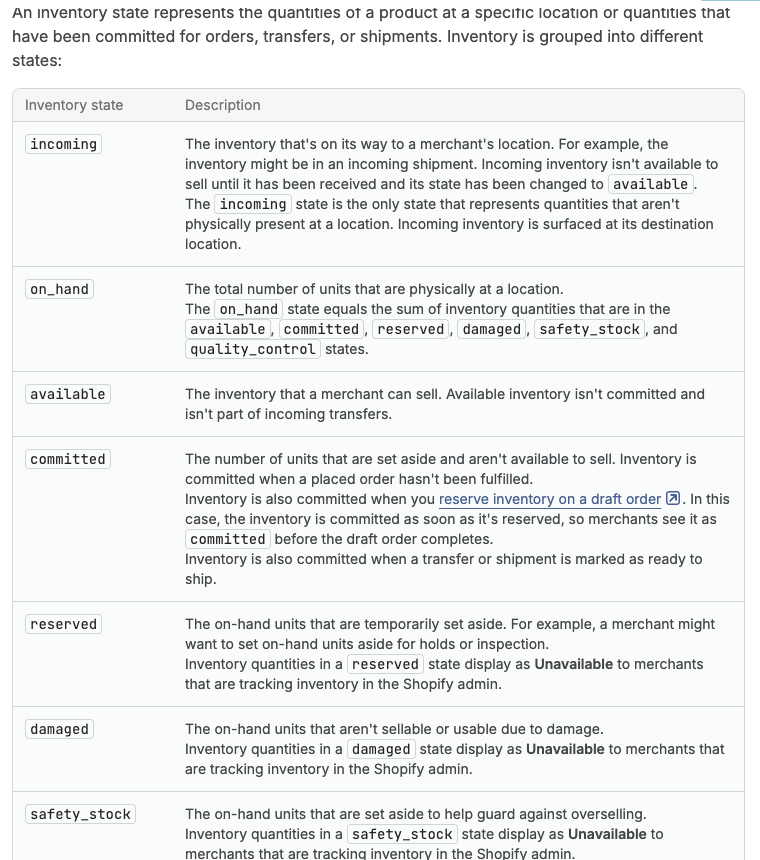
Shopify splits a quantity into states: incoming, available, committed, reserved, damaged, safety stock and quality control, with on hand as the sum of the physical ones. Available is what you can sell. Committed is set aside for placed orders that are not yet fulfilled, for stock reserved on a draft order, and for transfers marked ready to ship. Reserved, damaged, safety stock and quality control show as unavailable in the admin. (Shopify developer docs on inventory states)
When a customer orders, Shopify lowers available and raises committed. When the order is fulfilled, committed drops. That is the whole core loop, and it is solid.
There is also a per-variant setting for what happens at zero: customers can keep buying (continue) or cannot (deny). (ProductVariantInventoryPolicy)
Transfers between locations
Shopify has inventory transfers. A transfer moves stock from one location to another and goes through draft, ready to ship, in progress, transferred, or canceled. Shipments inside a transfer can carry tracking and a barcode. Stock on its way shows as incoming at the destination. (InventoryTransfer, InventoryTransferStatus, InventoryShipment)
Purchase orders: partly confirmed
Shopify's developer changelog says that, from API version 2026-10, apps can read purchase orders, including line items, the supplier name and linked transfers. It is a read-only release: purchase order mutations are not included. (Purchase Order Read API, 17 September 2026)
So purchase orders exist as an object in Shopify. Shopify's blog also mentions a Flow workflow that creates and sends a purchase order to the supplier. We cannot tell you which plans or stores can create purchase orders in the admin, or how far the workflow goes. Look under Inventory in your own admin before you buy anything for this.
Reports and automation
Shopify's own blog lists inventory reports under Analytics, then Reports: average inventory sold per day, percent of inventory sold, ABC analysis, sell-through rate and days of inventory remaining. It also describes Shopify Flow workflows that can notify a purchasing manager, tag products that need restocking, create and send a purchase order to the supplier, and hide out-of-stock products. (Shopify's inventory management guide)
What we did not find
On the pages we could read, we did not find native demand forecasting, supplier lead-time planning, or stock sync with other marketplaces. Shopify's blog describes Flow workflows for low-stock alerts and reorder triggers; we did not find a built-in alert screen on the pages we read. We also could not verify bundle stock handling, so test that in your admin instead of taking our word.
What happened to Stocky
Stocky was Shopify's own app for purchase orders and reorder suggestions. Ordoro and Descartes report that Shopify announced a shutdown on 31 August 2026, and Craftybase says inventory transfers and min/max forecasting had already been removed from it (Ordoro, Craftybase, Descartes). We could not open Shopify's own notice, so confirm with Shopify before you plan around the dates.
The practical point is this. If your purchasing ran through Stocky, you now need a new home for suppliers, purchase orders and reorder logic. Prediko's listing says it replaces Stocky and migrates suppliers and purchase orders, and StockWise carries a Stocky replacement tag. Export your history before you rely on any migration.
Signs you have outgrown native tools
These are our judgement, not a Shopify rule. Two or more of these usually means a tool will pay for itself:
- You build reorder lists in a spreadsheet by looking at last month's sales.
- Bestsellers stock out while slow lines tie up cash.
- The same product sells in two stores or on a marketplace and the counts drift.
- Moving stock between locations is done by editing numbers by hand.
- You sell kits or bundles and cannot see component stock.
- Your supplier lead times differ and you track them in your head.
- Staff count stock with scanners, or you need a stock take that is not a spreadsheet.
- Your accountant asks for stock value and you cannot give it quickly. (Shopify holds a unit cost on each inventory item, so fill that in first.)
If none of these apply, you probably do not need an app. You need cleaner data.
Data hygiene before you add any tool
Every tool below reads the same records. Bad records give bad forecasts and bad syncs.
- One SKU per variant, never reused. SKUs in Shopify are case-sensitive strings, and Shopify even keeps a count of items that share a SKU. Sync apps commonly match items by SKU (Trunk's listing says it syncs "matching SKUs"). Two variants with the same SKU, or the same item spelt two ways, is how counts go wrong. Search for duplicates and fix them first.
- Track every variant you sell. An untracked variant has no number to protect.
- Name locations clearly and keep them few. Warehouse, shop, 3PL and dropshipper locations are all locations, and apps for fulfilment can create their own. Retire unused ones. Check that a location holds no active stock before you deactivate it.
- Fill in unit costs. Planning and valuation tools need them.
- Decide the out-of-stock rule per variant. Continue selling at zero is fine for made-to-order lines and dangerous for finite stock.
- Run a clean count before you connect anything. A tool built on a wrong opening number multiplies the error.
The sync risks, in plain terms
Overselling mostly comes from two systems both thinking they own the count.
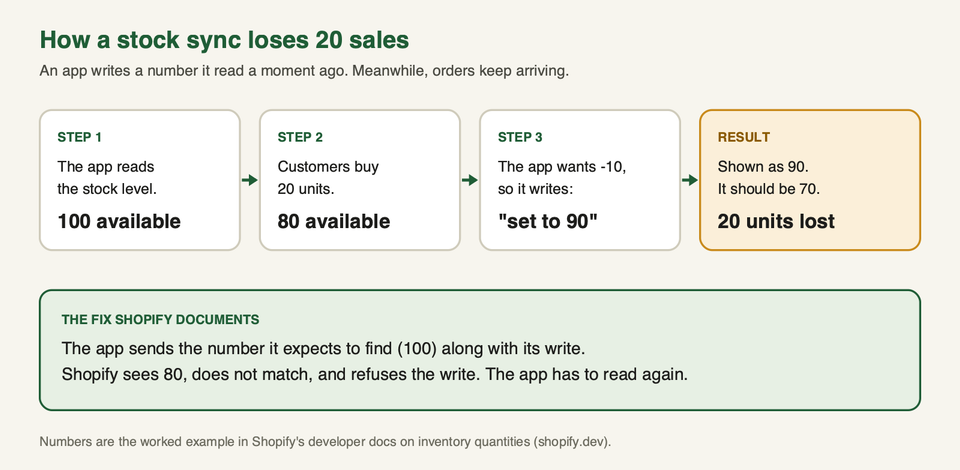
Shopify's docs describe exactly this. An app reads 100 units, 20 sell, the app then writes "set to 90" because it wants to take off 10, and the shop ends at 90 when it should be 70. Shopify's fix is "compare and swap": the app sends the quantity it expects to find, and Shopify refuses the write if the real number differs. Shopify also says to use the absolute "set" mutation only when the calling system is the source of truth, and to prefer relative adjustments otherwise. (Manage inventory quantities and states, inventorySetQuantities)
What this means when you pick a tool:
- Ask who the source of truth is. One system should own each stock number. Two apps writing to the same level will fight.
- Ask how it writes. A good vendor can say whether it uses relative changes or guarded writes. If they cannot answer, that is information.
- Ask whether it is real-time or scheduled. Listings use both words. A scheduled sync leaves a gap where a sale on one channel is invisible to another.
- Use a buffer. Shopify has a safety stock state for exactly this reason. Nventory's listing mentions buffers per channel and location.
- Know the limit. Apps cannot adjust committed quantities through the API. Shopify manages those through orders, fulfilment, draft order reservations and transfers. A committed number you disagree with is fixed by dealing with the order or transfer.
- Check returns. Make sure returned items go back to the right location, and only when they are sellable. Listings differ here. Brightpearl, Linnworks and Prediko mention returns; read how before you rely on it.
- Count on a schedule. Even a good sync drifts. A regular cycle count catches it early.
How to choose
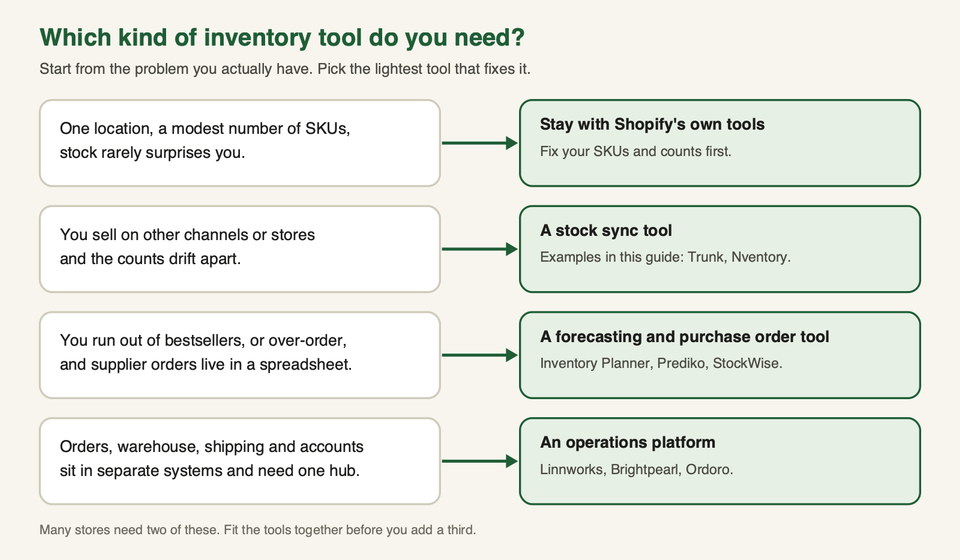
The detail that matters most is the kind of tool, not the brand. Sync tools keep counts equal across places. Planning tools tell you what to buy and when. Operations platforms replace several systems at once. The apps below are grouped that way.
Eight apps worth a look
We read each app's own Shopify App Store listing. We did not install or run any of them, so everything below is what the listing says, plus our view on fit. Pricing changes often and is not printed here; check each listing.
Planning and purchasing
Inventory Planner by Sage
The listing leads with demand forecasting, automated replenishment, multi-location planning, cash flow and inventory turnover, with SKU-level profitability analysis. It also lists purchase orders, barcodes, scanners and stock transfer among its features, and it works with Linnworks, Cin7, QuickBooks, ShipBob, Amazon and WooCommerce. The listing says it is free to install and that additional charges may apply, so ask the vendor what you would pay.
- Pick this if: you have a buyer, real sales history, several channels, and you want a planning layer that reads other systems.
- Skip this if: you want a quick install and a flat price, or your problem is only sync.
Prediko
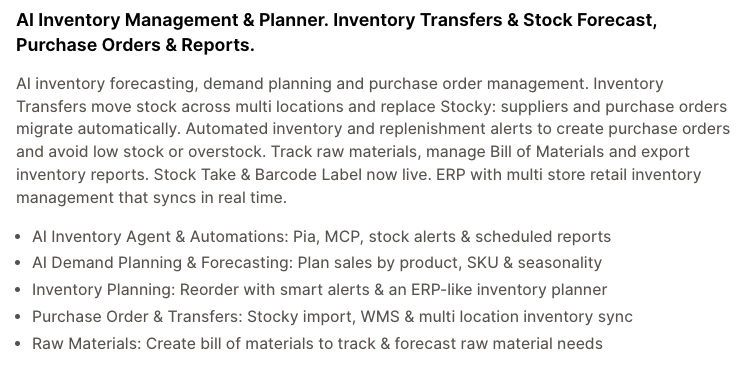
Prediko's listing covers AI demand planning, purchase orders, transfers across locations, bills of materials for raw materials, stock take and barcode labels, and over 100 warehouse and 3PL integrations. It says it replaces Stocky and that suppliers and purchase orders migrate automatically.
- Pick this if: you used Stocky, move stock between locations, or make products from raw materials.
- Skip this if: you want a small tool for one job. It is broad, and broad tools take longer to set up well.
StockWise
StockWise describes itself as an embedded Shopify app for forecasting, purchase orders, supplier management, stock alerts and ABC analysis. It mentions lead times, safety stock, per-product alert thresholds and coverage by location. It carries a "Stocky replacement" tag.
- Pick this if: you sell from Shopify only and want forecasting and purchase orders without an ERP.
- Skip this if: you sell on marketplaces or need warehouse features. We did not see either on the listing.
Sync across channels
Trunk
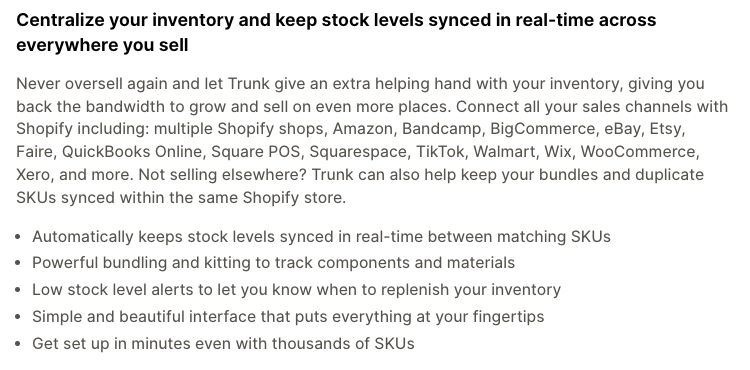
Trunk keeps stock synced in real time between matching SKUs across multiple Shopify shops and channels such as Amazon, eBay, Etsy, Faire, TikTok, Walmart, Wix and WooCommerce. It also does bundling and kitting to track components, low-stock alerts, and can sync bundles and duplicate SKUs inside one Shopify store.
- Pick this if: overselling across channels is the main pain, or you sell bundles built from components.
- Skip this if: you need forecasting or purchase orders. We did not see them on the listing. Because it matches on SKU, messy SKUs will hurt.
Nventory
Nventory keeps one stock count across Shopify and channels such as Amazon, eBay, Walmart, Etsy, TikTok Shop and WooCommerce. It offers safety stock buffers per channel and location, one order queue, order push to QuickBooks, Xero or Odoo, and alerts in Slack, WhatsApp or Telegram. The listing also says AI agents watch stock and fix routine issues with your approval.
- Pick this if: you are marketplace-heavy and want a buffer per channel.
- Skip this if: you need planning or purchase orders. Treat the AI agent claim as something to trial on a few SKUs, not a reason to buy.
Operations platforms
Ordoro
Ordoro bundles inventory, shipping and dropshipping. The listing names purchase orders, transfers, bills of materials, multi-location inventory, reorder points, kitting, barcode scanning and pick lists, plus inventory sync to marketplaces. It lists integrations with Amazon, eBay, Walmart, QuickBooks Online and ShipStation.
- Pick this if: a small team wants inventory, shipping and supplier work under one roof.
- Skip this if: you already like your shipping tool and only need planning. You would pay for overlap.
Linnworks
Linnworks calls itself a platform for omnichannel retailers: order and inventory management, warehouse management, analytics and forecasting, channel listings and fulfilment, with 100+ integrations and order routing.
- Pick this if: you run several warehouses and many channels and want one control point.
- Skip this if: you have one store and one location. In our view this is a project to implement, not a quick install.
Brightpearl by Sage
Brightpearl positions itself as a retail operating system for retailers and wholesalers. The listing covers order management, inventory, warehouse management, returns, forecasting and accounting (payables, receivables, general ledger), with first-party Shopify and Shopify Plus integrations.
- Pick this if: you are replacing a patchwork of systems, accounting included, and have the team to run a new back office.
- Skip this if: you are a lean store. It changes how the business operates, not just how stock is counted.
Side-by-side
"Listed" means the listing text or its feature tags say so. "Not listed" means we did not find it, not that it is impossible. Ask the vendor.
| App | Best for | Cross-channel sync | Purchase orders | Forecasting | Bundles or kits | Barcodes or warehouse |
|---|---|---|---|---|---|---|
| Inventory Planner by Sage | Planning over other systems | Multi-channel reporting | Listed | Listed | Not listed | Barcodes, scanners listed |
| Prediko | Stocky users, transfers, raw materials | Multi-store sync listed | Listed | Listed | Bills of materials | Stock take, barcode labels |
| StockWise | Shopify-only planning | Shopify sync listed | Listed | Listed | Not listed | Not listed |
| Trunk | Overselling, bundles | Listed | Not listed | Not listed | Listed | Not listed |
| Nventory | Marketplace sellers | Listed | Not listed | Not listed | Not listed | Not listed |
| Ordoro | Inventory plus shipping | Listed | Listed | Listed | Kitting listed | Barcode scanning, pick lists |
| Linnworks | Many channels, warehouses | Listed | Not seen on listing text | Listed | Not seen on listing text | Warehouse management listed |
| Brightpearl | Full back office | Listed | Listed | Listed | Not seen on listing text | Warehouse management listed |
Before you install: a checklist
- Export your products, SKUs, costs and stock by location. Keep the file.
- Clean your SKUs and set unit costs.
- Decide which system owns stock. Write it down.
- Trial on a small set of SKUs, not the whole catalogue.
- Run a manual count against the app's number a week later.
- Ask the vendor how a sale during a sync is handled.
- Check what happens to your data if you leave.
If you also run dropshipping, supplier stock feeds are their own problem; see Shopify dropshipping apps. For the wider stack around stock, such as email, support and reporting, see ecommerce tools. If you sell items before they arrive, the setup differs again; Shopify pre-order apps covers that.
If your stock data feeds several systems and you are not sure where the source of truth should be, that is a design question worth getting right once. We are happy to look at it; you can contact us.
FAQ
Does Shopify have built-in inventory management?
Yes. It tracks stock per variant and per location, uses states such as available and committed, and supports transfers between locations. Forecasting and cross-channel sync were not in the Shopify pages we read. Shopify's blog describes Flow workflows for low-stock alerts and reorder triggers, but we did not find a built-in alert screen.
How do I stop overselling on Shopify?
Track every variant, give each one a unique SKU, and make sure only one system owns each stock number. Add a safety buffer for risky items. If you sell on other channels, use a sync tool that guards its writes and ask the vendor how it handles a sale mid-sync.
What happened to Stocky?
Vendor posts we read say Shopify set it to shut down on 31 August 2026 and had already removed transfers and min/max forecasting. We could not open Shopify's notice, so confirm the status yourself. Export your purchase order history before you depend on any migration tool.
Do I need an app for multiple locations?
Not necessarily. Shopify tracks stock per location and supports transfers. You need an app when you want forecasts per location, purchasing across locations, or warehouse workflows such as scanning and stock takes.
How should I set up SKUs?
One SKU per variant, never reused, in one consistent format. SKUs are case-sensitive in Shopify, so pick a case rule and keep to it. Fix duplicates before you connect any sync or planning tool.
Can Shopify track bundle or kit stock?
We could not verify this from Shopify pages we could open. Trunk and Ordoro both list bundling or kitting on their App Store listings. Check how component stock is deducted before you rely on any of them.
Which app should a small store start with?
Often none. Clean your data, use Shopify's states and transfers, and add a tool when a specific problem shows up. If overselling is the problem, start with a sync tool. If stockouts and over-ordering are the problem, start with a planning tool.