Shopify Alternatives: Who Each One Fits and What a Move Involves
An honest guide to the main Shopify alternatives, who each one suits, what you give up by leaving, and what a migration really involves.


This guide helps you decide whether to leave Shopify, or skip it, and where to go if you do. The short answer: many unhappy stores have a fixable problem, and some have a real reason to move.
In one line: BigCommerce if you want hosted, WooCommerce if you want to own the code, and otherwise stay and fix what hurts.
First, our position. We are a Shopify agency, so we have a bias. We will try to be fair anyway: each option below gets a clear "pick this if" and "skip this if", and where a move would not help you, we say so.
Start with the reason you want to leave
A platform move is a big project. Before you compare anything, write down the actual pain. Most reasons fall into five groups:
- The storefront is slow or clumsy. This is usually a theme, app or image problem. See our theme performance guide before you blame the platform.
- Apps pile up. Too many apps can slow a store and make it hard to manage. Removing and replacing apps is cheaper than replatforming.
- Fees and plan limits. Work out your real costs on each side. Our post on how Shopify takes a percentage of sales explains the Shopify side. Check every competitor's current pricing page yourself, because plans change.
- You want to control the code. This is a genuine reason. Shopify lets you extend checkout through apps with extensions rather than editing checkout code directly, and some teams find that too limiting.
- Your business model does not fit. Complex B2B pricing, many storefronts, or content-led selling can push you to a different tool.
If your reason is the first or second one, a move will probably recreate the same problem on a new platform.
One more point before the options. Going headless is no longer a reason to leave. Shopify's own docs describe headless commerce, where you build the front end on your own stack and Shopify handles the commerce underneath.
The options at a glance
| Option | Type | Best fit | Main trade-off |
|---|---|---|---|
| BigCommerce | Hosted platform | Growing stores, B2B, several storefronts | Fewer apps to pick from than Shopify, in our judgement |
| WooCommerce | Open-source plugin for WordPress | Content-led stores, teams that want full control | You run hosting, updates and speed yourself |
| Wix | Hosted site builder with store tools | Small stores that want built-in tools | You work inside what the builder allows |
| Squarespace | Hosted site builder with store tools | Design-led brands with small catalogues | Product import has limits, and it is a one-time copy |
| Adobe Commerce | Enterprise platform, cloud or self-hosted | Large, complex catalogues with developers | Heavy to run and to staff |
| Shopware | Platform: SaaS, PaaS or self-hosted | B2B or custom needs, with partner support | Smaller ecosystem than Shopify, in our judgement |
BigCommerce
BigCommerce is the closest to Shopify in shape: a hosted platform with an app marketplace, themes, and a checkout you do not host yourself. Its product pages describe an open platform with B2B tools, multiple storefronts and a headless option.
What it does well. B2B is a core pitch. The home page lists account-specific pricing, quotes, reorders, invoice payments and buyer roles, plus multiple storefronts managed from one system. For developers, its headless page describes REST and GraphQL APIs and a reference storefront built on Next.js called Catalyst.
What it does less well. The app marketplace is smaller than Shopify's. BigCommerce itself lists over 1,200 apps, while Shopify calls its App Store the largest commerce ecosystem, so a niche app you rely on may only exist on Shopify. List every app you use and check each one before you commit.
What you give up. Shopify's app ecosystem and any Shopify-only features you use. Check your checkout, subscriptions and payment methods one by one.
Migration. BigCommerce offers a migration app for Shopify, WooCommerce and Adobe Commerce. Its page says the app handles products, variants, customers and order history, plus blog posts, CMS pages and SEO URLs with redirects. It also says to expect a temporary dip in search performance. It estimates one to two weeks for a store of 500 SKUs or fewer, and up to twelve weeks for large stores, which is a vendor estimate rather than a promise.
- Pick this if: you want a hosted platform like Shopify, with stronger built-in B2B and multi-storefront features.
- Skip this if: your reason for leaving is theme, app or speed trouble, or you depend on Shopify-only apps.
WooCommerce
WooCommerce is an open-source commerce plugin for WordPress. Its own pitch is full control of your checkout, your data and your costs, with any payments, any features and any host.
What it does well. You own the code and the data. You can change anything, and you can sell through the same WordPress site that carries your content. Its extensions add features as you need them.
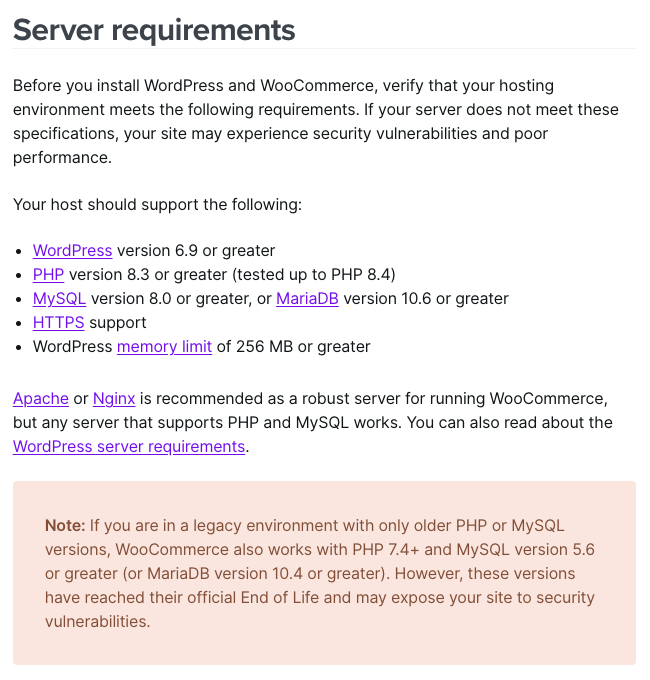
What it does less well. Control comes with chores. You choose a host, and the docs list server requirements for WordPress, PHP, the database, HTTPS and memory. Keeping those current, plus backups, security and speed, is your job or your agency's job. Large catalogue imports also depend on your server's memory and limits.
What you give up. A fully managed platform. Shopify takes care of hosting, security patches and a hosted checkout for you.
Migration. WooCommerce has a Shopify migration guide. It covers a manual route (a CSV import for products, plugins for customers and orders) and an all-in-one plugin route. It warns that customer passwords are not migrated, so customers must reset them, and that account creation dates and purchase histories are not kept with the CSV method. It also tells you to set 301 redirects for old Shopify URLs and to carry over SEO data.
- Pick this if: you already run WordPress, want full code control, and have someone to maintain the site.
- Skip this if: you want a platform where hosting, security and checkout are someone else's job.
Wix
Wix is a website builder with store tools built in. Its online store page describes an AI store builder, product catalogue tools, subscriptions, print on demand and dropshipping connections, and a wide list of payment providers.
What it does well. It bundles things that are separate apps on other platforms. Its migration page lists loyalty programmes, gift cards, back-in-stock requests and subscriptions as native tools. For developers, Wix has Velo for added code (named on its migration page), and a separate Wix Headless option for custom front ends.
What it does less well. It is a general site builder first. If you need deep catalogue logic, complex B2B, or full control of checkout code, you work within what Wix exposes. That is a judgement from reading its own pages, not a flaw in every case.
What you give up. Shopify's app ecosystem and its commerce-first tooling. The Wix store page says you can sell up to 50,000 products with up to 1,000 variants each, so check that against your catalogue.
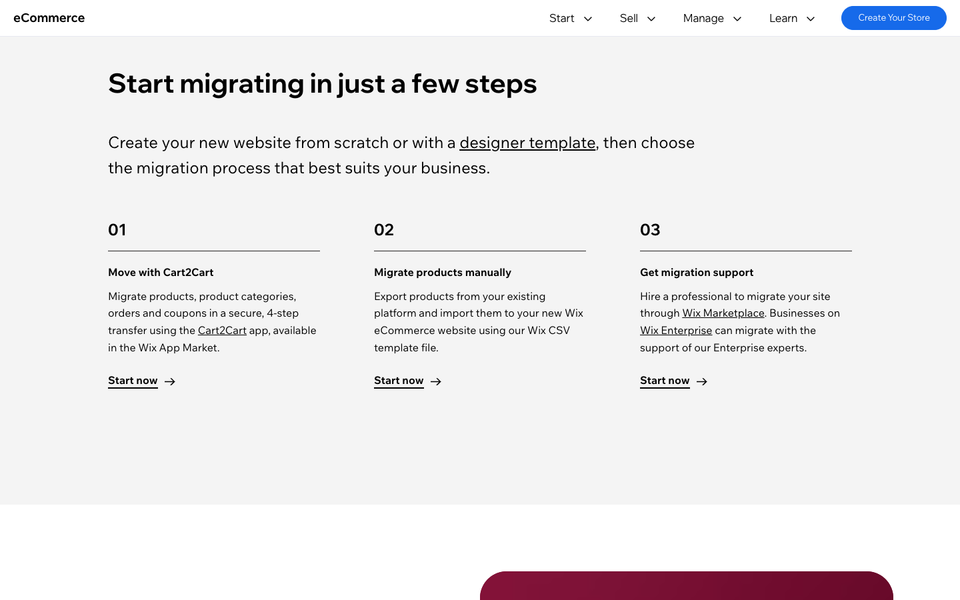
Migration. Wix names three routes. The Cart2Cart app moves products, categories, orders and coupons. A manual CSV import uses Wix's own template. Or you hire a professional through the Wix Marketplace.
- Pick this if: you run a small store, want built-in tools, and do not need custom code.
- Skip this if: you expect to grow into complex catalogue, B2B or checkout needs.
Squarespace
Squarespace is a design-led site builder with commerce built in. Its ecommerce page covers physical and digital products, subscriptions, services and in-person selling, with built-in SEO and email tools.
What it does well. Templates and design polish. If your brand lives on its look and your catalogue is small, the editor is easy to work in.
What it does less well. It is not built for large or complex catalogues. The import guide shows how narrow the migration path is: the import is one-time, inventory does not sync, and it covers physical and service products only. It cannot import download products or subscription products.
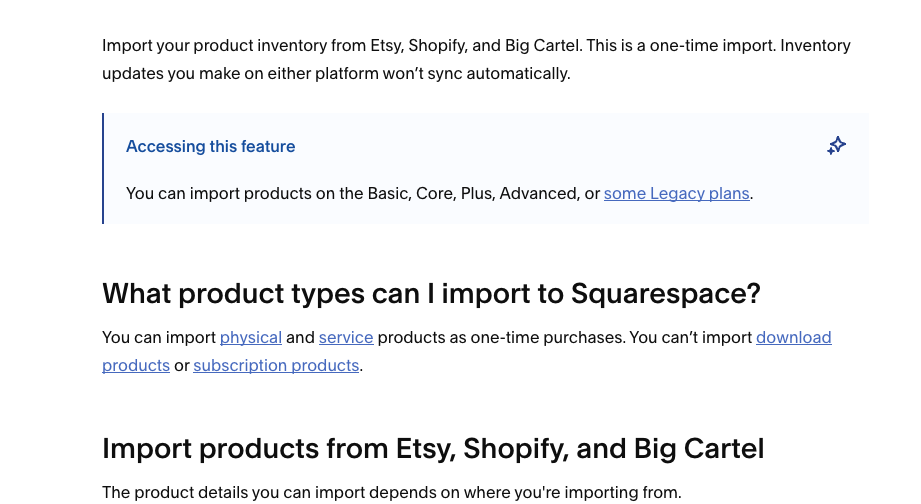
What you give up. Subscription and digital products do not come across by import, so you would rebuild them. The same article says version 7.1 takes up to 10,000 products per store page (version 7.0 takes 200 per page), with up to 100 variants per product. The article covers products. We did not find customer or order import on that page, so ask before you assume it exists.
Migration. Export your product CSV from Shopify, then import it through the Squarespace products panel. Expect to rebuild anything the import skips.
- Pick this if: you have a small, design-led catalogue of simple products.
- Skip this if: you sell subscriptions or downloads, or need to move customers and order history with the catalogue.
Adobe Commerce (Magento)
Adobe Commerce is the enterprise route. Adobe's documentation covers cloud and self-hosted deployments, B2B, catalogue management and multi-location inventory. The open-source sibling, Magento Open Source, has its own project page that describes basic commerce capabilities and points to Adobe Commerce for a full-featured store.
What it does well. Depth. Complex catalogues, B2B, multiple locations and heavy customisation are what it is built for, and your developers can change nearly anything.
What it does less well. It is demanding to run. Adobe's system requirements list the supported software versions, and Adobe says it supports only those combinations. Each release line also has its own end-of-support date on the released versions page, so upgrades are part of the running cost of the store, not an extra.
What you give up. Simplicity and speed of change. A merchant can run a Shopify store with a small team. Adobe Commerce usually needs developers on hand.
Migration. Treat it as a software project with a scope and a team. If you are on Magento today and wondering about the exit, see our guide to Magento alternatives.
- Pick this if: you have a large, complex catalogue and an engineering team or agency to match.
- Skip this if: you want a store that a small team can run without developers.
Shopware
Shopware is a commerce platform you can run as a cloud service or host yourself. Its product page describes SaaS, PaaS and self-hosted options, with B2B and B2C features. It also mentions a free Community Edition plan.
What it does well. Choice of how you run it: managed in the cloud, or on your own infrastructure if you have the developers. It targets B2B and B2C stores.
What it does less well. Its ecosystem is smaller than Shopify's, in our judgement, so check that your payment, shipping, tax and marketing tools have connectors before you commit.
What you give up. The Shopify app ecosystem and its large partner community.
Migration. Shopware's migration page lists migration from Magento and from Shopware 5. We did not find a Shopify-specific migration page on the pages we read, so expect to plan the data move with a partner.
- Pick this if: you want a choice between SaaS and self-hosting, have B2B or custom needs, and have partner support.
- Skip this if: you want the widest app choice and the biggest pool of agencies and freelancers.
How to choose by situation
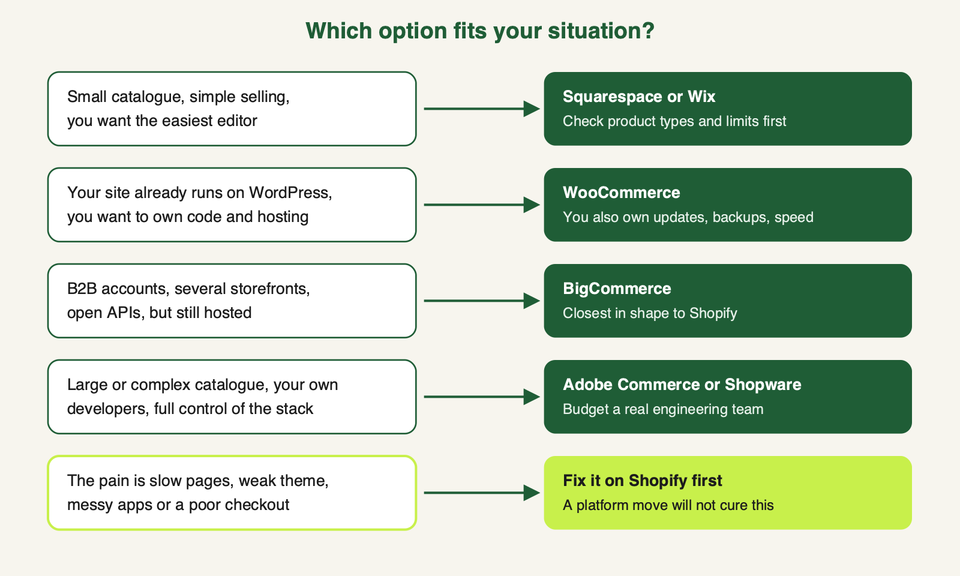
- You sell a few simple products and the brand matters most. Look at Squarespace or Wix. Check the product types and limits first.
- You publish a lot of content and already run WordPress. WooCommerce is the natural fit, if someone maintains it.
- You sell to businesses as well as consumers. Compare BigCommerce and Shopify's own B2B tools side by side before you move.
- You have a very large catalogue and developers. Adobe Commerce or Shopware are worth a serious look.
- You are on Shopify and unhappy with speed, apps or checkout. Fix it where you are first. Our Shopify vs Shopify Plus guide covers the step up if plan limits are the issue.
What a migration involves
Whatever you pick, five things have to move. The tools differ, but the checklist does not.
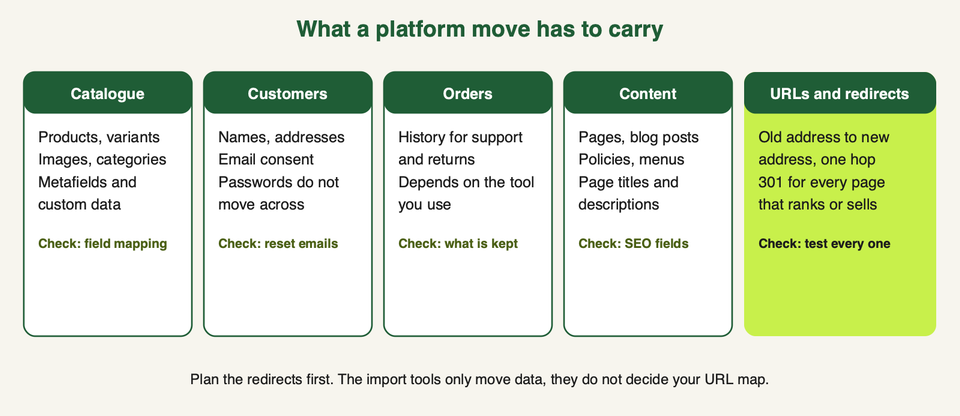
- Catalogue. Products, variants, images and categories usually move by CSV or a migration tool. Custom data such as metafields needs a mapping plan. Image URLs must stay reachable during the import.
- Customers. Names, addresses and consent can move. Passwords may not, so plan for a reset email: the WooCommerce guide says Shopify's passwords cannot be exported.
- Orders. Order history matters for support and returns. Tools differ in what they keep, so test before you commit.
- Content. Pages, blog posts, policies, titles and descriptions.
- URLs and redirects. Every old URL that ranks or sells needs a single 301 to its new home. BigCommerce says the same thing on its migration page: map your URLs, set redirects and migrate SEO fields, and expect a temporary dip while search engines catch up.
Run the new store in parallel and test every redirect, tax rule, shipping rule and payment method before you switch the domain. If you want a second pair of eyes on the plan, talk to us. We move stores onto Shopify, so we have no reason to push you off it.
Frequently asked questions
Is there a free Shopify alternative?
Some options have a free tier or free open-source software, such as WooCommerce, Magento Open Source and Shopware's Community Edition. Free software is not a free store: you still pay for hosting, themes, extensions and developer time. Check each vendor's pricing page for current numbers.
Which alternative is closest to Shopify?
BigCommerce is closest in shape: hosted, with an app marketplace and a managed checkout. Wix and Squarespace are also hosted, but they are site builders first.
Will I lose my SEO rankings if I move?
You can protect them, but you should expect some movement. Map every old URL to a new one with a single 301 redirect, carry over page titles and descriptions, and test before launch. BigCommerce's own page says a temporary dip is normal and recovers over time.
Can I move customer passwords?
Plan for a reset. The WooCommerce migration guide says Shopify's passwords cannot be exported, so customers need a reset email after the move. Treat it as part of the launch.
Is headless a reason to leave Shopify?
Not by itself. Shopify supports headless builds through its APIs, per its developer docs. BigCommerce and Wix offer headless routes too, so this is rarely what separates platforms.
How long does a migration take?
It depends on catalogue size, custom data and integrations. BigCommerce's own estimate ranges from one to two weeks for a small store to many weeks for a large one. Treat any vendor estimate as the best case.
Can I move just part of my store?
Yes. You can move one storefront or region first, or keep content on one platform and selling on another. That adds complexity, so decide the boundary early.
Should I leave Shopify because of apps and plug-ins?
Usually not. Cleaning up your app list, replacing heavy apps and fixing the theme is cheaper and faster than a platform move, and it addresses the cause.