Best Shopify Affiliate Apps: How Tracking, Payouts and Disclosure Really Work
Seven Shopify affiliate and referral apps compared on tracking, payouts, partner portals and fraud controls, plus the consent and ad-disclosure rules that apply to your program and a launch checklist.
An affiliate program pays people a commission when their link or code brings you a sale. A referral program rewards your own customers for bringing friends. Most of the apps below can run one or both, and the real differences are how they track a sale, how they pay, how they stop fraud, and how much work they leave you. This guide explains the models, how tracking works, what privacy and ad-disclosure rules expect from you, and then compares seven apps. We read each app's Shopify App Store listing and the official sources linked below.
Affiliate, referral, influencer and ambassador: what is the difference?
Start with who promotes you. Shopify's own guide says that in a referral program the promoters are existing customers, while in an affiliate program they are creators or publishers with an audience who may never have bought from you. Referral rewards are usually credit, points or discounts. Affiliates earn a percentage of the sales they generate (Shopify: referral vs affiliate marketing).
"Influencer" and "ambassador" are not tracking systems. They describe the relationship. This is how we use the words:
| Model | Who promotes | Usual reward | Fits best when |
|---|---|---|---|
| Referral program | Your existing customers | Store credit or a discount | You have happy repeat buyers and want to protect margin |
| Affiliate program | Creators, bloggers, publishers | A commission on tracked sales | You want reach beyond your own list |
| Influencer partnership | A few creators you choose | Gifted product, a fee, or a commission, often with a personal code | You want control over who speaks for the brand |
| Ambassador program | Long-term fans and loyal creators | Usually gifts plus a code or link | You want an ongoing relationship, not a one-off post |
If money or free product changes hands, the disclosure rules below apply whatever you call it.
One thing to rule out: Shopify runs its own affiliate program, but it pays people who refer new merchants to Shopify (Shopify affiliates page). It is not a way to run a program for your store.
How tracking works
Apps use some mix of four methods. Links and codes matter most.
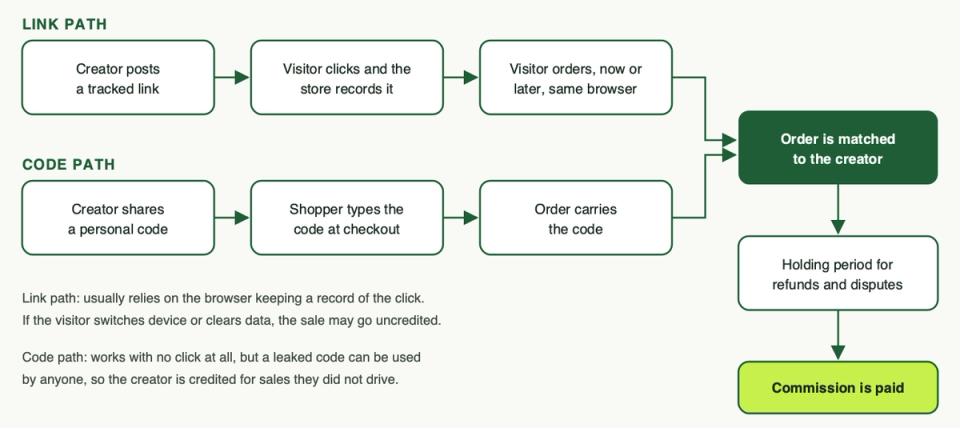
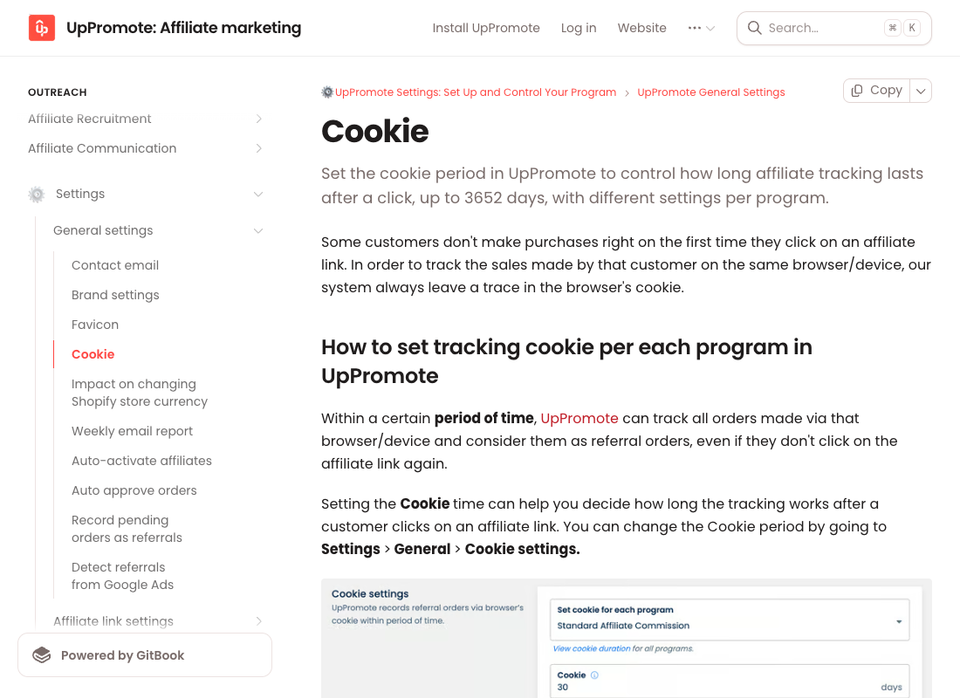
Tracked links. The creator shares a link carrying their ID. When someone clicks, the app records it. If the visitor buys later, the app matches the order to that click. Many apps do this with a browser cookie. UpPromote's documentation says it leaves a trace in the browser's cookie, counts orders from the same browser and device inside a period you set, and restarts the period on a new click. Set the period to zero and link tracking stops while coupon tracking keeps working (UpPromote docs: cookie).
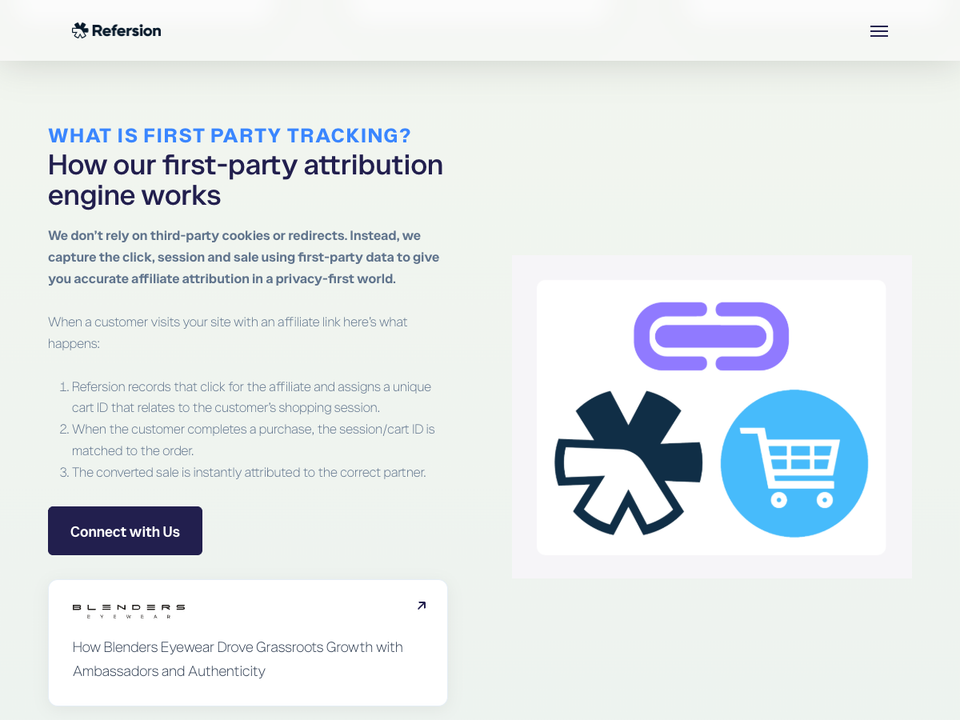
Some vendors say they work differently. Refersion describes first-party tracking with no third-party cookies or redirects: it records the click, assigns a cart ID tied to the shopping session, and matches that ID to the order later (Refersion: first-party tracking). That is the vendor's own description, so treat it as a claim to test.
Discount codes. The creator gets a personal code and the shopper types it at checkout. Codes work without a click, so they survive a change of device and suit video and podcast creators. The risk is leakage: a code posted on a coupon site credits the creator for sales they did not drive. In Shopify you can cap total uses and limit a code to one use per customer (Shopify Help: amount off discounts). Some apps add their own protection, flagged below.
Linked emails and customers. Some apps tie a customer's email to a creator so repeat orders keep earning. BixGrow lists "linked emails" as a tracking method.
Headless and custom storefronts. Check the listing first. UpPromote lists Hydrogen support, BixGrow lists headless tracking on its top plan, and Shopify has a Help page on personalised Collabs links for custom storefronts.
Privacy and consent
We are not lawyers, so treat this as a map and take advice for your markets. The official sources we opened are UK and Shopify ones, so check what applies in the EU, the US states you sell to and anywhere else you ship.
- UK. The ICO says that, unless an exception applies, a person using storage and access technologies must tell people what they are, explain what they do and get prior consent (ICO: PECR rules). Its guidance also covers link decoration, meaning extra information added to a URL, and says the key question is the purpose it is used for (ICO: storage and access technologies). "No cookies" does not by itself settle the question.
- Shopify's consent signal. Shopify's Customer Privacy API reports what a visitor allows. Its
marketingAllowedcheck covers marketing, attribution and targeted advertising from the merchant, and in regions set to require consent, non-essential purposes are off until the visitor agrees (Shopify: Customer Privacy API). Shopify itself cautions that collecting data without consent might not comply with applicable laws. - What to ask each vendor. Does its tracking respect Shopify's consent signal, what does it store in the browser, and what data does it collect? Read the "Data access" section on the listing. Collabs, for example, lists device and activity data there, including a client ID cookie, and its Help page says Shopify Network Intelligence must be enabled in your privacy settings (Shopify Help: Collabs).
- Test it. If a visitor declines marketing consent, link tracking may not credit the sale while code tracking may still work. We have not tested this for any app, so run your own test with the banner set to decline.
Also name the tool, and what it does with affiliates' personal and tax details, in your privacy policy.
Disclosure: the FTC and ASA basics
Affiliates are advertising for you, and both US and UK regulators treat that as your concern too.
United States (FTC). The FTC says endorsers should disclose a material connection to the brand, which covers anything of value, not just cash. The disclosure belongs with the endorsement, not on a profile page, behind a "more" click, or buried in hashtags (FTC: Disclosures 101). Its Q&A adds, on affiliate links:
- Disclose clearly and conspicuously, as close to the recommendation as possible.
- "Affiliate link" alone may not be understood and a "buy now" button is not enough. "Paid link" right next to the link should do.
- A clearly personalised code may not tell people the creator is paid, so the FTC suggests erring on the side of disclosure.
- Companies should have reasonable programs to train and monitor the people they pay and direct, during a contract and for a reasonable time after, such as a few months.
Source: FTC Endorsement Guides Q&A.
United Kingdom (ASA and CAP). The ASA's influencer guide says content with a tracked link or discount code that pays the creator is advertising, and that both creator and brand are responsible for making it clear. It asks for a prominent "Ad" label up front. A general line saying some links might earn commission is not enough, and labels like "aff" or "afflink" should be avoided. It also advises against "Gifted", "Sponsored", "Collab" and "brandambassador" as the only signal (ASA: Influencers' guide).
One label for both markets. The FTC accepts "sponsored" and the ASA does not, so use a plain "Ad", placed up front. Put it in your affiliate terms, give creators a line to copy, and check what they actually post.
Seven Shopify affiliate and referral apps
We picked these from the Affiliate programs category (category page) to cover Shopify's own tool, the big general apps and two that lean toward customer referrals. We read the listings and did not install or test any app, so the features below are what the vendors list. We do not quote prices because they change: read the pricing block on each listing.
Shopify Collabs
Shopify Collabs lets you recruit creators by direct invite, an open access program or an application page, send gifts or discount codes, track sales and pay commissions (Shopify Help). Links and codes are made and tracked inside Collabs. Commissions go through your Shopify bill after a holding period, which defaults to 30 days and can be set from 1 to 90, and you can open a dispute on suspicious commission during that time. Creators must activate auto-payouts to be paid by PayPal or bank transfer (Shopify Help: payments). The listing says free to install, and the payments page describes a processing fee on automatic payments, so read it first.
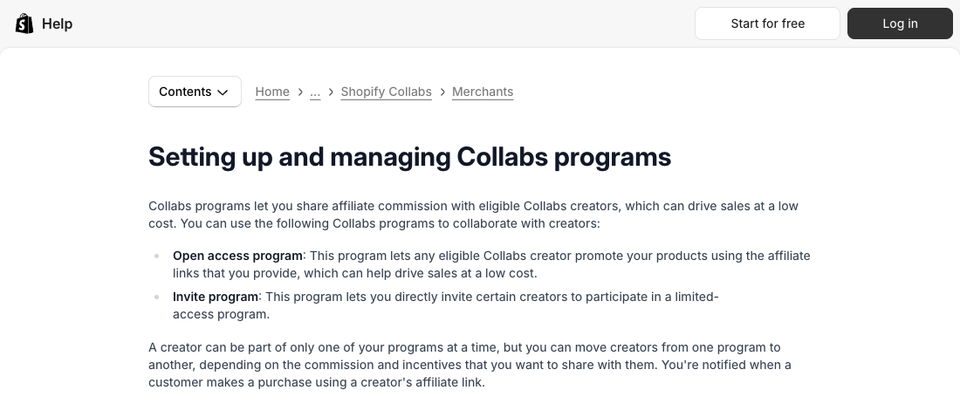
Limits: it is not available on the Starter and Retail plans, the open access program only reaches creators from the United States, the United Kingdom and Canada, and Shopify's Help page says Collabs is not accepting new creator signups at the moment (merchants can still invite creators and accept applications). In practice, bring your own creators.
Pick this if you want an invite-led program with payouts handled through Shopify. Skip it if you need to recruit a large new pool of creators.
UpPromote
UpPromote is the broadest general option here. The listing mentions tracking by link or coupon, partner portals, PayPal payouts, analytics, and fraud detection with block lists and anti-leak discount links. Its docs let you set the cookie period per program. Features vary by plan: the listing puts automatic PayPal payouts and anti-leak discounts on a higher paid plan, and a customer referral program on a paid plan. It also lists tax forms, a paid creator discovery add-on, and support for Hydrogen and subscription apps like Recharge and Appstle.
Read the pricing block closely. The free plan limits how much referral volume you can review each month, and paid plans add a percentage of referral sales on top of the monthly fee.
Pick this if you want one mainstream app covering links, codes, fraud tooling and a portal. Skip it if you want flat, predictable costs at scale.
Refersion
Refersion leans toward larger affiliate and publisher programs. The listing describes first-party tracking links, percentage, flat, recurring and tier-based commissions, sign-on bonuses, multi-level options, payouts through PayPal, ACH and bank transfer, and automated tax forms. A marketplace lets affiliates find your offer, with a free tier for listing one. Paid plans charge a monthly fee plus a percentage of affiliate-generated sales, and the listing says Refersion can bill this separately from your Shopify invoice. Fraud protection is not among the features listed, so ask the vendor how it handles self-referrals and abuse.
Pick this if you expect many affiliates or publishers and want payouts and tax paperwork handled. Skip it if you want one bill, all inside Shopify.
GoAffPro
GoAffPro gives each affiliate a branded portal with a referral link and stats, automated tracking and order attribution, and payouts by PayPal, ACH, bank transfer, card or gift card. It also lists affiliate mobile apps with push notifications, maturation periods, fraud protection and a post-checkout popup. The listing shows a free plan and a paid plan that adds multi-level features, a portal on your own domain and bulk email. Multi-level commission adds legal and reputational complexity that most direct-to-consumer brands do not need, so take advice before using it.
Pick this if you want a free start with a portal and many payout routes. Skip it if you plan a large program and want deep merchant-side controls.
LeadDyno
LeadDyno offers more hand-holding. The listing mentions 30-plus integrations (including Klaviyo, Stripe, HubSpot and Zapier), a branded affiliate portal on your domain, automated link tracking, bulk payouts, tax forms and fraud protection. Plans are tiered by the number of affiliates, commission plans and affiliate groups, so cost grows as the program does. There is a free trial but no free plan listed.
Pick this if you want onboarding help and links into your email and CRM stack. Skip it if you want to test the idea on a free plan first.
Shopjar
Shopjar combines customer referrals and affiliates. Referrers and creators share unique links or coupon codes, and rewards can be discounts, cash or store credit. The listing mentions branded referral pages, a thank-you page popup, affiliate signup forms and a member portal for sales and payouts. The free plan covers a basic referral program and affiliate features start on a paid plan. Self-referral protection is listed on paid plans, with advanced fraud protection, PayPal mass payouts and cash payouts via ACH and Venmo on the top plan.
Pick this if your first goal is customer referrals with affiliates as an add-on. Skip it if your main goal is a large creator program.
BixGrow
BixGrow is another two-in-one app. It lists affiliate links, coupons and linked emails as tracking methods, payouts by store credit and PayPal, a marketplace for finding affiliates, multi-level options, anti-leak coupons on a mid-tier plan, and API access and headless tracking on its top plan. The free plan caps programs, affiliates and monthly referral orders, so it suits a trial more than a growing program, and automatic payouts are on the top plan.
Pick this if you are a small store wanting a free tier and both program types in one place. Skip it if you expect volume beyond the free caps.
Side by side
This is what each listing says. "Not listed" means the listing does not mention it, not that the app lacks it.
| App | Tracking | Payouts | Partner portal | Fraud controls |
|---|---|---|---|---|
| Shopify Collabs | Links and discount codes made in Collabs | Via your Shopify bill, then PayPal or bank transfer | Creator account plus a store application page | Holding period and payment disputes |
| UpPromote | Link with a set cookie period, and coupons | Manual on the free plan, automatic PayPal on a higher plan | Branded partner portal | Fraud detection, block lists, anti-leak discounts |
| Refersion | First-party tracking links (vendor claim) | PayPal, ACH, bank transfer, tax forms | Branded dashboards and domain | Not listed |
| GoAffPro | Referral links, order attribution | PayPal, ACH, bank, card, gift card | Branded portal and mobile apps | Fraud protection listed |
| LeadDyno | Affiliate links and coupon codes | Bulk payouts, PayPal, tax forms | Portal on your own domain | Fraud protection listed |
| Shopjar | Links or coupon codes | Credit or discounts, cash via ACH, Venmo, PayPal on higher plans | Member portal and branded pages | Self-referral and advanced protection by plan |
| BixGrow | Links, coupons, linked emails | Store credit and PayPal | Branded portal and custom dashboards | Anti-leak coupons and fraud protection listed |
The category has many more apps. Two free ones we did not shortlist are Affilitrak, where affiliates can create their own links and coupon codes, and Affiliate Marketing ReferrLy, which can ask customers to become affiliates in a popup. They are worth a look for a very small trial.
How to choose
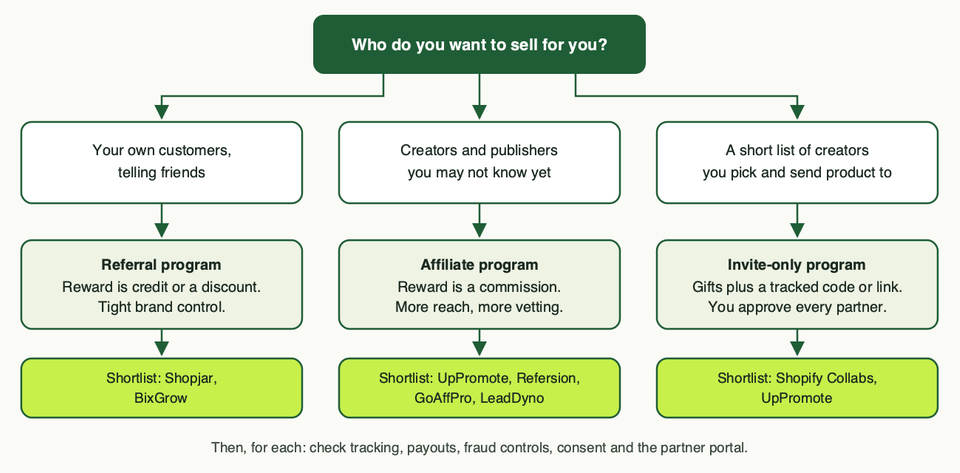
- Decide the program first. Happy customers telling friends means referrals. Reach through strangers you will vet means affiliates. A handful of creators you pick means invite-only.
- Do the margin sum. Add the shopper's discount, the commission, the app fee and shipping. If the order still makes money, go on. If not, change the offer, not the app.
- Match tracking to your creators. Video and podcast creators lean on codes. Bloggers and social posters lean on links. Most programs need both.
- Check payouts, fraud controls and privacy. Who pays, when, and who handles tax forms. What happens with self-referrals, leaked codes and refunds. What the app stores in the browser.
- Price it at ten times your starting volume. Percentage fees and tier jumps are where programs get expensive.
If you sell subscriptions, check whether the app can pay commission on renewals and read our guide to subscription apps. For wider tool lists see free Shopify apps and e-commerce tools.
Launch checklist
- Write the offer: who it is for, the commission, the customer discount, and which products count.
- Run the margin sum on your lowest-margin product and your average order.
- Choose the tracking window and holding period, and write both into your terms.
- Set unique codes per partner, with a total use limit and one use per customer where sensible.
- Write affiliate terms: an upfront "Ad" label, banned claims, no bidding on your brand name, and how fraud is handled.
- Give creators a copy-and-paste disclosure line and show where it goes.
- Update your privacy policy and cookie banner for the tool you chose.
- Place test orders with a link and with a code, with the banner on accept and on decline. Test a refund too.
- Onboard a small first group by hand and check their first posts for disclosure.
- Review week one: orders, refunds, odd code use, any post without a label.
What usually goes wrong
- Leaked codes. A partner code lands on a coupon site and everyone uses it. Use per-partner codes, limits and anti-leak features, and search for your codes weekly.
- Commission paid on refunds. Use a holding period so refunded orders cancel before payout.
- Weak disclosure. The regulators above say brands share responsibility. Check posts, not just contracts.
- Broken tracking after a theme or checkout change. Re-run your test orders after any change.
- Margin that vanishes. Discount plus commission plus fees can wipe out profit on small orders.
- A dead program. Signups without onboarding, content or fresh offers go quiet.
- Costs that scale faster than sales. Percentage fees and tier jumps make the bill rise with success.
- Consent blocks tracking. Test each method with the banner on decline.
Questions people ask
What is the difference between an affiliate and a referral program?
Referral programs reward your customers, usually with credit or a discount. Affiliate programs pay creators and publishers a commission. Many apps run both.
Do I need an app, or are discount codes enough?
Codes alone work for a handful of creators. You need an app once you want link tracking, a partner portal, automatic payouts, tax forms or fraud controls.
Does an affiliate program need a cookie banner?
If tracking stores or reads information on the visitor's device, UK rules expect clear information and prior consent unless an exception applies. Rules differ by country and by method, so take advice and test your setup.
Who is responsible for disclosure, me or the affiliate?
Both. The FTC expects companies to train and monitor the people they pay, and the ASA says creator and brand are both responsible. Give creators a clear rule and check what they post.
Is "ambassador" or "collab" enough as a label?
No. The FTC advises against stand-alone terms like "ambassador" and "collab", and the ASA advises against them too. Use "Ad", placed up front.
How long should the tracking window be?
Match it to how long your customers take to decide. A cheap impulse product needs a shorter window than a considered purchase. Some apps, like UpPromote, let you set it per program.
Need a hand?
If you want help choosing between these apps, checking tracking on your theme and checkout, or wiring consent properly, talk to us. We are happy to sanity-check a plan before you pay for anything.