Ecommerce Tools for a Shopify Store: The Stack by Job
A map of the tools a Shopify DTC store actually needs, grouped by job, with two to four options per job, who each one suits, and a minimum stack for each stage of growth.


Most Shopify stores need fewer tools than they think. Shopify already covers the first version of email, analytics, shipping, inventory, search and an AI assistant, and you add an app only when you hit a real limit. This guide maps the stack by job, gives you two to four options for each, says who each one suits, and shows a minimum stack for each stage of growth. We checked every tool on its own vendor page or Shopify App Store listing.
We assume you sell on Shopify. If you have not picked a platform yet, read our guides on setting up a Shopify store and Magento alternatives first, then come back.
The platform: what you get before you install anything
Your platform is the biggest tool in the stack, so start by seeing what it already does. On its own pages, Shopify lists these as part of the product, not as extras:
- Analytics. Pre-built reports, custom reports, a real-time dashboard, and marketing reports that group traffic and sales into campaigns (Shopify analytics).
- Email and SMS. Shopify Messaging sends email, SMS and WhatsApp campaigns and automations (Shopify Messaging).
- Shipping. Discounted labels, bulk label printing, pick lists and tracking emails (Shopify Shipping).
- Inventory. Stock levels across locations, purchase orders, transfers and an ABC analysis report (Shopify inventory).
- Automation. Shopify Flow, a no-code tool built from triggers, conditions and actions (Shopify Flow).
- AI assistant. Sidekick, which Shopify describes as built into every store (Sidekick).
- Search. The Search & Discovery app, made by Shopify, adds filters, synonyms, product boosts and recommendations (listing).
The picture below shows this as a ledger. The left column is what Shopify gives you. The right column is where outside tools earn their place.
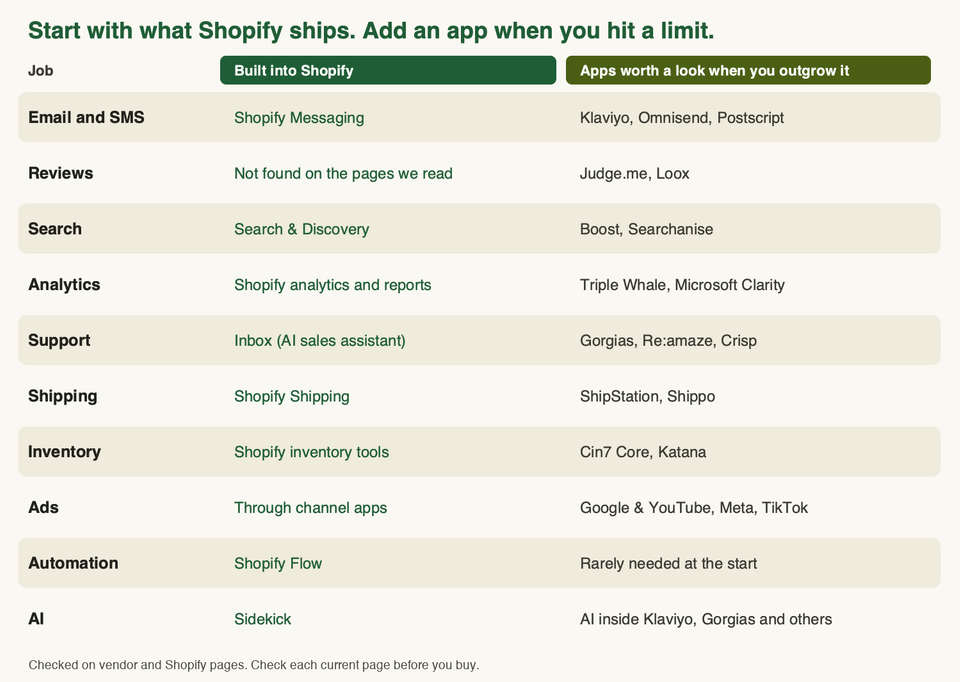
Plans differ in what they include, for example how many staff accounts, and whether checkout can be fully customised. Check the current plan page for your region. If you are weighing Plus, our guide to Shopify vs Shopify Plus covers the trade-offs.
How to read this guide
Each job below has two to four options. For each one we say who it suits and when to skip it. The "skip it if" lines are our judgement, built from the vendor's own description of the product. We did not run these tools on a live store for this post, so read them as a buyer's guide, not a lab test.
Two rules we use with clients:
- Every tool needs one job and one number you can check. If you cannot name both, it is a candidate to remove.
- Try the built-in option first. Move to an app when you can say what the built-in tool cannot do.
Email and SMS
Email is the job where most stores outgrow the built-in tool first, because segmentation and automation are where the depth is.
- Shopify Messaging. Email, SMS and WhatsApp in one place, with templates that pull your branding, products and prices from the store, and automation templates such as welcome and winback (Shopify). The listing says it is free to install and that additional charges may apply. Pick it if you are new, your list is small and you want welcome and abandoned-cart emails running this week. Skip it if you want to join data from many other tools into your segments.
- Klaviyo. Email, SMS, WhatsApp, push and pop-ups, with data from 350+ integrations and AI-assisted segments, according to its listing. The listing also says new stores get a guided setup for a sign-up form, a welcome email and an abandoned-checkout flow. Pick it if email is a main revenue channel and you have the product and order data to segment well. Skip it if you send one newsletter a month. The listing says it is free to install, but your real cost depends on your plan, so check Klaviyo's current pricing.
- Omnisend. Email, SMS, web push, pop-ups and landing pages, with a free plan available per its listing. It also says you can connect ChatGPT or Claude to it to build campaigns. Pick it if you want sign-up forms, email and SMS in one tool with a lighter setup. Skip it if you already know you need Klaviyo's integrations.
- Postscript. SMS only, with tools for two-way messaging, A/B tests and compliance (listing). Pick it if SMS is a real programme for you, run next to your email tool. Skip it if you have not built your email flows yet. Get consent properly and check the texting rules in each market you sell to.
Larger brands also look at Attentive, which sells SMS and email together and lists in-house compliance experts on its listing.
Reviews
Reviews are one of the few jobs where we did not find a built-in Shopify option on the pages we read, so most stores need an app. Our longer roundup is best review apps for Shopify.
- Judge.me. Collects reviews with photos and video, sends review requests after fulfilment or delivery, and can show Google reviews and import Etsy and Amazon reviews. It has a free plan, per its listing. Pick it if you want a broad feature set and a low starting cost. Skip it if you want a very visual, social-proof wall as the main look.
- Loox. Built around photo and video reviews, with AI sorting and highlights, and it can sync reviews with the Shop app, per its listing. It also has a free plan. Pick it if your products look good in customer photos, such as fashion, home and beauty. Skip it if your products are hard to photograph and most reviews are text.
Before you install any review app, check how the widget looks in your theme, whether it can import your old reviews, and how it affects page speed. Reviews sit high on product pages, so a slow widget costs you.
Search and discovery
Search matters more as your catalogue grows. With a small catalogue, shoppers browse. With a large one, they search.
- Shopify Search & Discovery. Free, made by Shopify. It covers filters, synonym groups, product boosts, related and complementary products, and search analytics, per its listing. Pick it if you want the basics at no extra cost. Skip it if your search results are visibly poor even after you set up synonyms. Read the recent reviews on the listing before you rely on it.
- Boost. AI search that handles typos and vague searches, filters by tag, metafield and variant, pinning and boosting of products, and multi-language support (listing). It offers a free trial. Pick it if you have a large catalogue with many attributes. Skip it if you have a small shop.
- Searchanise. Instant search bar, filters, merchandising and voice search, with a free plan available (listing). Pick it if you want predictive search and filters on a small budget.
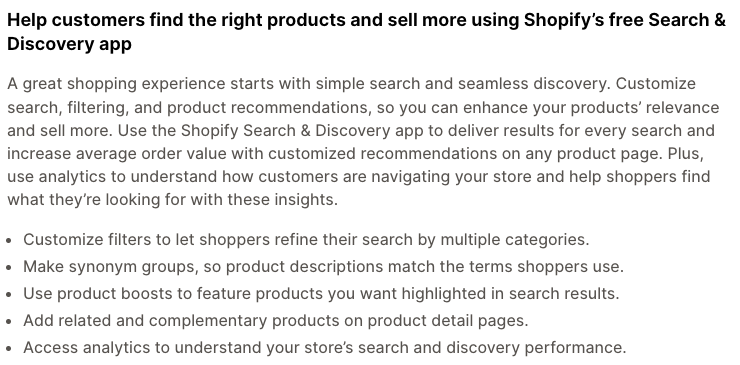
Search apps change how your collection and search pages load, so test speed before and after. Our guide to Shopify SEO apps covers the search engine side, and best upsell apps covers recommendations and bundles.
Analytics and customer behaviour
You need two kinds of answers. First, what happened: sales, conversion rate, traffic. Second, why: where shoppers got stuck.
- Shopify analytics. Built in. It has pre-built and custom reports, live monitoring and marketing reports by channel (Shopify). Start here. It is enough for most stores until they run several paid channels.
- Microsoft Clarity. A free app with session replays, heatmaps, funnels and AI insights, per its listing. Pick it if you want to see where shoppers hesitate on product pages and checkout steps. Replays record behaviour, so make sure your cookie and consent setup fits your market.
- Triple Whale. An attribution and analytics platform with a pixel, multi-touch attribution and an AI assistant. A free plan is available (listing). Pick it if you spend on several ad channels and keep arguing about which one works. Skip it if you spend little on ads. Any attribution tool gives you a model of what happened, not a perfect record.
- Google & YouTube app. Connects your store to Merchant Center, Performance Max campaigns and Google Analytics, per its listing. It is also an ads tool, so it appears again below.
Customer support
Support tools split into two types. Some answer buyers on the storefront. Others are helpdesks that manage tickets, email and chat for your team. Our live chat apps guide goes deeper on chat.
- Shopify Inbox. Free. Its listing describes an AI sales associate on your storefront that answers product questions from your catalogue, policies and store content, and you set its tone and rules. Signed-in Shop users can get replies that use their purchase history. Pick it if you want help with product questions at no extra cost. Skip it if you need a full ticket system. We did not find ticketing features on the listing.
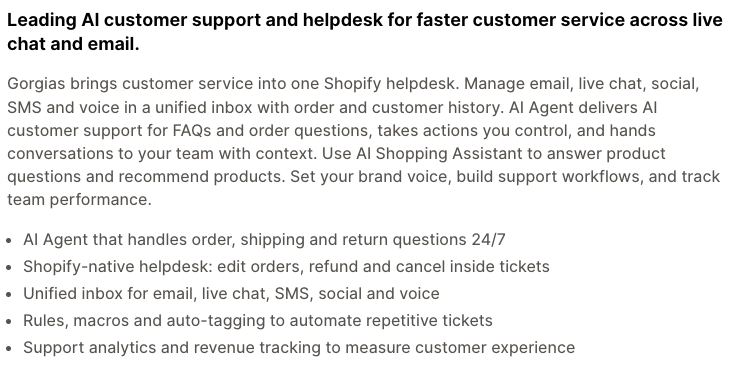
- Gorgias. A helpdesk built for Shopify. The listing says it brings email, live chat, social, SMS and voice into one inbox, lets agents edit orders and issue refunds inside tickets, and includes an AI agent for order and return questions.
Pick it if ticket volume is high enough that your team needs macros, rules and order actions in one place. Skip it if you get a handful of messages a day. Plans are tied to ticket counts, so check how that matches your volume.
- Re:amaze. A helpdesk with live chat, an AI agent and the ability to change Shopify orders from a conversation, per its listing. Pick it if you want a helpdesk and chat in one tool and want to compare it with Gorgias.
- Crisp. A helpdesk and AI chatbot for small stores, with a free plan, many channels, an FAQ builder and a handover from bot to human (listing). Pick it if you are small and want chat on a tight budget.
Zendesk also has a Shopify app. Its listing is aimed at teams that already run Zendesk and want order data and refunds inside the ticket.
Shipping and returns
- Shopify Shipping. Discounted domestic and international labels, up to 250 labels at once, pick lists, tracking updates for buyers, address validation, and the option to connect your own carrier account (Shopify). Pick it if you ship from one place and want everything in the admin. Check that it is available in your country first, because we did not confirm that.
- ShipStation. Syncs orders and inventory across channels such as TikTok Shop, Amazon and Walmart, supports 200+ carriers, and offers branded tracking and a returns and exchanges portal (listing). Pick it if you sell on several channels and need rules to batch and route orders. Skip it if you only sell on your own store.
- Shippo. Order sync, 40+ carriers, bulk labels, return labels and branded tracking, with a free plan available (listing). Pick it if you want a lighter multi-carrier tool.
Shipping price is a conversion topic as well as a cost topic. Our guide to free shipping on Shopify covers how to set it up.
Inventory
For a single warehouse and a simple catalogue, the built-in tools may be enough. Shopify's page lists stock across locations, purchase orders, transfers, tracking for bundles, subscriptions and pre-orders, and an ABC analysis report (Shopify). Shopify Flow can also hide out-of-stock products or send restock alerts.
An old note: Stocky, Shopify's former inventory app, is gone. Shopify's Help Center says it is no longer available after 31 August 2026 and points you to Shopify's own inventory features (Stocky help). If an older guide still recommends it, ignore that advice.
When you outgrow the built-in tools:
- Cin7 Core. Syncs stock and orders across warehouses and channels, with purchasing, AI forecasting and B2B wholesale support (listing). A free trial is available. Pick it if you have several warehouses or a wholesale arm. Skip it if you have one location.
- Katana. Inventory and production planning for multi-channel sellers, including those who manufacture, with a free plan available (listing). Pick it if you make products and need to plan materials and production. Skip it if you resell and do not manufacture.
If you run your own warehouse, stock planning is only part of the job. Receiving deliveries, tracking where stock sits, and picking and packing orders need their own workflows. LaSyncro's guide to Shopify warehouse management explains when a dedicated warehouse management system (WMS) is worth adding.
See Shopify inventory management apps for a longer list.
Ad tools
Ad tools on Shopify are mostly free channel apps. The spend is on the ad platform, not the app.
- Google & YouTube. Syncs products to Merchant Center, supports Performance Max campaigns and links to Google Analytics (listing).
- Facebook & Instagram (Meta). Syncs products to your Facebook and Instagram shop, helps set up the conversion pixel and gives shop insights (listing).
- TikTok. Lets you create TikTok ads, install the pixel and sync TikTok Shop orders and inventory into your admin (listing).
Each listing says it is free to install and that additional charges may apply. Pick one channel first. Add a second when the first is steady and you can read its results. Add Triple Whale or a similar tool only when you run several channels and need one view.
AI
AI now sits inside many of the tools above, so treat it as a feature, not a separate shopping category. Our AI for ecommerce guide goes wider.
- Sidekick. Shopify's assistant. Its page lists prompts such as writing product descriptions, a weekly performance summary, low-stock alerts and a shipping audit (Sidekick). Our Sidekick guide explains how to use it. Always read what it writes before you publish it.
- AI inside your other tools. Klaviyo, Omnisend, Gorgias and Shopify Inbox all describe AI features on their listings. Use those first, before you add a standalone AI app.
- Microsoft Clarity Brand Agents. Clarity's listing describes AI shopping assistants that use behaviour signals. It is new and we did not test it, so treat it as something to trial, not a default.
Quick comparison
| Job | Start with | Add when | Skip the app if |
|---|---|---|---|
| Email and SMS | Shopify Messaging | Klaviyo or Omnisend for deeper segments | You send few campaigns |
| Reviews | One reviews app | Switch if the widget is slow or limited | You have no orders yet |
| Search | Search & Discovery | Boost or Searchanise for large catalogues | You have a small catalogue |
| Analytics | Shopify analytics | Clarity for behaviour, Triple Whale for multi-channel ads | You run one or no ad channel |
| Support | Shopify Inbox | Gorgias, Re:amaze or Crisp for ticket volume | You get few messages |
| Shipping | Shopify Shipping | ShipStation or Shippo for several channels or carriers | You ship from one place |
| Inventory | Shopify inventory tools | Cin7 Core or Katana for multiple warehouses or production | You have one location |
| Ads | One channel app | A second channel, then attribution | You do not run paid ads |
| Automation | Shopify Flow | Only if Flow cannot reach what you need | You have no repeat tasks |
| AI | Sidekick | AI inside the tools you already use | Nothing else to automate yet |
The minimum stack by store stage
Stages describe how your store behaves, not a revenue number. Move up when a real problem forces you to.
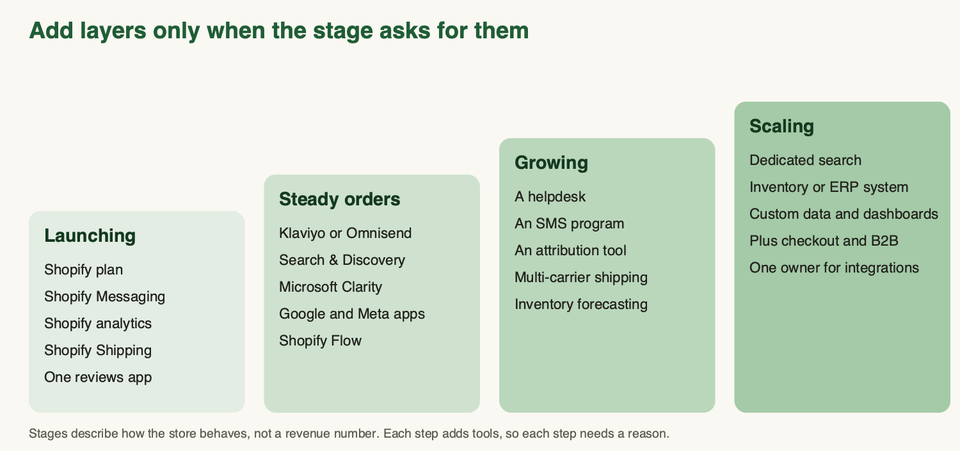
- Launching. Shopify plan, Shopify Messaging for a welcome email and abandoned-cart email, Shopify analytics, Shopify Shipping and one reviews app. Do not buy more. Use our launch checklist to test everything before you go live.
- Steady orders. Add Klaviyo or Omnisend if you outgrow Shopify Messaging, Search & Discovery, Microsoft Clarity, one ad channel app and one or two Shopify Flow automations.
- Growing. Add a helpdesk when support takes real hours, an SMS programme if your email is solid, an attribution tool if you run several ad channels, and multi-carrier shipping if you need it. Add inventory forecasting when stock-outs or overstock cost you money.
- Scaling. Dedicated search, an inventory or ERP system, custom dashboards, Plus features such as checkout customisation and B2B, and one named person who owns integrations. At this stage the main risk is tools that do not talk to each other.
The warning: tool sprawl and speed
Every app you add is another thing that can break, bill you, and slow your pages. Shopify's own developer documentation sets the rule for app builders: to be published in the App Store, an app must not reduce a storefront's Lighthouse performance score by more than 10 points (Shopify performance docs).
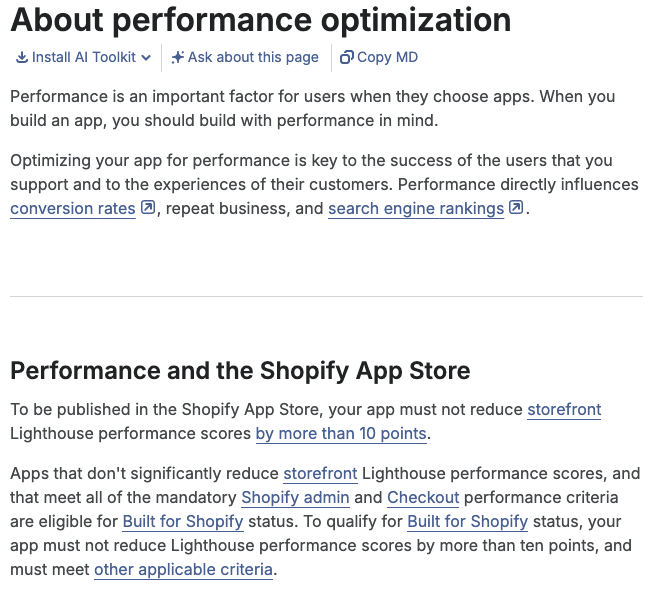
That is a limit per app, and it is generous. Our reading is that nothing in it stops five apps from each adding a few points that add up on your pages. We did not find a store-level limit on the pages we read. So measure your own store.
Here is what we do to keep a stack lean:
- List every app and give each an owner and a number. An app with no owner and no number goes on the removal list.
- Separate admin-only apps from storefront apps. Shipping, inventory and helpdesk tools mostly work in the admin. Reviews, search, pop-ups, chat and pixels usually load on the storefront. The second group is where speed is lost.
- Test before and after each install. Run your key pages through a speed test, then repeat after you add the app. Our theme performance guide shows how.
- Uninstall properly. Removing an app does not always remove the code it left in your theme. Check the theme files for leftover snippets, ideally on a duplicate theme first.
- Prefer one tool that does two jobs well over two that overlap. Overlap means double billing and double scripts.
How to choose
- Write down the three jobs that cost you the most time or money today.
- Check whether Shopify already does that job. Use the ledger above.
- If you need an app, shortlist two. Install each on a duplicate theme or at a quiet time, and compare setup time, speed and support.
- Read the recent reviews on each listing, not only the overall score.
- Check the current pricing page, because plans and usage limits change.
- Set a date to review the app, such as 90 days after install. Remove it if its number has not moved.
If your stack has grown tangled, or you need apps to share data cleanly, we can help. Talk to us and we will start with an audit of what you run today.
Frequently asked questions
How many apps should a Shopify store have?
There is no safe number. A better test is whether each app has one job, one owner and one number you can check. A store with eight well-used apps can be healthier than a store with three forgotten ones.
Do I need Klaviyo from day one?
No. Shopify Messaging can send campaigns and run welcome and winback automations. Move to Klaviyo or Omnisend when you need richer segments, more integrations or more control over flows.
Do apps really slow down my store?
They can. Shopify requires published apps to stay within a 10-point Lighthouse drop each, but several apps together can still cost you speed. Test your pages before and after each install.
Is Shopify's built-in inventory enough?
For one location and a simple catalogue, often yes. Shopify's page lists multi-location stock, purchase orders, transfers and an ABC report. Look at apps when you have several warehouses, wholesale or production to plan.
Which AI tool should I start with?
Start with Sidekick, which Shopify lists as part of the platform, then use the AI features inside tools you already pay for. Read the output before you publish it. See our AI for ecommerce guide for more.
Should I run SMS as well as email?
Only after email works. SMS needs clear consent and has its own rules in each market. If you start, use a tool that handles consent and unsubscribes, and test with a small group first.
What happened to Stocky?
Shopify's Help Center says Stocky is no longer available after 31 August 2026 and tells merchants to move to Shopify's inventory features. Plan your inventory around the built-in tools or one of the apps above.
Where can I find more apps by category?
Our other roundups go deeper: free Shopify apps, review apps, live chat apps, SEO apps, upsell apps and inventory apps.