Best Free Shopify Apps: What "Free" Really Means
A job-by-job guide to free Shopify apps, from Shopify's own tools to third-party apps with a free plan. It explains what each kind of "free" costs you in caps, data, speed and upgrades, and how to audit what you have already installed.


"Free" on the Shopify App Store means four different things, and only the first is free in the plain sense. This guide groups the apps worth a look by job (email, search, forms, automation, reviews, support, analytics, shipping and a few more), says who each is for, and shows where the free part ends. At the end there is a short audit you can run on the apps you already have.
We checked every app below on its own Shopify App Store listing. Listings change, so treat the labels here as a snapshot and read the pricing block before you install.
What "free" means on the App Store
The pricing label on a listing is the first thing to read. It means four different things.
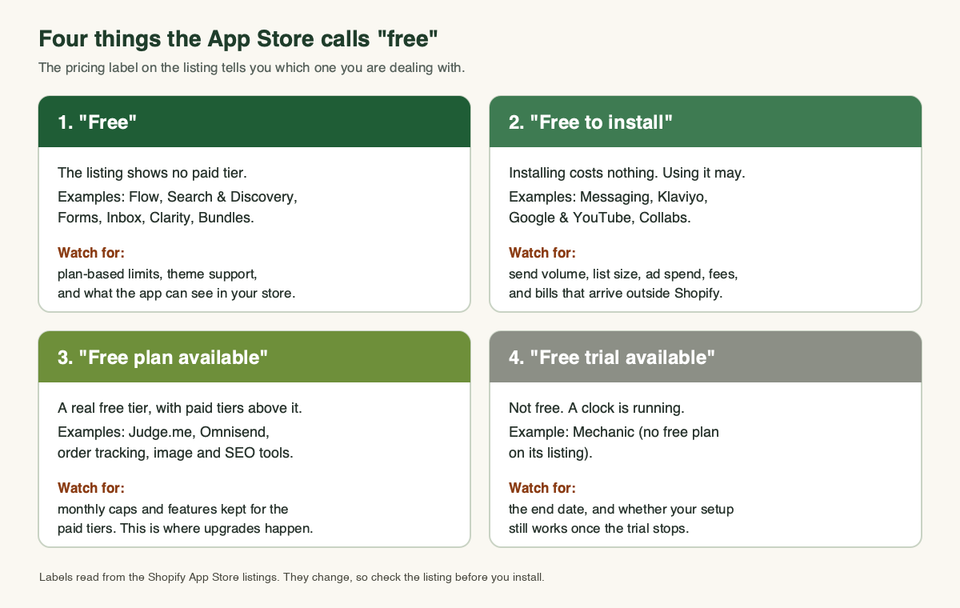
- Free. The listing shows no paid tier. Most of Shopify's own apps sit here. Shopify's help centre says apps made by Shopify are usually free and supported by Shopify, while third-party apps might have app charges. "Usually" matters: a few Shopify apps carry usage charges.
- Free to install. Installing costs nothing. Using it might. The listing says "additional charges may apply", and that is where email volume, ad spend and fees show up.
- Free plan available. A real free tier, with paid tiers above it. These are the apps where limits and upgrade prompts live.
- Free trial available. Not free. The app starts billing when the trial ends.
One more line to look for is "External charges may be billed ... separately from your Shopify invoice". It appears on some email apps. Shopify's help centre warns that uninstalling an app from your admin does not cancel charges made outside Shopify.
How we picked these apps
We started with the apps Shopify itself publishes, then added third-party apps that have a free plan on their own listing and a clear job. We only kept an app if its listing opened today and said what it does. We did not run all of them on a live store, so this is a read of the listings and the vendor and Shopify help pages, plus our judgement on who each one suits. We left out apps whose free plan is only a trial.
Two things we dropped:
- Shopify Product Reviews. Its listing now says the app is not currently available on the App Store. If an old guide still points you to it, skip it.
- Mechanic. It is a paid automation platform. Its listing offers a free trial, not a free plan, so it does not belong in a list of free apps.
Email and messaging
Shopify Messaging
Shopify's own tool for email, SMS and WhatsApp campaigns is listed on the App Store as Shopify Messaging. The web address still ends in shopify-email, so you may know it as Shopify Email. It offers ready-made templates, segmentation and automations, and lets you edit branded emails by describing changes to Sidekick.
- Label today: Free to install, additional charges may apply. The listing says a monthly allowance of emails is free and then pricing is by volume. Check the pricing block for SMS and WhatsApp.
- Pick this if you are starting your list and want everything inside Shopify with one customer record.
- Watch for: the listing's data-access block shows it can edit customer data, discounts and marketing events, and view order history for the last 60 days. That is normal for an email tool, but you should know it.
Klaviyo
Klaviyo is the deeper option. The listing describes guided setup for new stores (sign-up form, welcome email, abandoned-checkout flow), segmentation and a large integration library.
- Label today: Free to install. The listing says there is a free tier with caps on contacts and SMS credits, and that external charges may be billed by Klaviyo separately from your Shopify invoice.
- Pick this if you already know you need detailed segmentation or flows beyond welcome and abandoned cart.
- Watch for: billing that happens outside Shopify, and the cap on contacts. Your list will grow past a free tier if the marketing works.
Omnisend
Omnisend covers email, SMS and sign-up forms such as exit-intent pop-ups and spin-to-win. Its listing also mentions building campaigns from an AI assistant through MCP.
- Label today: Free plan available, with external charges that may be billed by Omnisend separately from Shopify. The free plan lists a cap on emails per month.
- Pick this if you want pop-ups and email in one tool and prefer a third-party tool over Shopify's.
- Watch for: the same two things as Klaviyo, a monthly send cap and billing outside your Shopify invoice.
Sign-up forms
Shopify Forms
Shopify Forms adds pop-up and inline forms for newsletter sign-ups, wholesale leads and similar, and can tag new customers.
- Label today: Free.
- Pick this if you want a plain sign-up form that feeds your Shopify customer list without another app.
- Watch for: Shopify's help page says you can have up to 25 forms per store, that pop-ups and inline forms need the Forms theme app embed turned on, and that inline forms also need a compatible theme. If a form does not appear, check the embed first.
Search and filtering
Shopify Search & Discovery
Search & Discovery lets you set up product filters, synonym groups, search boosts and related-product recommendations, and view search analytics.
- Label today: Free.
- Pick this if your catalogue is small to medium and you want better filters and search results without paying for a third-party search tool.
- Watch for: the limits in Shopify's filter documentation. Filters only show if your theme supports them. Collections with more than 5,000 products do not display filters. Filter counts on search results use up to the first 1,000 results, and one filter shows at most 100 values. Some reviews on the listing today say search quality got worse after a change and that there is no always-on availability filter, which hurts size filtering. Test it on your own catalogue and read recent reviews before you rely on it.
Automation
Shopify Flow
Flow is Shopify's no-code automation tool: triggers, conditions and actions. The listing says it has hundreds of templates and works with tags, metafields, B2B, Slack and Google Sheets, among others.
- Label today: Free. Shopify's help centre says it is free on the Basic, Grow, Advanced and Plus plans.
- Pick this if you do the same admin task by hand every week: tagging orders, flagging high-risk orders, alerting on low stock.
- Watch for: Shopify's Flow help page says the Send HTTP Request action needs Grow, Advanced or Plus, and that usage limits follow your plan's API limits. A badly built flow can also do damage at scale, such as tagging or changing the wrong products, so build with a test condition first.
Reviews
Judge.me
Judge.me collects product reviews, photo and video reviews and star ratings, and syncs with Google reviews. The listing carries a badge saying it meets Shopify's highest standards for performance, design and integration.
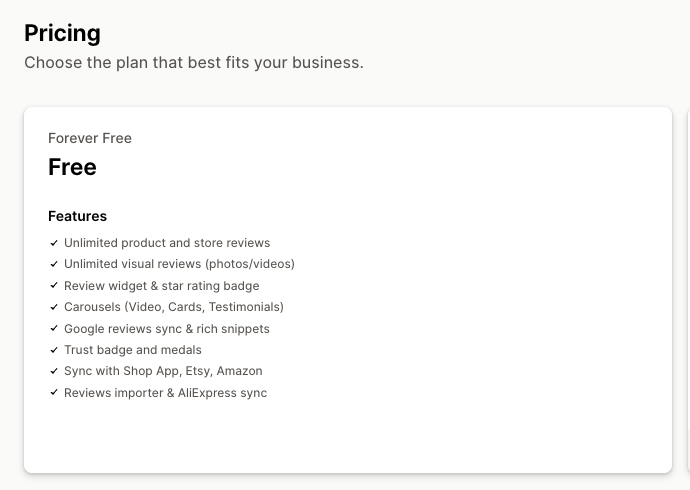
- Label today: Free plan available. The free tier lists unlimited reviews, photo and video reviews, widgets, Google reviews sync and rich snippets.
- Pick this if you want to start collecting reviews today without paying.
- Watch for: the paid tier holds things many stores end up wanting: coupons and referrals, more widgets, AI replies and many integrations, including Klaviyo. For more review apps, see our review apps roundup.
Support and chat
Shopify Inbox
Inbox has changed. Its listing now describes an AI sales associate for your storefront that answers questions using your catalog, policies and store content, and can run with or without the agent.
- Label today: Free.
- Pick this if you want basic pre-sales help without staffing live chat.
- Watch for: the data-access block lists all order history, among other data. You control the agent's tone and rules, but you should read its answers regularly, especially on shipping and returns. If you need a human-first tool, see our live chat guide.
Analytics and insight
Microsoft Clarity
Clarity gives you session replays, heatmaps, funnels and AI insights. Its listing now also pushes AI "Brand Agents" that talk to shoppers.
- Label today: Free.
- Pick this if you want to see where visitors get stuck on a product or checkout page.
- Watch for: session recordings may count as personal data under UK and EU rules, so get advice on consent. The listing says it includes built-in consent, but check how it works with your own cookie banner. Do not switch on the AI agents just because they sit on the same page.
Google & YouTube
Google & YouTube syncs your products to Google Merchant Center, supports Performance Max campaigns and connects Google Analytics.
- Label today: Free to install, additional charges may apply. The extra cost is usually ad spend, if you run campaigns.
- Pick this if you want your products to appear in Google's shopping surfaces.
- Watch for: product data quality. If titles, images and prices are messy in Shopify, they will be messy in Google too.
Shipping and orders
Order tracking (CWILL Order Tracking, formerly Parcel Panel)
This app gives you a branded tracking page, real-time order sync and a shipments dashboard, with many carriers supported. The listing carries the same "highest standards" badge.
- Label today: Free plan available. The free tier is capped by orders per month.
- Pick this if "where is my order?" emails take up your inbox.
- Watch for: features such as shipping notifications and custom shipment statuses are listed on the first paid tier, not the free one. The listing also lists all order history in its data-access block.
Selling features built by Shopify
These three are free Shopify apps for specific selling jobs. All three are basic compared with paid specialists, which is often fine.
Shopify Bundles
Bundles creates fixed bundles and multipacks from the Shopify admin, with stock updating in real time. It is basic. One reviewer on the listing calls it basic but is glad it is free and does the one thing they need. Pick it for fixed kits. Pick a paid app if you need mix-and-match bundles or a heavy upsell layer. See our upsell apps guide.
Shopify Subscriptions
Subscriptions offers auto-billed weekly, monthly or yearly subscriptions with discounts, and lets you move existing subscription contracts across. If you sell subscriptions at scale, compare it with the third-party options in our subscription apps guide.
Shopify Collabs
Collabs helps you recruit creators and affiliates and pay commissions. Label: Free to install, additional charges may apply. The listing says a commission processing fee on automatic payments may apply, so read that line before you switch on automatic payouts.
Store basics
Shopify Translate & Adapt
Translate & Adapt lets you translate products, collections, pages and policies. The listing says you can auto-translate up to two languages for free and add as many manual translations as you like. That is a cap to plan around if you sell in more than two languages.
TinySEO (formerly TinyIMG)
TinySEO bundles image compression, alt text, filenames, schema markup and page-speed options. The listing carries the same badge. The free plan caps how many image optimizations you get each month.
Pick it if image weight is your main problem. Be careful with the speed options such as lazy loading and script minification, since they change how your theme loads assets. Test on a theme copy, and read our image sizing guide and our SEO apps roundup first.
Quick comparison
| App | Job | Label on the listing today | Where the free part ends |
|---|---|---|---|
| Shopify Messaging | Email, SMS, WhatsApp | Free to install, charges may apply | Email volume and other channels |
| Klaviyo | Email and SMS | Free to install | Contact and SMS caps, billed outside Shopify |
| Omnisend | Email, SMS, pop-ups | Free plan available | Monthly email cap, billed outside Shopify |
| Shopify Forms | Sign-up forms | Free | 25 forms, theme embed needed |
| Search & Discovery | Search and filters | Free | Theme support, catalogue size limits |
| Shopify Flow | Automation | Free | Plan-based usage limits and actions |
| Judge.me | Reviews | Free plan available | Coupons, integrations and more widgets are paid |
| Shopify Inbox | Storefront chat | Free | Data access, answer quality |
| Microsoft Clarity | Session replays | Free | Consent and privacy setup |
| Google & YouTube | Shopping and ads | Free to install, charges may apply | Ad spend |
| Order tracking (CWILL) | Tracking page | Free plan available | Monthly order cap, notifications are paid |
| Shopify Bundles | Fixed bundles | Free | Fixed bundles and multipacks only |
| Shopify Subscriptions | Subscriptions | Free | Check it fits your billing needs |
| Shopify Collabs | Creators | Free to install, charges may apply | Commission processing fee |
| Translate & Adapt | Translation | Free | Two languages auto-translated for free |
| TinySEO | Images and SEO | Free plan available | Monthly optimization cap |
The hidden costs of free apps
Free apps cost you in five places other than the bill.
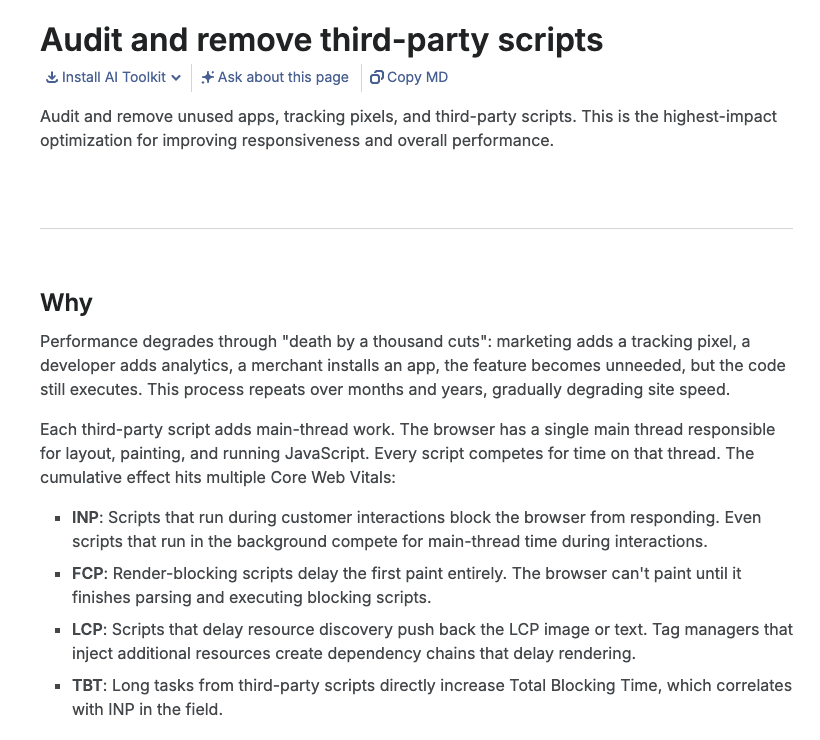
1. Speed. Shopify's developer docs call removing unused apps and scripts the highest-impact optimization for responsiveness and describe performance as dying by "a thousand cuts". Each script adds work for the browser's single main thread. Review apps, chat widgets and email capture pop-ups are named as common offenders because they often load on every page even when they only show on some. Shopify tests an app's effect on storefront speed by comparing a Lighthouse score before and after install, which is also a fair way to test it yourself.
2. Data. Every app lists what it can read and edit before you install. Klaviyo, Inbox and the order tracking app all list order history. That is not a red flag by itself, but each app is another place your customer data lives.
3. Caps. Free tiers are capped by something: contacts, emails, orders, images, languages, forms. The cap is the app's way of finding out when you have grown.
4. Upgrade triggers. Look at what the free tier leaves out. A free review plan with no coupons or integrations is fine until you want review requests in your email tool. A free tracking plan without shipping notifications is fine until customers ask for them.
5. Leftovers. Shopify's help centre says some apps add code to your theme that is not removed when you uninstall, that some app data cannot be recovered after uninstalling, and that reinstalling may not restore your old settings. Your speed score will not recover until the code is gone.
For a fuller look at speed, see our theme performance guide.
How to audit the apps you already have
Block out an hour, and do this once a quarter.
- List every app. In your admin go to Settings, then Apps. Write down what each one is for, who set it up and when it was last used.
- Cut duplicates. Shopify's performance docs name two analytics tools, or two apps doing the same job, as a common source of bloat. Keep one.
- Check each app's cost. Read its pricing block today. Note any external billing and any usage-based charge. If you stopped using it, uninstall it.
- Check what each app can see. Open the data-access block on its listing. If it asks for more than the job needs, find another app.
- Measure what it loads. Run a Lighthouse audit on your home page, a collection page and a product page, then open the Treemap view to see every script grouped by origin. Use the Coverage tab in Chrome DevTools to spot scripts that download but barely run. Check each template, because a script that looks unused on the home page may work on a product page.
- Uninstall in the right order. Read the app's listing for removal steps first, then uninstall from Settings, then search your theme files for its name and script domains, check
layout/theme.liquidand thesnippets/folder, and view your page source to confirm the app's domain no longer loads. Duplicate your theme before deleting anything, so you can roll back. - Re-test. Run the same speed checks and compare. Write the date and the result next to the app in your list.
If you would like a second pair of eyes on an app audit or a slow theme, talk to us. It is a normal part of the work we do.
How to choose
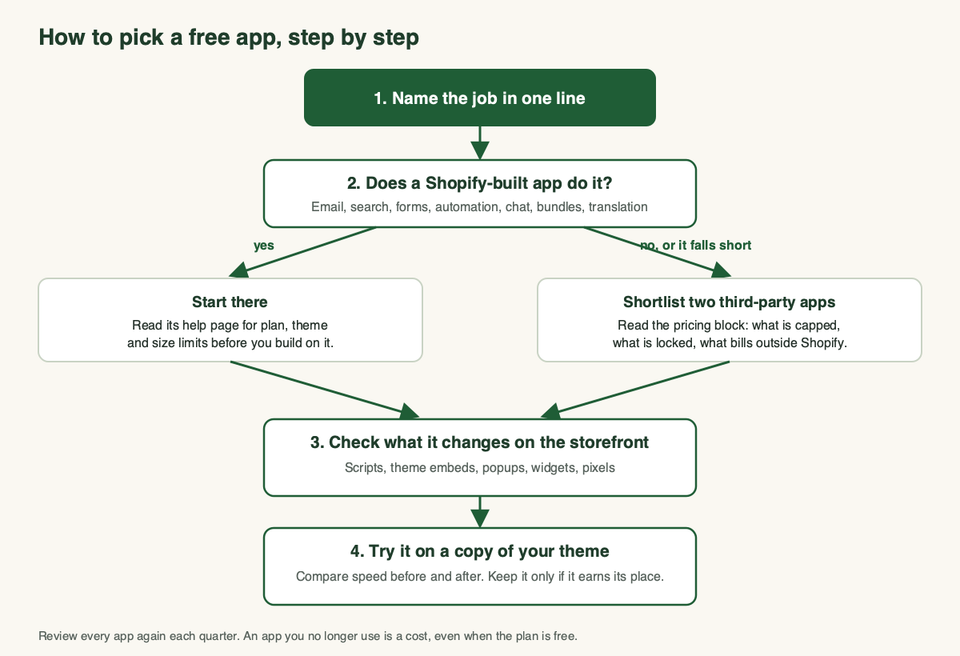
- Start with the job, not the app. One sentence: "send abandoned cart emails", "tag high-risk orders", "show a tracking page".
- Try Shopify's own app first. It is supported by Shopify, it usually costs nothing, and it tends to fit the admin well. It is not always the best tool, as the Search & Discovery reviews show.
- Read the pricing block twice. Once for the free plan, once for what the paid plan adds.
- Prefer apps that add no storefront code. Admin-only apps such as Flow cost you nothing in page weight. Storefront apps (chat, reviews, pop-ups, tracking widgets) need a speed test.
- Pick the free plan you can live in for six months. If you will outgrow it in two, plan for the upgrade now or start with the paid tool.
- Keep the list short. Every app you add is one more thing to keep updated, audited and paid for. For wider tool choices beyond apps, see our e-commerce tools guide.
Frequently asked questions
Are Shopify's own apps really free?
Mostly. Shopify's help centre says apps made by Shopify are usually free, and many listings say plain "Free". Some, such as Messaging and Collabs, say additional charges may apply. Read the pricing block.
Do free apps slow down my store?
They can. Any app that adds code to the storefront adds work for the browser, and Shopify's docs list review, chat and email capture apps as common sources. Admin-only apps do not affect page speed. Test any storefront app before and after install.
Do I need Shopify Plus to use Flow?
No. Shopify's help centre says Flow is a free app on the Basic, Grow, Advanced and Plus plans. Some actions, such as Send HTTP Request, need the Grow plan or higher. Check the help page for your plan.
What happens to my data if I uninstall an app?
It depends on the app. Shopify's help centre says some apps store data you cannot recover after uninstalling, and that reinstalling might not restore your old settings. Export anything you need first, such as your review or customer data.
Is Shopify Inbox still available?
Yes. Its listing is live and describes an AI sales associate for your storefront. It is no longer only a basic chat tool, so check that it does what you expect.
How many apps is too many?
There is no official number. Shopify's guidance is to make sure each app creates enough value to offset any speed cost, and to remove apps you do not need. One app with a heavy script can cost more than five light ones.
Should I start with Shopify Messaging or Klaviyo?
If your needs are simple (welcome message, abandoned cart, a monthly newsletter), start with Messaging because it lives inside Shopify. If you already need detailed segmentation or many flows, start with a dedicated tool such as Klaviyo or Omnisend, and plan for billing outside Shopify.
Does a "Built for Shopify" badge mean an app is fast?
It is a good sign. Shopify says its Built for Shopify standards are about apps being easy to use, safe and performant. It is still worth testing on your own theme.