How to Change Your Shopify Store Name (and What Stays the Same)
Renaming a Shopify store is one field, but your store name, myshopify.com address, custom domain, legal name and card statement text are separate things. Here is what changes where, plus a rename checklist.


You can rename a Shopify store in a minute: open Settings, then General, and edit the store name. The catch is that "store name" means six different things, and only one of them changes when you edit that field. This guide shows which is which, what you must update by hand, and how to move to a new domain without losing search traffic.
The steps below come from Shopify's Help Center (business settings, primary domain and Shopify Payments), Shopify's developer docs, Shopify Community forum replies, and Google's documentation. We say so wherever a step rests on a forum reply. Menus move around, so confirm each setting in your admin before you save.
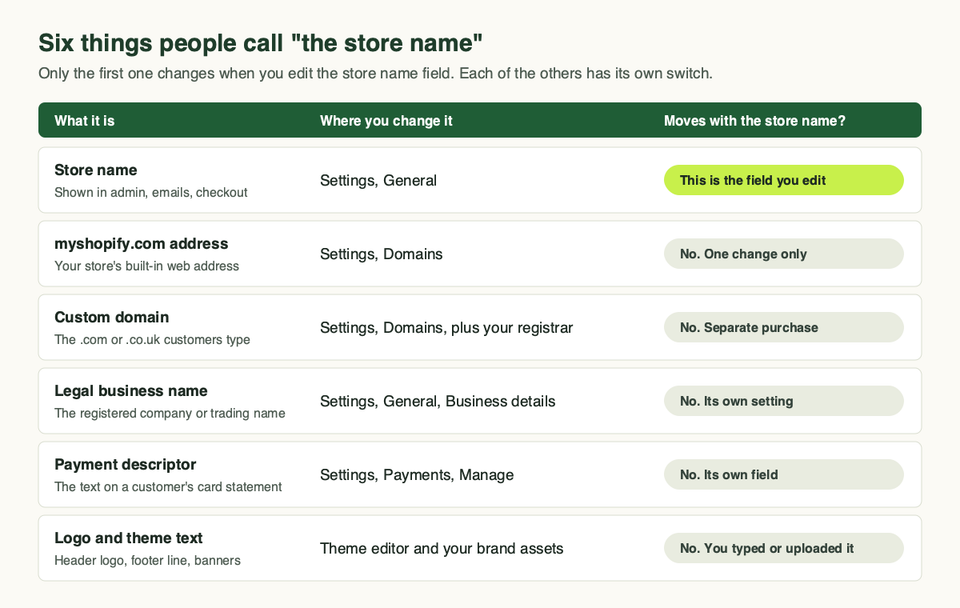
Six things people call "the store name"
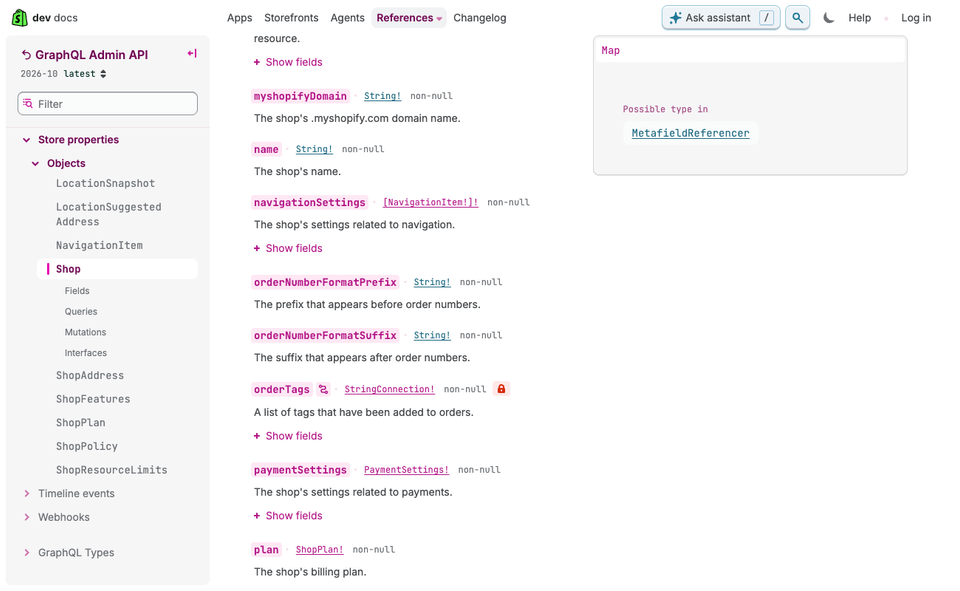
Shopify's developer docs show the same split. In the Admin API, the shop has a name field, a separate myshopifyDomain field, and a separate primary domain.
Most "my rename didn't work" complaints come from changing the first row of that table and expecting the other five to follow.
Step 1: Change the store name
- In your Shopify admin, go to Settings, then General.
- In the Store contact details section, open your store name and edit the Store name field.
- Save.
Shopify's Help Center says there are no limits on changing your store name and contact information: you can change them as often as you want. It adds one exception. If your store uses Shopify Payments, you need to contact Shopify Support to change the business name on your Payments account. Another Help Center section says an updated store name in Store contact details syncs to Shopify Payments as your trade name, and to contact Support if that does not work. Read the two together: edit the store name, then check what your Payments account shows.
What it updates, from what we could read:
- The admin and the login picker. A Shopify Community reply says the new name shows at login and on your online store.
- The sender name on automated emails. A 2021 forum reply says automated notifications use the store name as the sender name. That reply is old, so test with a real order.
It does not touch places where someone typed the old name by hand. In one forum thread, a merchant renamed the store but the order confirmation still said "Thank you for shopping with" the old name. Shopify staff explained that by default the store name appears only at the top of that email, so the old name had been written into the template. Search each email template for the old name. Resetting a template to default would also wipe your other edits, so copy those first.
Step 2: Decide whether to touch the myshopify.com address
Every store has a built-in address ending in .myshopify.com. The Help Center is explicit that changing your store name does not change it.
Per the Help Center, you can choose a new myshopify.com name for free, but only 1 time from your Shopify admin. Go to Settings, then Domains, hover over your myshopify.com domain, click the pencil icon, enter the new name and click Add domain. The new address becomes your primary domain, the old one redirects to it, and your admin URL changes to match.
Think before you spend your one change:
- Customers usually do not use it. The Help Center says that when you use a custom domain as your primary domain, the myshopify.com name is not shown to customers.
- You still need the old one. The Help Center says you and your staff must keep using your previous myshopify.com domain to log in and when you contact Shopify Support. Write down both.
- Typos are final. In a forum thread, a merchant with a misspelled address was told to be careful because the change is allowed once.
The page we read describes no way to make a second change. If you need one, ask Shopify Support. If you are unsure, leave the address alone. It is an admin address, not a brand asset.
Step 3: Change the custom domain (only if the brand changed)
If you are moving from oldbrand.com to newbrand.com, treat it as a separate project. A Shopify guide on changing a domain lists three routes: buy the new domain through Shopify, connect one you own elsewhere, or transfer one in.
The Help Center's primary domain page gives the order:
- Add the custom domain and wait until its status on the Domains page is Connected. The page says this can take up to 48 hours.
- Go to Settings, then Domains, and click the domain.
- In the Type row, click Change, choose Primary domain, and click Change domain type.
When you do this, the domain that was primary becomes a redirect domain. It stays connected, and visitors to it are sent to your new primary domain. The Help Center also warns that if you use markets with subfolders, those URLs change when the primary domain changes.
One caution: this is a whole-domain redirect. In forum threads, merchants asking for page-by-page redirects from an old domain got no confirmed answer, so do not assume Shopify maps old.com/product to a different new page for you.
Step 4: Legal business name and policies
Editing the store name does not change your company's legal name. The Help Center says your legal business name is a separate setting under Business details, and editing it does not change the company name in your store address.
If you use Shopify Payments, contact Shopify Support to change the business name on that account. Other business details are under Settings, then General, then Business details. The Payments page of the Help Center warns that changing the legal entity name, tax ID or business type creates a new legal entity, and says to contact Support if you need help. A registered or trading name change also goes through your company registry, accountant or lawyer. This is not legal advice.
Also edit your policies. A forum reply lists this as a step, and refund, shipping, privacy and terms pages often repeat the business name many times.
Step 5: Fix the card statement text
Customers notice this one when they do not recognise a charge. There are two separate names. The Shopify Payments Help Center page covers both.
Customer statement name. Go to Settings, then Payments, click Manage in the Shopify Payments section, and use the Statement name field in the Customer billing statement section, along with a phone number. Shopify says it must be 2 to 19 characters and include your shop name, legal entity name, "doing business as" name or URL. If your edit is deemed insufficient, Shopify updates it for you and emails you. Some extra public information may appear depending on the card network, brand or issuing bank, and that is the bank's decision.
Payout statement name. This is how payouts appear on your own bank statement, and the default is "Shopify". Edit it under Payout settings, Payout schedule, in the Payout name field. It must be 5 to 22 characters. The change affects future payouts only, can take up to 3 business days or until your current payout cycle ends, and your bank might not use your custom name.
After you change these, test with a small real order on your own card. If you use a payment provider other than Shopify Payments, a Shopify staff reply says to ask that provider about its statement text.
Step 6: Logo, theme text and images
Your theme does not read the store name everywhere. Logos, footer lines, announcement bars and About copy are text or images someone typed or uploaded. Check:
- Header and footer logo files, especially images with the old name baked in
- Favicon and social share image
- Footer copyright and "Welcome to" lines
- Page titles and meta descriptions
- Product and packaging photos with the old name printed on them, which no setting can fix
On a heavily customised theme, a code search for the old name is faster than clicking every section. Our Dawn theme guide shows where those settings live.
What does not change on its own
| Place | Does it follow the store name? | What to do |
|---|---|---|
| Custom domain | No | Connect the new domain and set it as primary |
| myshopify.com address | No | One-time change in Domains, or leave it |
| Sender email address | No | Change it in notification settings, ideally to your new domain |
| Email inboxes | No | Set up mailboxes on the new domain with your email host |
| Social handles | No | Change or claim them on each network |
| Google Business Profile | No | Edit the name inside Google, to the real-world name only |
| Card statement and payout names | No | Edit both in Payments |
| Marketplace and ad accounts | No | Update each one |
If you have a Google Business Profile, Google's guidelines say to represent your business as it is shown consistently in the real world, on signs and stationery. Rename the profile when your signs and packaging match.
A rename checklist
- Decide what is changing: the name only, or the name and the domain.
- Write down your myshopify.com address and primary domain, and screenshot your notification templates and policies.
- Change the store name in Settings, then General, and check your Payments account.
- Search every email template for the old name, then update policies and legal pages.
- Update the logo, favicon, footer text and share image.
- Update the customer statement name and the payout name.
- Place a test order and read the confirmation email, checkout page and card statement.
- Work through the table above for everything outside Shopify.
- Tell customers with a short email and a site banner.
- If the domain is changing, read the next section first.
Our Shopify launch checklist covers other settings worth re-checking after a big change.
If the domain changes: protect your search traffic
A name-only change leaves your page addresses alone. A domain change moves every one, so Google's site move guidance applies:
- Use permanent redirects. Google recommends server-side 301 or 308 redirects and says they do not cause a loss of PageRank. Avoid chains.
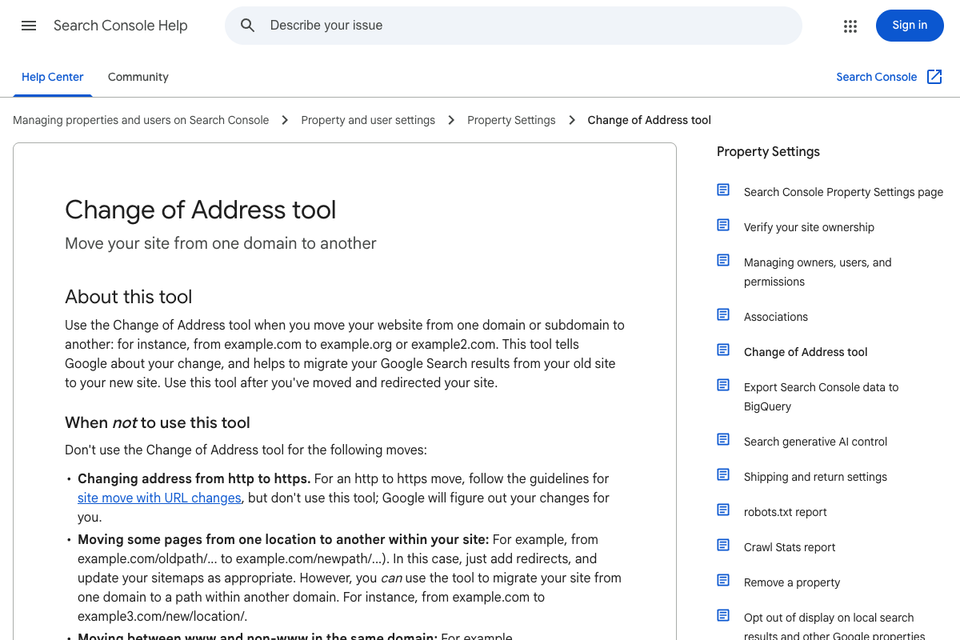
- Keep paths the same. Google's Change of Address page says the same site structure helps signals pass across, and that combining a move with a URL redesign will probably cost some traffic.
- Change one thing at a time. Domain first, redesign later.
- Expect noise. Rankings can fluctuate, and for a medium-sized site it can take a few weeks or more for new URLs to replace old ones.
- Verify both sites in Search Console, every variant, with and without www.
- Use the Change of Address tool after the redirects are live.
- Fix what redirects do not. Check canonical tags and sitemaps, and update links in emails, social profiles and your content. Our Shopify SEO apps roundup may help with the audit.
We could not confirm from the Help Center which HTTP status Shopify uses for a redirect domain. Check it yourself with a header request such as curl -I https://old-domain.example and look for a 301 or 308 and a Location header pointing at the new domain. We did not run this against a live store.
If you would rather not manage a domain move alone, talk to us. It is a small project, but it is easy to get wrong in ways that only show up weeks later.
Common questions
Can I change my Shopify store name for free?
The Help Center says there are no limits on changing your store name and you can do it as often as you want. It does not mention a fee for that edit. A new custom domain is a separate purchase, so check the current price with Shopify or your registrar.
Will renaming my store hurt my rankings?
A name-only change keeps your URLs, so there is nothing to redirect. Page titles and meta descriptions may contain the old name, and editing them can change how pages appear in results. A domain change is the riskier move.
Can I change my myshopify.com address more than once?
The Help Center says you can choose a new myshopify.com domain from your admin only 1 time. If you need another change, ask Shopify Support.
Why does my customer's bank statement show the old name?
You may not have updated the customer statement name, or the bank may add its own details, which Shopify says is the bank's decision. Payouts have a separate name and can take a few days to change.
Do I need to tell Google if I only changed the store name?
No. The Change of Address tool is for moving between domains. Update titles and descriptions and let Google recrawl.