Magento alternatives in 2026: who should move and who should stay
What Magento Open Source and Adobe Commerce look like, the real alternatives, who should move, who should stay, and what a migration involves.


Magento is still alive, and plenty of stores should stay on it. But the support, hosting and security picture has shifted, and every Magento merchant should make a choice on purpose, not by drift. This guide covers where Magento and Adobe Commerce stand today, the alternatives that are worth a serious look, who should move, who should stay, and what a migration really involves. Everything below was against official pages.
One thing up front: we are a Shopify agency, so Shopify is the platform we know best. We have tried to be fair to the rest, and we say where Shopify is the wrong answer.
Where Magento and Adobe Commerce stand today
Two products share one code base. Magento Open Source is the free version that Adobe still publishes: Adobe's Open Source page describes it as a free platform for small businesses, and Magento's GitHub releases list version 2.4.9 plus an early 2.4.10 alpha. Adobe Commerce is the paid version with Adobe support, and it also comes as a hosted service. So Magento is not abandoned. The question is which version of it you run, and who is responsible when something breaks.
Adobe's lifecycle policy (last updated 18 September 2026) gives every release three years of standard support from its release date. Here are the lines that matter now.
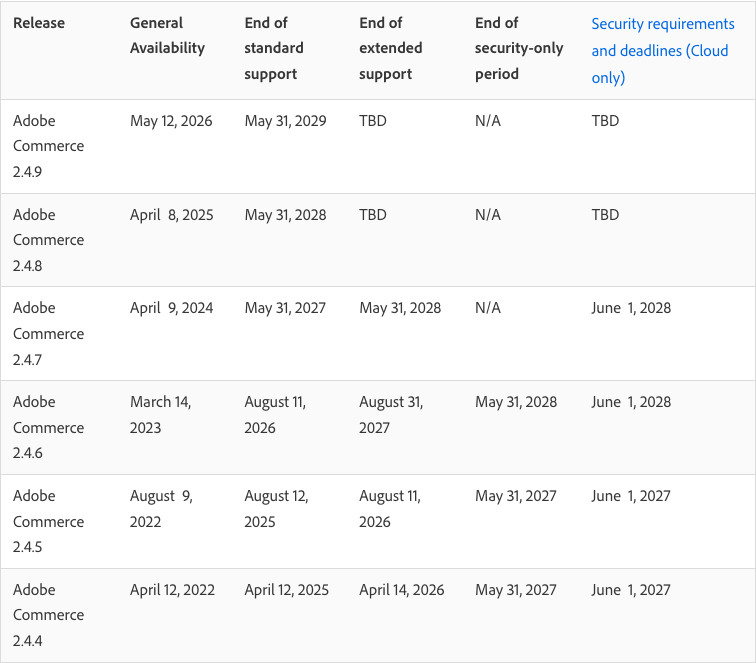
| Release | Released | Standard support ends | Extended support ends (Adobe Commerce only) |
|---|---|---|---|
| 2.4.9 | 12 May 2026 | 31 May 2029 | Not set yet |
| 2.4.8 | 8 April 2025 | 31 May 2028 | Not set yet |
| 2.4.7 | 9 April 2024 | 31 May 2027 | 31 May 2028 |
| 2.4.6 | 14 March 2023 | 11 August 2026 | 31 August 2027 |
| 2.4.5 | 9 August 2022 | 12 August 2025 | 11 August 2026 |
| 2.4.4 | 12 April 2022 | 12 April 2025 | 14 April 2026 |
Four details change the picture.
- Extended support is for Adobe Commerce customers only. Adobe's release policy says extended-support security patches are not available for the Magento Open Source code base. The lifecycle table is titled for Adobe Commerce, and we did not find a separate Open Source support table on the pages we read. If you run Open Source, ask your developer exactly which patches you can still get for your version.
- There is a short security-only period for 2.4.4, 2.4.5 and 2.4.6. Adobe calls it a one-time exception and tells merchants to treat it as migration time.
- Adobe Commerce on Cloud has hard deadlines. From 1 June 2027, Adobe says it will no longer maintain Cloud environments that run unsupported versions, and that this can include suspending traffic, which takes the storefront offline. The table lists Cloud security deadlines of 1 June 2027 for 2.4.4 and 2.4.5, and 1 June 2028 for 2.4.6 and 2.4.7.
- Old PHP is a compliance problem too. Adobe notes that PHP 8.1 reached end of life on 31 December 2025 and PHP 8.2 reaches it on 31 December 2026, and says running past end of life puts PCI compliance at risk. It also says PCI compliance is the merchant's responsibility.
Security is not theoretical either. In September 2026 Adobe published bulletin APSB26-146, a critical flaw (CVSS 10.0, no login needed) that Adobe says was being exploited in the wild. It lists Adobe Commerce 2.4.4 to 2.4.9 and Magento Open Source 2.4.6 to 2.4.9 as affected, with a hotfix. Read the bulletin for your own version. If it applies to you, that comes before anything else in this article.
Adobe's own direction: a headless cloud service
Adobe now recommends Adobe Commerce as a Cloud Service as the long-term destination for Cloud customers. Adobe manages hosting, patching and upgrades. The storefront is headless, built on Edge Delivery Services and a GraphQL layer, and the overview says plainly that Luma storefronts are not supported. So moving to Adobe's own cloud service is itself a storefront rebuild, not a simple upgrade. Keep that in mind when you compare costs: "stay with Adobe" and "stay on what we have" are different projects.
Mage-OS: staying on the code without Adobe
Mage-OS is a community distribution of Magento Open Source run by a non-profit association. By its own FAQ it has no licence fee, says it stays compatible with Magento extensions, and does not provide direct commercial support: support comes through agency partners. It is a real option if you want the Magento code and a community that ships fixes, and if you already have a team or agency to run it. It does not remove the work of hosting, patching and upgrading.
Who should stay
Moving is not always the grown-up choice. Staying makes sense when:
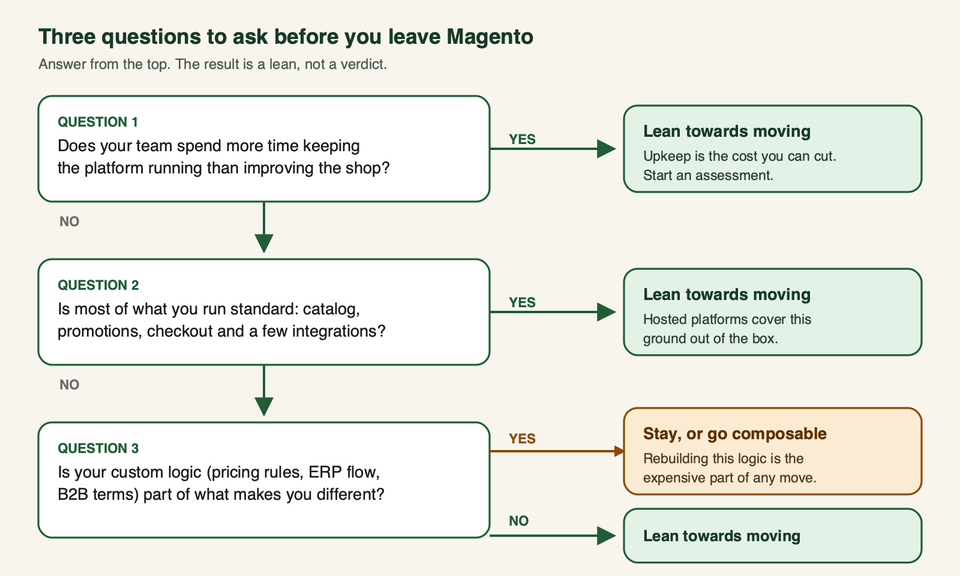
- Your custom logic is the business. Complex B2B pricing, contract rules, unusual fulfilment or an ERP flow you built over years is expensive to rebuild. Mage-OS's own FAQ names "extensive customization that SaaS platforms can't provide" as the case where this approach fits, and we agree.
- You have a team that runs Magento well. Patched on time, current PHP, a clean upgrade path, and an agency or in-house developers who are not stretched. A well-run Magento store is not a problem to solve.
- You are close to a big release or peak season. A rushed migration is how stores lose data and rankings. Patching and upgrading first, then moving on a calm schedule, is a legitimate plan.
- You are on Adobe Commerce with a support contract and the money works. Adobe is selling a supported, enterprise-grade product, and for the right company it is one.
Who should move
The case for moving is usually about upkeep, not features:
- Upgrades, patches and hosting eat more of your budget than growth work. If "keeping it running" is the main job of your developer, a hosted platform takes much of that off you.
- You are on an old version and facing the dates above. For Open Source stores, extended support does not exist, so being a version or two behind is a risk you carry yourself.
- Your store is mostly standard. Catalog, promotions, checkout and a handful of integrations are covered by every hosted platform below.
- Merchandisers wait on developers. If simple changes need a ticket, a hosted platform's editor and app model can speed that up.
The real alternatives
There is no single best replacement. These are the platforms we think are worth a serious look, with what each is for and where it is a poor fit. Everything about a product below comes from its own site. We do not quote prices: they change, and they depend on your volume.
Shopify and Shopify Plus
Shopify describes Plus as an all-in-one platform you can customise and connect through APIs, and has a separate Enterprise path for building your own stack. It supports headless builds (Plus mentions a React-based stack) and B2B selling. For the differences between the plans, see our guide to Shopify vs Shopify Plus.
- Pick it if: your store is mainly catalog and checkout, you want the platform to be someone else's problem, and your extras can live in apps or in Shopify's extension model.
- Skip it if: your checkout or pricing logic is deeply custom. Shopify's developer docs say
checkout.liquidis no longer supported for the main checkout steps, and extra checkout behaviour is built with apps, checkout UI extensions and Shopify Functions. That is safe to upgrade, but it is a different way of working from editing Magento code. Shopify also publishes per-store resource limits for things such as variants per product, product options and URL redirects, so check them against your catalog before you commit.
BigCommerce
BigCommerce is also a hosted platform. Its site has a migration page that names Magento among the platforms it covers, B2B features such as quotes, reorders and invoice payments, and a headless offer with a Next.js reference storefront called Catalyst.
- Pick it if: you want a hosted platform with an API-first approach, built-in B2B features, or a headless front end, and your agency already knows it.
- Skip it if: you rely on a long tail of niche add-ons. Check each one has a real equivalent before you decide, as with any platform.
WooCommerce
WooCommerce is the open-source commerce plugin for WordPress. It says you can choose any host, any payments and any features.
- Pick it if: your business is content-led, you already run WordPress well, and you want to own the code and the hosting.
- Skip it if: you are leaving Magento to escape upkeep. WooCommerce, WordPress, plugins and hosting are still yours to patch and update. It is lighter than Magento for many stores, but it is not hands-off.
Salesforce Commerce Cloud
Commerce Cloud from Salesforce covers B2C, B2B and order management, with a headless and composable approach, and ties into Salesforce's CRM and marketing tools.
- Pick it if: you are a large company already on Salesforce, with an enterprise-sized project budget and team.
- Skip it if: you are a mid-sized brand. We found nothing on the pages we read that suggests it is aimed at smaller stores, and the project scope will reflect that.
commercetools and other composable options
commercetools describes its platform as headless, modular and API-first, with each commerce capability exposed as its own API, for B2C, B2B and mixed models.
- Pick it if: you have strong engineers, want to assemble your own stack, and need something no packaged storefront gives you.
- Skip it if: you want a working store quickly. Headless means you build and maintain the front end yourself. The same trade-off applies to headless setups on other platforms, including Shopify and BigCommerce.
Quick comparison
| Option | Type | Best for | Main trade-off |
|---|---|---|---|
| Magento Open Source or Mage-OS | Self-hosted, open source | Teams with strong developers and custom logic | You carry hosting, patching and upgrades |
| Adobe Commerce (on-premises or Cloud) | Paid, Adobe-supported | Large merchants with complex needs | Version deadlines; upgrade cycles continue |
| Adobe Commerce as a Cloud Service | Adobe-hosted SaaS, headless | Large Adobe customers | No Luma storefront, so the front end is rebuilt |
| Shopify or Shopify Plus | Hosted SaaS | Standard catalog and checkout, less upkeep | Checkout and back-end changes go through extensions |
| BigCommerce | Hosted SaaS | API-first, B2B, headless | Check every niche add-on has an equivalent |
| WooCommerce | Open source on WordPress | Content-led brands, owners of their hosting | Still your job to patch and host |
| Salesforce Commerce Cloud | Enterprise SaaS | Large Salesforce customers | Enterprise-scale project and team |
| commercetools | Headless, API-first | Engineering-led teams | You build the storefront |
What a migration actually involves
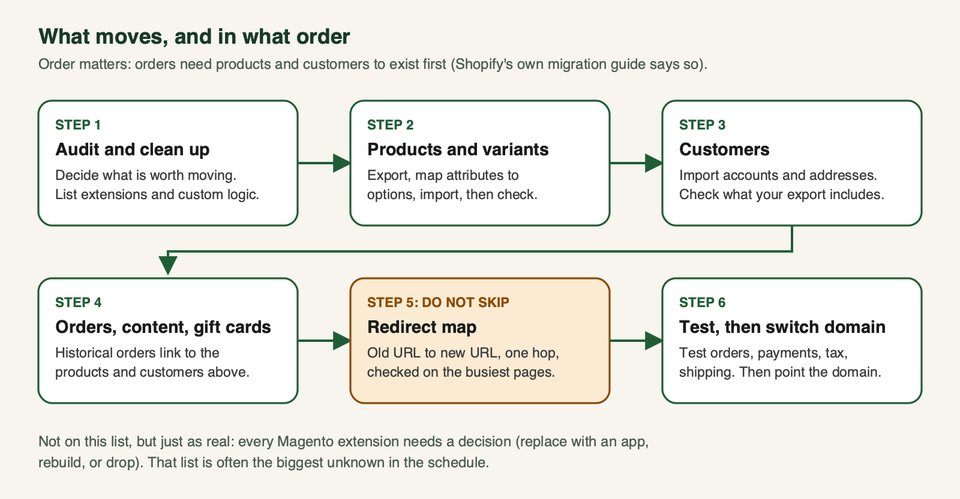
Whatever you choose, the work falls into the same buckets. This is the part that decides your schedule and your risk.
1. Audit first
Decide what is worth moving. Shopify's migration guide suggests treating the move as a chance to drop old, low-performing content. List every Magento extension and every piece of custom code, and next to each write one of three words: replace, rebuild, or drop.
2. Catalog
Magento's admin has a data export (System, Data Transfer, Export). Adobe's export page lists entity types including products, advanced pricing, customer data and stock sources, and saves the CSV to a folder on the server. The hard part is not the file, it is the mapping. Configurable products, attribute sets and custom attributes have to be turned into the target platform's options, variants and custom fields. On Shopify, the help centre lists the usual import errors, such as products that arrive unpublished or variants that fail to import. The order of work matters too: products, then customers, then orders.
3. Customers
Customer main files and addresses are in the same export tool. Check exactly what your export includes before you promise anything. We did not find an official statement that customer passwords can be carried across, so plan for the case where customers need to set a new password, and tell them before launch.
4. Orders and other content
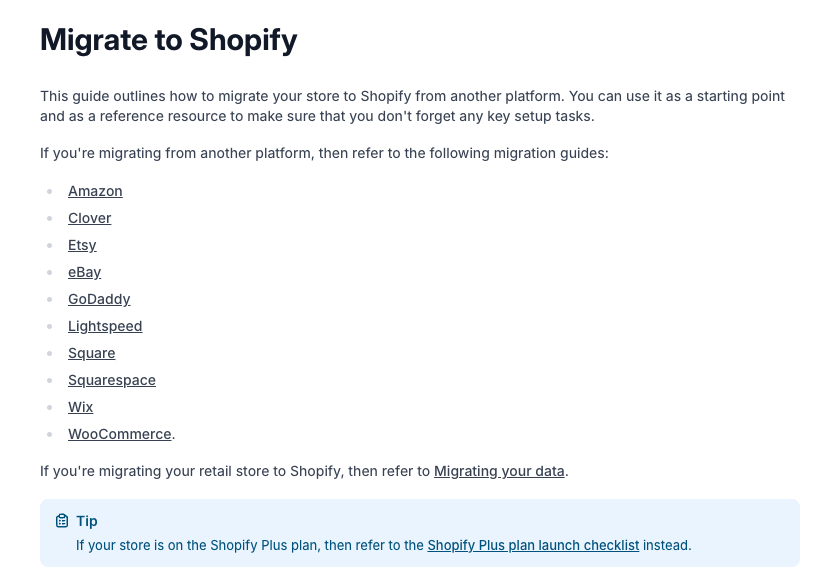
This is where Magento is awkward. The export tool's entity list has no orders in it. Shopify's own guide says historical orders move with a migration app or through its order and transaction APIs, and that CSV import does not cover orders or blog posts. Shopify's Store Migration app names Square, WooCommerce, Etsy, Wix, Amazon, eBay, Clover and Lightspeed as sources, and Shopify's list of platform guides does not include Magento either, as the screenshot below shows. So for Magento, plan on a third-party migration tool, a Shopify Partner, or a custom script using Shopify's API. All three are normal routes. None is a one-click import.
Gift cards, store credit, blogs and pages need their own route. Every one of them is a small decision with a real cost if it is missed.
5. URLs and redirects
This is where rankings are won or lost. Magento keeps URL rewrites for products, categories and pages, and creates 301 redirects by default when a URL key changes. That table is a good starting list of old URLs, along with your sitemap and your Search Console data. Shopify's guide warns that its link structure differs from other platforms, so old links to specific pages may not load, and tells you to set up URL redirects before you switch the domain. You can add them one at a time or with a CSV, and then you must test the pages that get the most traffic. Aim for one hop from old to new. Do not skip the redirect map.
6. Extensions become apps, rebuilds or nothing
Adobe's site promotes the Magento Marketplace as thousands of third-party extensions and templates. On a hosted platform, the equivalents are apps, theme features or platform functions. Some will map neatly, some will cost more than the extension did, and some will have no equivalent. On Shopify, start with the app categories we cover, such as SEO apps and wholesale apps, then check anything unusual by hand.
7. Payments, tax, shipping and checkout
These are rebuilt, not moved. Test real orders in every payment method and country you sell to. If you save cards or run subscriptions, ask your payment provider whether that data can move and how. Do not assume it can. Our launch checklist covers the final checks for a Shopify store.
The risks, stated plainly
- Search traffic can dip. Even with good redirects, rankings can wobble for a while. Plan the move away from your peak season, and watch Search Console daily for the first weeks.
- Orders and history are the weak point for Magento. Test the order import on a copy first and compare totals.
- Custom logic does not travel. Anything in your Magento code that nobody documented will be found out during the move.
- Staying put has a cost, too. Unsupported versions, old PHP and unpatched flaws are risks that grow quietly. The September 2026 bulletin above is a good reminder.
- Headless moves add a second project. If you choose a headless route, including Adobe's own, you are building a storefront as well as migrating data.
How to choose
- Check your version and its dates today. If you are on an unsupported version, patching comes before every other decision.
- Write the replace, rebuild or drop list. If most items are "replace with an app", a hosted platform fits. If most are "rebuild", staying or going composable may cost less.
- Pick the one or two platforms that match your list, then ask each for a plan for your orders, your URLs and your three hardest extensions.
- Run a small test. Move a slice of the catalog and a few hundred orders to a trial store and compare the numbers.
If you want a second opinion on the list before you commit, talk to us. We will tell you honestly if staying is the better answer for you.
FAQ
Is Magento still supported in 2026?
Yes. Adobe's table shows 2.4.9 supported to 31 May 2029 and 2.4.8 to 31 May 2028. Older lines such as 2.4.6 and below are past standard support. Check the table above for your version.
Is Magento Open Source still free?
Adobe's Open Source page describes it as a free platform. You still pay for hosting, developers, extensions and security work, and Adobe's extended support is not available for the Open Source code base.
What is the best Magento alternative?
It depends on your list of custom needs. For standard catalog and checkout, a hosted platform such as Shopify or BigCommerce is the usual fit. For content-led stores, WooCommerce. For large enterprises, Salesforce Commerce Cloud or commercetools. For custom-heavy stores, staying on Magento or Mage-OS can be the right call.
Can I migrate from Magento to Shopify myself?
You can move the catalog with CSV files. Orders, gift cards and content need a migration app, an API script or a partner, and the redirect map needs care. A small catalog with few extensions is doable. A large store with orders and custom logic usually is not worth doing alone.
Will I lose my search rankings?
You can limit the risk, not remove it. Map old URLs to new ones, use one hop, test the busiest pages before the switch, and watch Search Console afterwards. Rankings can still move for a while.
What happens if I stay on an old Magento version?
You lose vendor fixes. Adobe says it does not patch third-party software such as PHP, and for Cloud customers it plans to take action against unsupported environments from June 2027. For self-hosted stores, the risk is unpatched flaws and PCI compliance questions.
What is Mage-OS?
A community distribution of Magento Open Source run by a non-profit. It has no licence fee, says it stays compatible with Magento extensions, and gets support through partners, not directly. It suits teams that want to stay on the Magento code without Adobe.
Is Adobe Commerce as a Cloud Service just a newer Magento?
Not quite. It is Adobe-hosted and headless, and it does not support Luma storefronts. Moving to it means rebuilding the front end as well as moving the data.