Shopify Wholesale Apps: When Native B2B Is Enough, and 7 Apps for the Rest
Shopify now has wholesale tools built in. Here is what they cover on each plan, where they stop, and which seven wholesale apps fill the gaps.


If you want to sell wholesale on Shopify, start with Shopify's own B2B tools, because they now cover more than most people expect. Add an app only when you hit a specific limit, such as more than three price lists, credit limits, or signup forms that collect documents. This guide shows what native B2B does, where it stops, and seven wholesale apps that fill the gaps. We opened every Shopify page and App Store listing below, so check the linked pages again before you buy.
What Shopify's built-in B2B covers
Shopify B2B is a set of native features for selling to other businesses from the same store admin. Per Shopify's B2B overview, it is available on the Basic, Grow, Advanced and Shopify Plus plans, and not on Starter or Retail. You can run it in one store alongside retail sales (Shopify calls this a blended store) or in a separate B2B-only store.
The building blocks are simple:
- Companies and locations. Each business you sell to is a company, with one or more locations. Each location can have its own tax ID, tax exemptions, addresses, pricing, payment terms and contacts, per Shopify's company guide.
- Catalogs. A catalog sets which products a buyer can see and at what price, either as a percentage change on everything or fixed prices on chosen products. Shopify explains this in its catalog guide.
- Quantity rules and volume pricing. You can set minimums, maximums and increments per variant, and add price breaks when a buyer orders more in one order. See quantity rules and volume pricing.
- Payment terms. Net terms run from net 7 to net 90, or due on fulfillment, or a fixed date. Buyers can pay early from their account.
- Ordering tools. Buyers can reorder by copying an old order, add a purchase order number, and use a quick order list on product pages. You can also make a location submit orders as drafts so you review them first.
- Staff roles. You can limit sales reps to the companies assigned to them.
Tax is covered too. Plans that support B2B can calculate tax for B2B orders and set exemptions at company or location level. If you use Shopify Tax and the location is in the UK or EU, the tax ID field becomes a VAT number that Shopify validates.
What each plan gets
The difference between plans is smaller than people think, but the differences that exist are the ones that push stores toward apps. This is Shopify's own plan table, screenshotted:
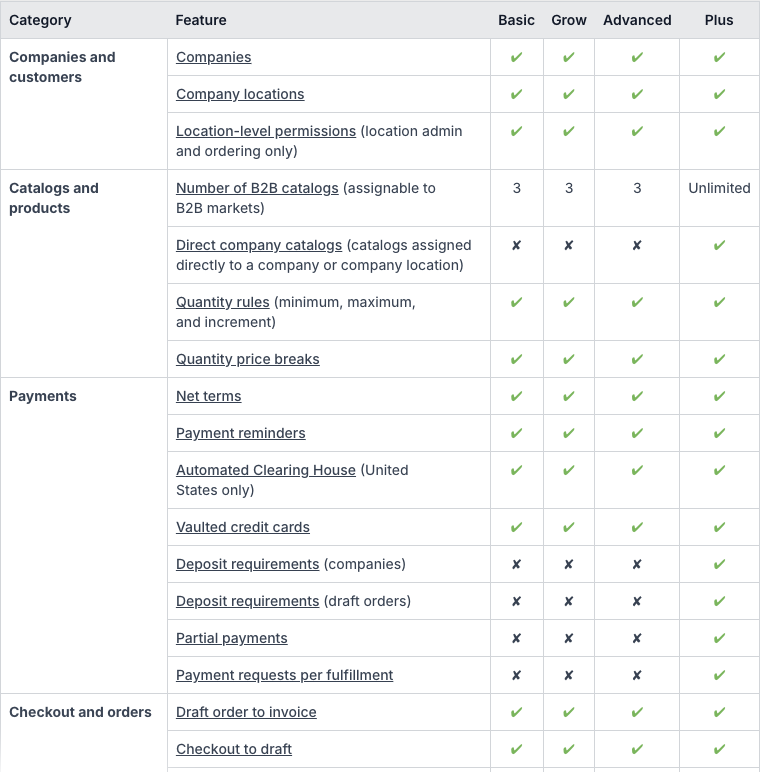
The short version, from that page:
- Basic, Grow, Advanced: companies, company locations, quantity rules, price breaks, net terms, payment reminders, easy reorders, PO numbers, the Trade theme and the quick order list. You can assign up to 3 active catalogs across all your B2B markets.
- Advanced and Plus: contextual checkout and storefront customization through Shopify Markets.
- Plus only: unlimited catalogs, catalogs assigned directly to a company or location, deposits, partial payments and payment requests per fulfillment.
One more condition: on Basic, Grow and Advanced, the B2B catalog features need your store to be using the new Shopify Markets.
How a native B2B order works
Knowing the flow helps you see where the limits bite.
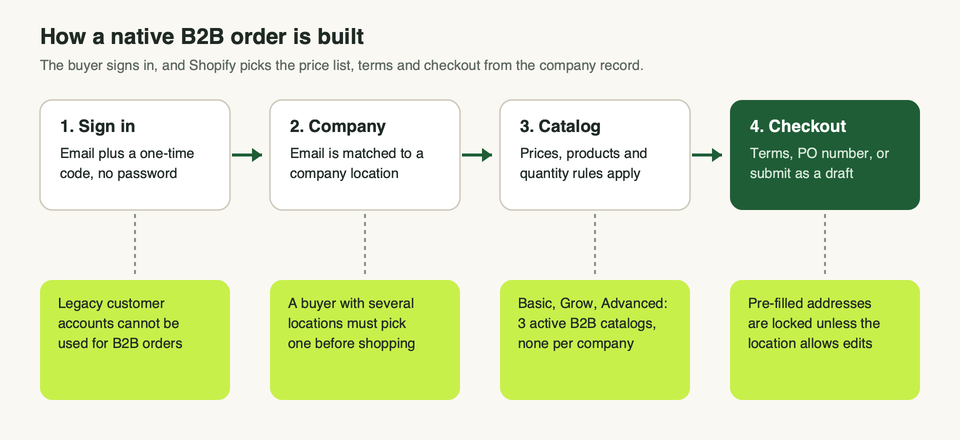
B2B buyers have to sign in with customer accounts. Per Shopify's sign-in guide, they enter their email and a one-time code, with no password. Legacy customer accounts cannot be used for B2B customers or orders. If a buyer belongs to several locations, they pick one before they add anything to the cart.
At checkout, addresses are pre-filled from the company profile and cannot be edited unless the buyer has the location admin role or the location allows editing. If the location has net terms, the buyer submits the order and it shows as payment pending. If you require drafts, it goes to you for approval first.
Where native B2B stops
These are the limits that matter in practice, all from Shopify's own pages:
- Three catalogs below Plus. On Basic, Grow and Advanced you can have 3 active catalogs across your B2B markets, and they attach to markets, not to a single company. If you want one price list per customer, direct company catalogs are Plus only.
- Deposits and partial payments are Plus only. Net terms are not.
- Sign-in is by one-time code. That is simple for buyers, but a custom login means connecting your own identity provider, which Shopify supports on the B2B side.
- Locked checkout fields. Buyers cannot change a pre-filled address at checkout unless you allow it.
- Abandoned checkouts are off for B2B. Shopify says they are not available outside Plus, and on Plus you have to ask Plus Support to turn them on.
- Store access is all or nothing. On a dedicated B2B store you can restrict browsing to logged-in B2B buyers, but Shopify says this does not redirect visitors to a login page. A full login wall, or restricting single pages, needs an app or custom Liquid. Shopify's guide names Locksmith as one example.
- Signup requests. Shopify points to its free Shopify Forms app for company account requests. That app is a general lead-capture tool, and we did not check whether it can collect documents such as tax certificates. If you need uploads and a clear approve or reject step, look at a wholesale app.
- Credit limits. We did not find a credit limit setting in the Shopify B2B pages we read. Some apps below say they add one.
Native B2B or an app?
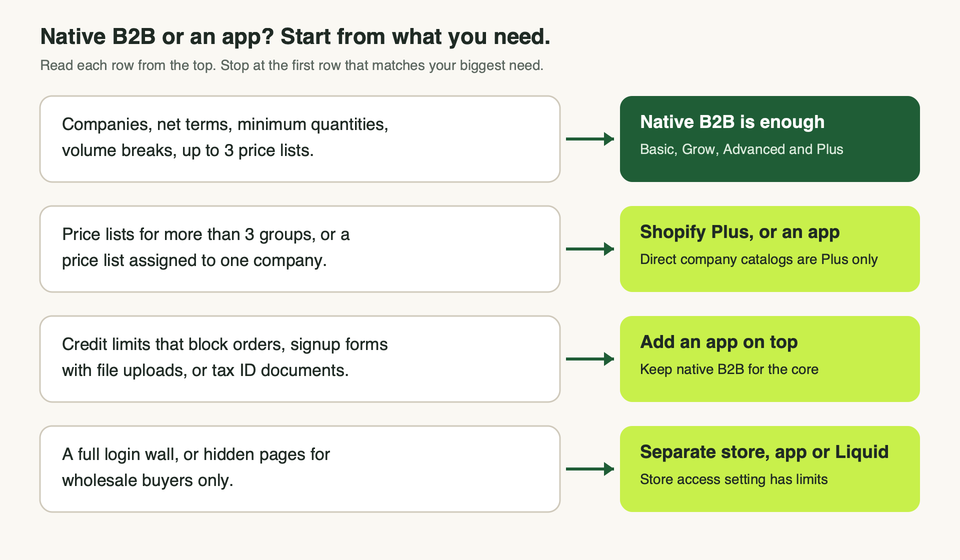
Use native B2B on its own if you sell to a handful of business customers, one or two price tiers cover everyone, and net terms plus minimums are the main rules.
Reach for an app if any of these are true:
- You need more price groups than your plan allows, and Plus is not on the table. See Shopify vs Shopify Plus for the wider picture.
- You want signup forms that collect documents, with a clear approve or reject step.
- You want orders to stop when a buyer is over their credit limit.
- You want to hide wholesale products from retail shoppers on a store that is not a dedicated B2B store.
Many of the apps below work in one of two ways. Some add wholesale logic on top of Shopify's company records. Others run on customer tags and their own rules, separate from Shopify's companies. Ask which one an app does before you install it, because it decides where your payment terms and tax settings live.
Seven wholesale apps worth a look
We read each listing the same day. We did not install or test any of them, so what follows is what the listing says, plus our view of who each one suits. Ratings and prices change often, so we leave them out.
Clay: B2B Wholesale Pricing
Clay sells itself on "unlimited B2B catalogs", which is the exact limit native B2B has below Plus. The listing covers custom signup forms with file uploads for tax IDs and logos, VAT checking, wholesale prices and volume breaks, minimums and case-pack sizes, net terms, shipping rates and a quick order form. One listed feature is creating company accounts in Shopify B2B, so it can sit on top of the native records.
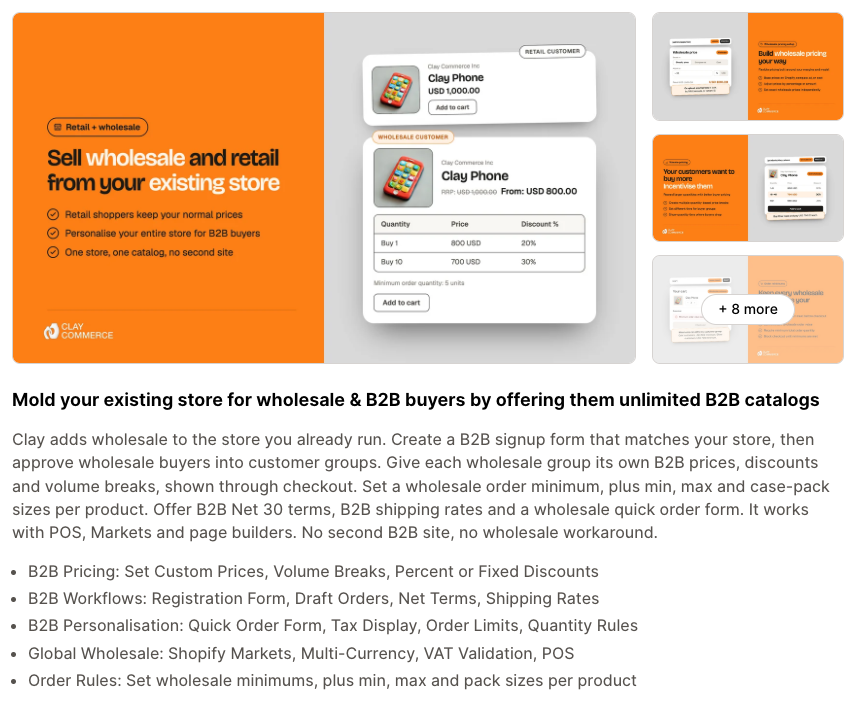
- Pick it if: you sell to EU or UK businesses and need VAT or tax ID checks at signup, or you need more price groups than native allows.
- Watch for: features are split across paid tiers. The free plan covers the signup form and VAT check but limits how many products can have wholesale prices, and net terms and the quick order form sit higher up.
Sami B2B Wholesale Pricing
Sami (by Samita) covers wholesale and retail from one store. Prices can be set by customer group, product, variant, market or quantity. The listing also mentions tax display and exemptions, net terms, shipping rules, order limits, draft orders and Shopify POS. It lists a free plan.
- Pick it if: you want one app for pricing, signup, tax exemption and POS, and you may sell in person too.
- Watch for: the free plan limits registration forms and volume rules. The quick order form needs a paid plan, and tax exemption, payment terms and POS sit on the top paid plan.
Wholesale Gorilla
Wholesale Gorilla describes a login-based model: approved customers sign in and see their wholesale rates. The listing mentions net terms, custom shipping, order limits, product exclusions, quantity breaks and store or page locks. It works with checkout and customer accounts and has a free trial but no free plan.
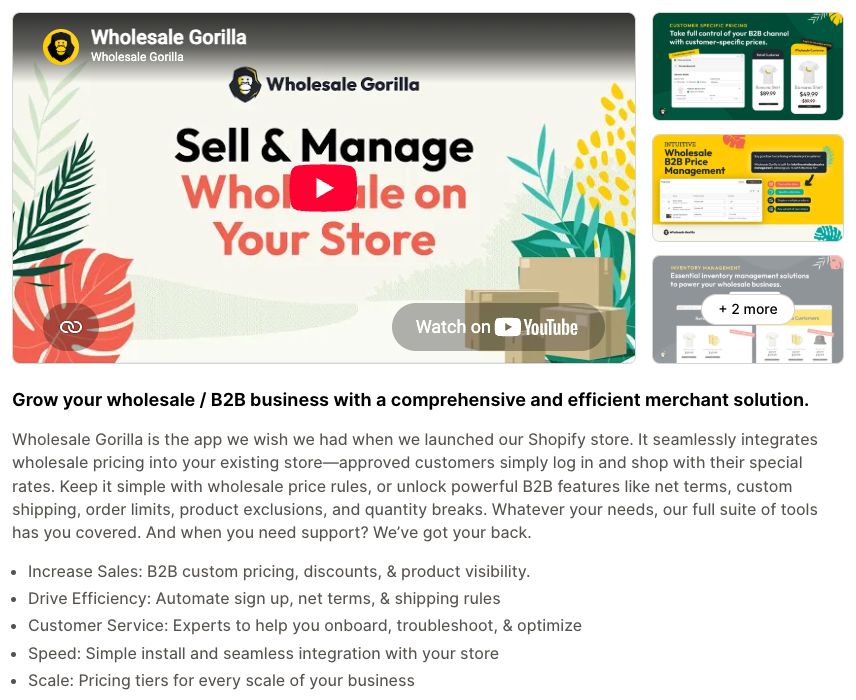
- Pick it if: you want hiding and locking of wholesale products and pages built into the same app, plus shipping rules for wholesale orders.
- Watch for: the quick order form and net terms need the middle paid tier, and volume discounts and store or page locks need the top one. One merchant review on the listing reports checkout problems, so read the latest reviews and test checkout on a copy of your theme first.
B2B Wholesale Hub (formerly Wholesale Club)
B2B Wholesale Hub is tag-based: tag a customer group and the wholesale prices show on product pages. It also lists order minimums by cart quantity or value, collection, product or variant, bulk ordering, a quick order form and a registration form. It works with checkout, customer accounts, POS and Flow.
- Pick it if: you want a simple, tag-driven setup that runs retail and wholesale side by side.
- Watch for: net terms, per-variant custom prices, volume discounts and order minimums sit on the middle paid tier, and product locking sits on the top one. There is no free plan.
Wholesale Discount Pro (Wholesale Pro)
Wholesale Discount Pro offers pricing by customer email or tagged group, volume discounts, a one-page wholesale order form and net 15 or net 30 terms for verified buyers. It also lists accounts receivable tools. It has a free plan.
- Pick it if: you are starting small and want a free way to test a quick order form with one pricing rule.
- Watch for: the free plan allows one pricing rule. Net terms and the registration form need the top paid plan. One review on the listing says a heavily customized theme needed developer help, so budget for theme testing.
SmartB2B
SmartB2B focuses on the people side: a branded signup form, one-click approval that assigns a catalog, payment terms and tax, a portal where buyers manage their own team and locations, one-click reorders and, on a paid plan, credit limits. Because approval assigns catalogs and terms, it looks designed to work with Shopify's company records.
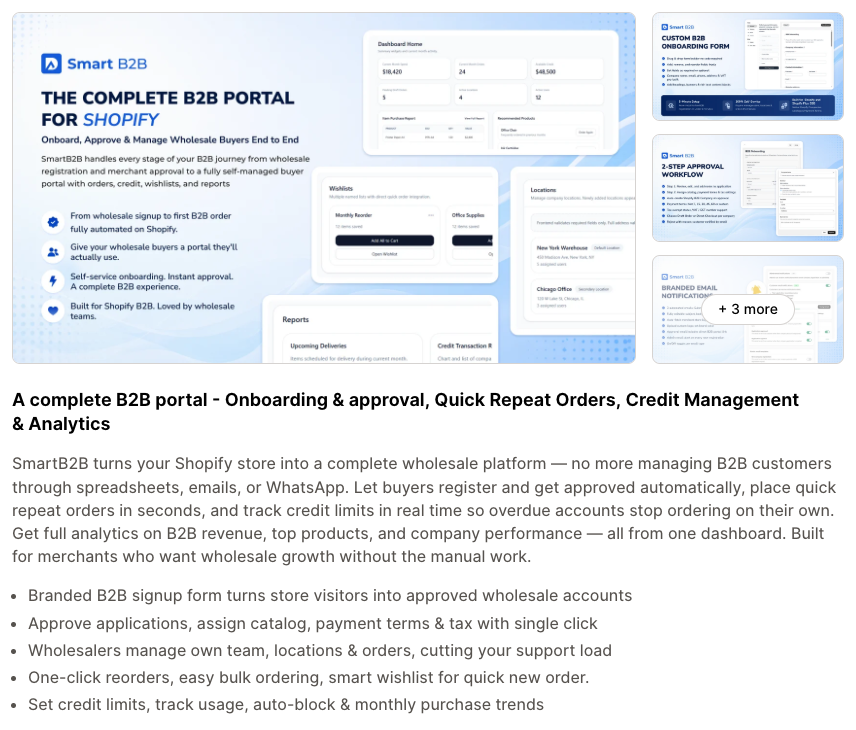
- Pick it if: you already use native B2B and your pain is onboarding buyers and chasing credit, not price rules.
- Watch for: the listing shows it launched in June 2026 with very few reviews, so it is young. The free plan caps companies and orders.
Net Terms Tracker
Net Terms Tracker does one job: net terms with credit limits, branded PDF invoices and a portal where buyers pay their invoices. It says it hides net terms for customers who are overdue or over their limit, and that it works alongside native B2B or on its own. It lists a free plan with a small number of net-terms customers, and enforced per-customer credit limits at checkout on a paid plan.
- Pick it if: native B2B covers your pricing and you only need credit control.
- Watch for: the listing shows it launched in May 2026 and had no reviews yet, so treat it as unproven. Its claims about what native B2B lacks are the vendor's own words.
Quick comparison
This table comes from each listing's plan and feature lists. "Tier" means a paid plan above the cheapest one. Check the live page, because plans move around.
| App | Free plan | Signup and approval | Net terms | Quick order form | Tax exemption or VAT |
|---|---|---|---|---|---|
| Clay | Yes | Free plan, with file uploads | Mid paid tier and up | Top paid tier | VAT check on free plan |
| Sami | Yes | Free plan, with limits | Top paid tier | First paid tier | Top paid tier |
| Wholesale Gorilla | No, free trial | Basic form on entry plan | Middle paid tier | Middle paid tier | Not listed |
| B2B Wholesale Hub | No, free trial | All plans | Middle paid tier | Entry plan | Not listed |
| Wholesale Discount Pro | Yes | Top paid plan | Top paid plan | Free plan | Listed as a feature |
| SmartB2B | Yes, with caps | Free plan | Set at approval | Free plan | Set at approval |
| Net Terms Tracker | Yes, small | Not its job | Core feature | Not its job | Not listed |
How to choose
Work through these questions in order.
- Write down your rules first. List your tiers, minimums, terms and who gets which price. Then try to build them in native B2B. Only the rules that will not fit need an app.
- Check your plan limits. If you need more than 3 price lists on a plan below Plus, that is the usual reason to pick an app.
- Decide where records live. If you want company and location records in Shopify (for terms, tax and staff roles), prefer an app that builds on them, such as Clay or SmartB2B. If you want a lighter tag-based setup, Hub or Wholesale Discount Pro may be enough.
- Read the "works with" line. Look for checkout and customer accounts on the listing, then test a real wholesale checkout yourself, including a tax-exempt buyer and a net terms order.
- Count tier jumps. Features you need may sit one or two plans up. Price the plan that has all of them, not the one in the headline.
- Test speed and theme. Wholesale apps add code to your storefront. Check your theme before and after, and see our theme performance guide.
If your wholesale rules touch inventory, review how your stock is split between retail and wholesale too. Our inventory management apps guide can help.
FAQ
Does Shopify have wholesale features built in?
Yes. Shopify B2B includes companies, catalogs, quantity rules, volume pricing, payment terms, draft orders and customer accounts for buyers. It is available on the Basic, Grow, Advanced and Plus plans per Shopify's help center.
Do I need Shopify Plus to sell wholesale?
No. Companies, net terms, quantity rules, price breaks and a quick order list are on Basic, Grow and Advanced too. Plus adds unlimited catalogs, catalogs assigned straight to a company, deposits and partial payments.
Can I offer net terms without an app?
Yes. Native B2B supports net 7 to net 90, due on fulfillment and fixed dates on all B2B plans. What it may not do is stop an order when a buyer is over a credit limit, which is why credit apps exist.
Can I hide wholesale prices from regular shoppers?
Partly. Shopify says only logged-in B2B customers see B2B pricing and B2B-only products, but the store itself is public by default. A dedicated B2B store can limit access to logged-in buyers, and the Trade theme hides prices from visitors who are not signed in. Hiding single pages needs an app or code.
Do wholesale buyers need an account?
Yes. B2B buyers sign in with customer accounts using a one-time code sent to their email. Anyone who is not tied to a company location is treated as a retail customer.
Should I use one store or two?
Shopify recommends choosing carefully, because switching later means redoing most of your setup. A blended store shares inventory and staff. A dedicated store has its own admin, theme and inventory, and lets you restrict access to B2B buyers only.
Can I use an app and native B2B together?
Some apps are built to. Clay lists creating company accounts, SmartB2B assigns catalogs and terms at approval, and Net Terms Tracker says it works alongside native B2B. Tag-based apps run on their own rules, so check how they behave with companies.
How do I handle tax-exempt buyers?
Native B2B lets you set tax exemptions on a company location. Some apps add document uploads or VAT checks at signup. Confirm with your accountant what proof you need to keep.
Need help setting it up?
Wholesale setups go wrong in the details: terms, tax and which price wins when two apply. If you want a second pair of eyes before you commit, talk to us. We can look at your rules and tell you whether native B2B, an app or Plus fits.