BFCM Checklist 2026: 100+ Shopify Tasks for Black Friday and Cyber Monday
A BFCM checklist for Shopify stores with more than 100 numbered tasks, ordered by when to do them, with the exact Shopify, Klaviyo and Google steps and the limits that catch stores out.


Lock one offer, test it, ramp email, then freeze the store
Generated by Ecompanda AI
With under two weeks to Black Friday, choose one offer, build and test its discounts in Shopify, grow email volume gradually, publish shipping cut-offs and stop changing the store before Thanksgiving. Watch checkout, stock and payments through the weekend, then turn first-time buyers into repeat customers in December.
- Black Friday is 27 November and Cyber Monday 30 November 2026
- Shopify allows 25 active automatic discounts and 5 codes plus 1 shipping code per order
- Grow email sends step by step and keep Gmail spam complaints under 0.1%
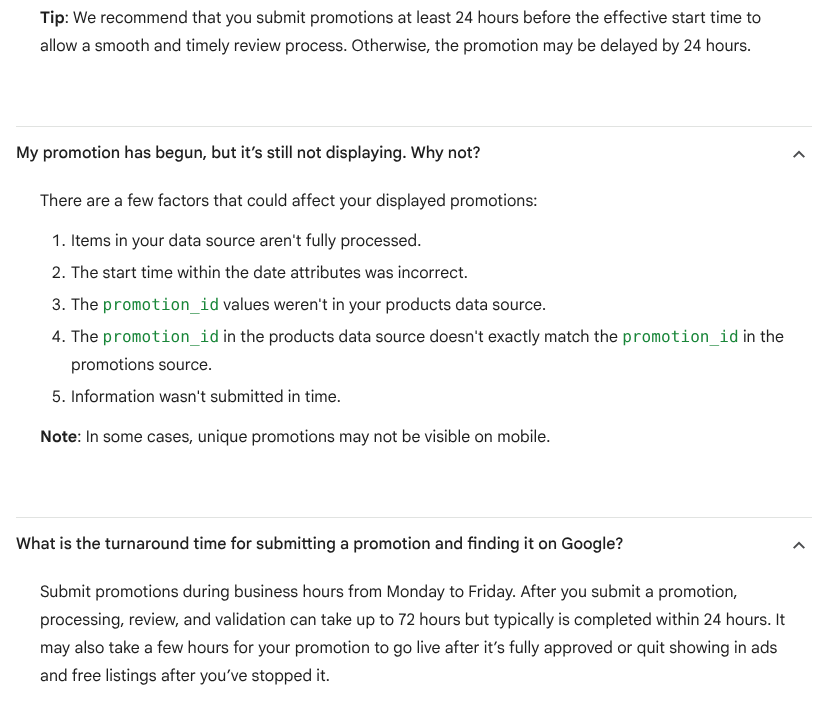
- Submit Google promotions on a weekday, at least 24 hours before they start
- Freeze theme and app changes before Thanksgiving
With two weeks or less to Black Friday, five jobs still pay off: one offer, discounts built inside Shopify's limits and tested on a phone, a gradual email ramp, published shipping cut-offs and a change freeze before Thanksgiving. This BFCM checklist has 129 numbered tasks for Shopify stores, each tagged with when to do it and where.
The 2026 dates: Thanksgiving is Thursday 26 November (US Office of Personnel Management), Black Friday is Friday 27 November, Small Business Saturday is 28 November (SBA) and Cyber Monday is 30 November.
If you only have one day: the 10 tasks that matter most
Short on time? Do these ten, in this order. The numbers point to the full tasks below.
- Decide one offer and its end time (tasks 1 and 4). Everything else depends on it.
- Build the discounts inside Shopify's limits (tasks 45 to 49). 25 active automatic discounts is the ceiling.
- Test every discount as a customer, on a phone (tasks 55 to 57).
- Place a real test order, then make sure test mode is off (task 58).
- Remove apps and scripts you no longer use (tasks 11 and 12).
- Publish your shipping cut-offs for Christmas (task 91).
- Send only to engaged subscribers and grow volume step by step (tasks 68 to 70).
- Submit Google promotions by Monday 23 November (task 84).
- Set your holiday returns window before the first sale order (task 99).
- Freeze theme, app and price changes before Thanksgiving (task 20).
How to use this BFCM checklist
Work top to bottom. Each section has a "when" tag, so you can see what has to happen now and what can wait for the week before. Tasks are numbered continuously so a team can say "task 47 is done".
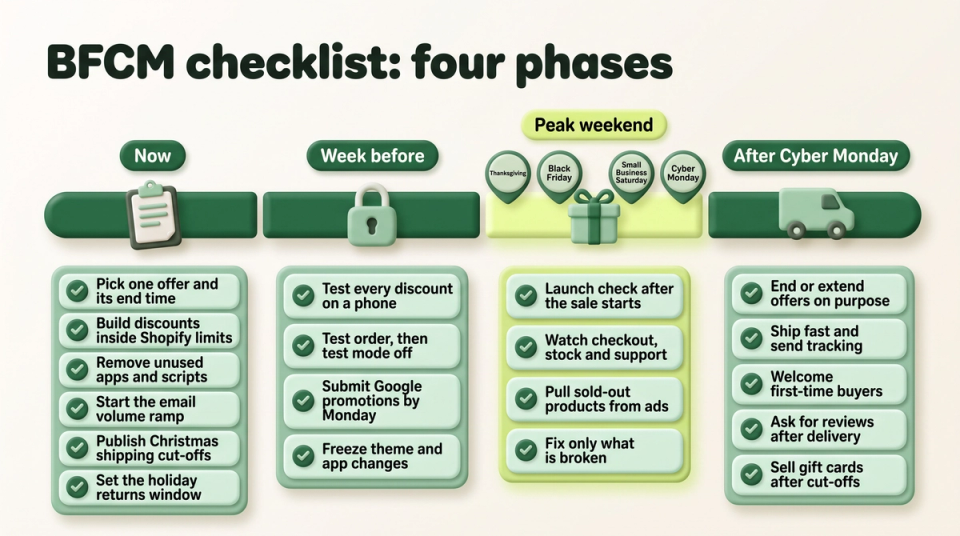
| Phase | Dates | What happens |
|---|---|---|
| Now | 14 to 20 November | Decide the offer, build discounts, fix speed, start the email ramp, publish cut-offs |
| Week before | 21 to 25 November | Test everything, submit ad promotions, brief support, freeze changes |
| Peak weekend | 26 to 30 November | Watch checkout, stock, payments and support; change only what is broken |
| After | 1 December onward | Cyber Week, shipping deadlines, gift cards, reviews, returns, retention |
Strategy and offer (now)
The offer decides how much work the rest of the list takes. One clear offer is easier to build, test, explain in an ad and support than four stacked ones.
- 1. Write your main offer in one sentence. For example "20% off everything until Monday" or "a free gift on orders over the threshold". If it needs two sentences, it is two offers.
- 2. Set a margin floor for each product before you pick a discount depth. Take the price, subtract product cost, shipping, payment fees and expected returns, and keep what is left above zero after the discount.
- 3. Choose what is in and what is out. Feature products with deep stock. Leave out items you cannot restock before Christmas or that already run on thin margins.
- 4. Fix start and end times, and check your store time zone. Shopify discount dates and times follow the time zone set in your admin, not your customer's, and a start date begins at midnight in that zone (Shopify). A UK store selling to the US should plan around both.
- 5. Decide on early access for subscribers and past buyers. A discount limited to a customer segment works only for customers who already have a profile in your store, so new visitors cannot use it (Shopify).
- 6. Plan Cyber Monday as a different offer, not a repeat. A Klaviyo partner agency writing on Klaviyo's blog warns against treating Cyber Monday as "our sale has been extended". A bundle or a gift with purchase gives the second weekend its own reason.
- 7. Check the price-reduction rules in each market you sell to. In the EU, a "was" price must be the lowest price you charged in at least the 30 days before the reduction (Ireland's CCPC, Shopify's consumer protection page). For a Cyber Monday or December reduction, that lowest price can be your Black Friday price (Ireland's CCPC). In the US, the FTC's pricing guides say a former price must be one you openly offered for a reasonably substantial period (16 CFR 233.1). UK sellers should read the CMA's guidance on unfair commercial practices. Never raise prices in November to make the discount look bigger.
- 8. Write the offer terms on one page. Who qualifies, what is excluded, whether it combines with other codes, how returns work on sale items. Support, email and ads all copy from this page.
- 9. Pull last year's numbers as a baseline. Orders, sales, average order value and email revenue for 27 November to 1 December 2025. Read task 103 before you compare conversion rates.
Store speed and stability (now)
Shopify runs the servers. What slows a store in peak week is usually what the merchant added. Shopify names the theme, installed apps and any third-party code added by hand as the biggest factors in store speed (Shopify). In Baymard Institute's survey of US shoppers, 17% of those who abandoned for reasons other than browsing said the website had errors or crashed (Baymard).
- 10. Measure your top pages on mobile. Home, the sale collection, your top five product pages and the cart. Google's targets for a good experience are Largest Contentful Paint within 2.5 seconds, Interaction to Next Paint of 200 milliseconds or less and Cumulative Layout Shift of 0.1 or less (web.dev).
- 11. Uninstall apps you no longer use. Then check the theme for code they left behind, such as snippets and app embeds that still load.
- 12. Audit your tag manager. Remove old pixels, expired tests and duplicate analytics tags.
- 13. Trim long templates. Shopify advises against piling sections onto page templates and suggests pagination for large collections (Shopify).
- 14. Replace heavy banners. Shopify's image CDN resizes and compresses images automatically (Shopify), but an autoplay video or a long animated banner above the fold still costs load time.
- 15. Do not buy extra DDoS protection for the storefront. Every request to a Shopify online store passes through Cloudflare, with a web application firewall and DDoS protection always on (Shopify). This covers the Shopify online store only, not a headless storefront hosted elsewhere. Spend the time on tasks 10 to 14 instead.
- 16. Walk the whole purchase on a real phone. Adobe forecasts that 63% of US online spend on Thanksgiving and 57.4% across the season will come through mobile devices (Adobe).
- 17. List every outside service in the buying path. Carrier rates, address checks, review widgets, upsell apps, chat. Note who to call if each one fails.
- 18. Bookmark the status pages. Shopify points merchants to Shopify Status to check whether a problem is theirs or the platform's (Shopify). Add your email, SMS and reviews apps' status pages to the same folder.
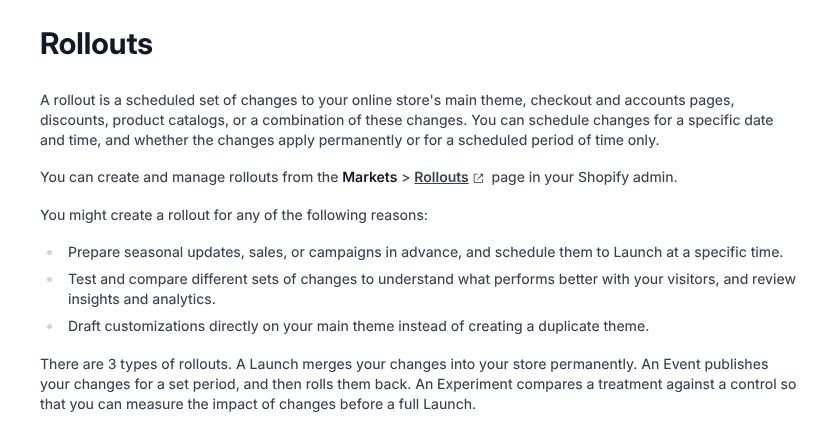
- 19. Schedule the sale's theme and discount changes as a rollout. A Shopify rollout can change the main theme, checkout, catalogs and discounts at a set time. Its "Event" type publishes changes for a set period and then rolls them back (Shopify), and rollouts are available on the Basic plan or higher (Shopify). Skip this if you use a vintage theme: rollouts do not apply to them. If you apply an Event permanently, any discount it switched on loses its end date (Shopify's discounts FAQ). When an Event that changed a catalog ends, Shopify POS and your Google product feeds can show the sale prices until their next sync (Shopify's requirements page).
- 20. Freeze changes from Tuesday 24 November. No new apps, theme edits or price imports until 1 December, except fixes. Keep a copy of the live theme you can switch back to.
- 21. Avoid Experiments and part-traffic rollouts on sale prices. Shopify warns that a catalog change shown to only part of your visitors can leave the online store showing different prices than Google and other channels (Shopify). Save price tests for January.
- 22. Name an owner for each system. Store, email, ads, support and warehouse, with a phone number each for the weekend.
Product pages and merchandising (now)
Shoppers arrive on product and collection pages from ads and email. These tasks make sure they see the sale price, the stock and the answers they need.
- 23. Build a sale collection that updates itself. Shopify's own BFCM checklist suggests an automated collection with the condition "Compare-at price is not empty" (Shopify).
- 24. Use compare-at prices for "was and now" on product pages. Discount codes and automatic discounts show a crossed-out price only at checkout. To show discount savings struck through on product and collection pages, you need an app or custom work (Shopify).
- 25. Check how your theme shows sale prices. The theme controls the badge and where both prices appear, so look at a collection page and a product page in the theme editor before launch (Shopify).
- 26. Turn on inventory tracking for everything in the sale. Overselling controls and hiding sold-out items both depend on it (Shopify, Shopify).
- 27. Decide "Continue selling when out of stock" product by product. Turn it off for anything you cannot restock in time for Christmas (Shopify).
- 28. Hide sold-out products from collections. Add the condition "Inventory stock is greater than 0" to automated collections, or use the Shopify Flow template "Publish and unpublish products based on inventory level" (Shopify).
- 29. Check the add-to-cart limit before a doorbuster. Go to Settings > Checkout, then Add-to-cart limit under Advanced preferences. It is on by default, applies to every tracked product and variant, and stores with fewer than 250 sales get a recommended limit of 50 per item (Shopify). Set it low enough that one buyer cannot clear a doorbuster, but not so low that it blocks normal bulk orders.
- 30. Put delivery, returns and sizing answers next to the buy button. Baymard found slow delivery and an unsatisfactory returns policy among the main reasons US shoppers abandon (Baymard).
- 31. Show reviews near the price on your top products. If you have no reviews app yet, our guide to Shopify review apps compares the options.
- 32. Update the homepage and menu. Link the sale collection, show the end date and the free-shipping threshold, and remove last month's banners.
AOV levers: raise order value without discounting everything (now)
Average order value (AOV) is total sales divided by the number of orders. During BFCM it is often cheaper to raise it than to buy more traffic, and most of the levers use Shopify's own settings or apps; pre-orders need a pre-order app.
| Lever | What it does | Where to set it up |
|---|---|---|
| Free-shipping threshold | Lifts small carts over a line | Settings > Shipping and delivery |
| Bundles and multipacks | Sells a set at one price | Shopify Bundles app |
| Volume tiers | Bigger discount for more units | Discounts, minimum quantity |
| Gift with purchase | Free item above a spend or quantity | Discounts, Buy X get Y |
| Complementary products | Add-ons on the product page | Search & Discovery app |
| Gift cards | Late gifts after shipping cut-offs | Products, gift card product |
| Pre-orders | Sells sold-out items with a ship date | A pre-order app |
- 33. Set a free-shipping threshold a little above your current AOV. In Settings > Shipping and delivery, a rate can offer free shipping above a minimum order amount (Shopify). ShipperHQ's own data from its merchants shows free shipping on 58% of Black Friday 2025 orders (ShipperHQ). Our free shipping guide covers the set-up options.
- 34. Show progress to the threshold in the cart. Use your theme's cart message or an app, so shoppers see how much more qualifies.
- 35. Create fixed bundles and multipacks with Shopify Bundles. It is free, first party and available on all plans, with up to 30 components in a fixed bundle (Shopify). Skip it if you need mix-and-match bundles: the app does not support them.
- 36. Recheck bundle prices after any price change. When a component's price changes, the bundle price does not update. You must change it by hand (Shopify).
- 37. Know what bundles cannot do. They do not work with subscriptions or pre-orders and cannot be bulk edited. A discount on a bundle must include the parent bundle product (Shopify).
- 38. Build volume tiers from separate automatic discounts. Create one "amount off" discount per tier with a minimum quantity or minimum purchase amount (Shopify). When discounts cannot combine, Shopify applies the one that is best for the customer (Shopify). Two or three tiers are enough.
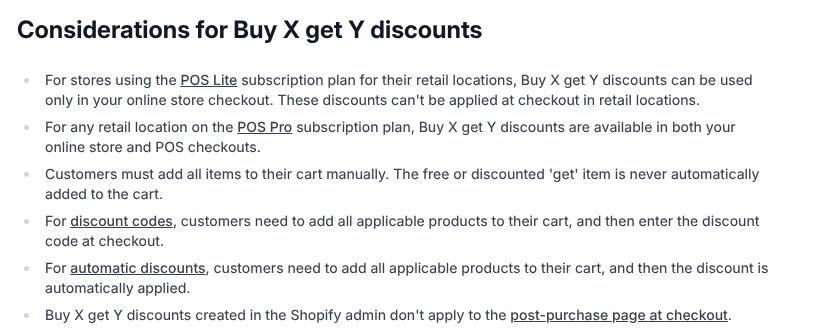
- 39. Run a gift with purchase as a Buy X get Y discount. Set the "get" item to free. Shopify never adds the gift to the cart automatically, so the shopper has to add it (Shopify). Show the gift on product pages and in the cart with a clear "add your free gift" line.
- 40. Keep the gift in stock. If the free product's inventory reaches zero, it shows as sold out and customers cannot use the offer (Shopify).
- 41. Add complementary products to top product pages. Set them in the Search & Discovery app (Apps > Search & Discovery). Your theme needs a complementary products section, the product must have stock above zero to show, and Shopify suggests add-ons that cost the same or less than the main product (Shopify).
- 42. Add a cart or post-purchase upsell only if it is already tested. Automatic discounts and discount codes created in the Shopify admin do not apply on the post-purchase page (Shopify). Our roundup of Shopify upsell apps compares the tools. Skip a brand-new app this close to the weekend.
- 43. Sell gift cards. Gift cards are available on all plans and arrive as a digital code once you fulfil the order (Shopify). Discount them with a discount, never with a compare-at price, as Shopify advises.
- 44. Offer pre-orders only when you can promise a ship date. Shopify requires a pre-order app and Shopify Payments or PayPal Express (Shopify). You need a reasonable basis for the date you state, or a reasonable belief the item ships within 30 days if you state none. Shop Pay, Apple Pay and Google Pay cannot be used for pre-orders, and Buy X get Y discounts do not apply to them (Shopify). Skip pre-orders if your supplier has not confirmed a delivery date.
Discounts: set up and test in Shopify (now, test in the week before)
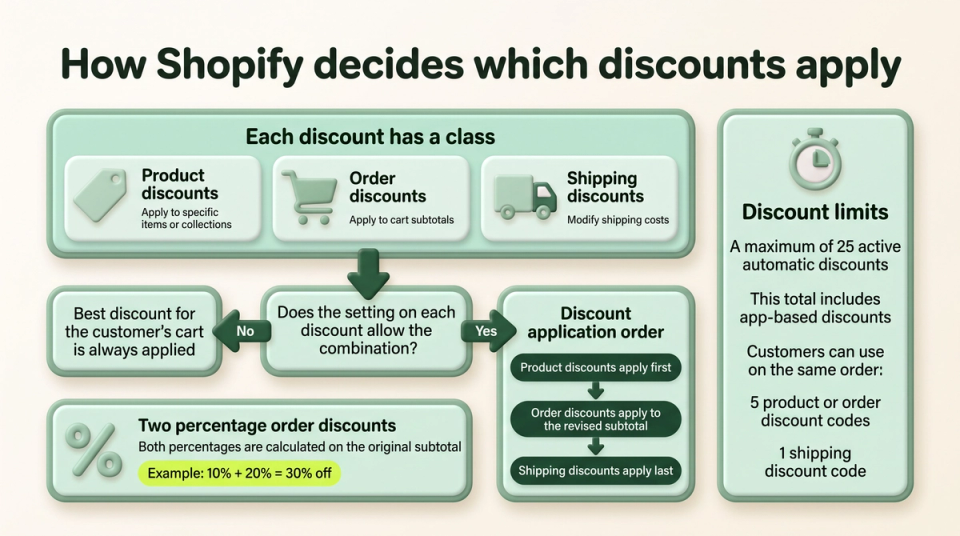
Discounts are where most BFCM problems start: a code that will not apply, two offers that stack too far, a gift that never reaches the cart. Shopify discounts come in three classes: product, order and shipping (Shopify).
- 45. Choose automatic discount or code for each offer. Automatic discounts need nothing from the shopper. Codes suit email, influencers and segments, but Shopify notes that a forgotten code can lead to an abandoned cart (Shopify).
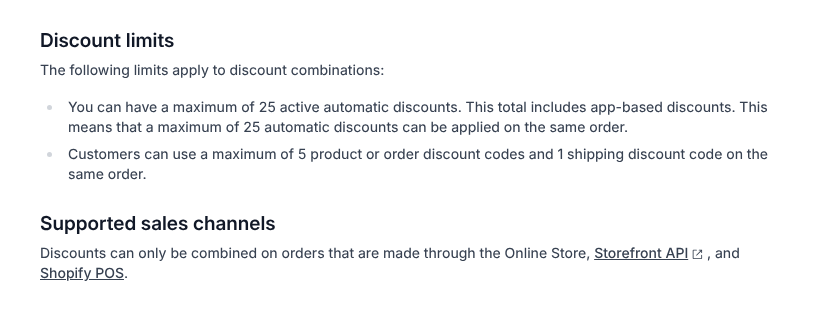
- 46. Stay inside Shopify's limits. A store can have at most 25 active automatic discounts, app discounts included, and a customer can use at most 5 product or order codes plus 1 shipping code on one order (Shopify).
- 47. Set the combination rules on every discount on purpose. Two discounts combine only when both allow it. Combining product with order discounts, or order with order discounts, needs a store without checkout.liquid customisations (Shopify).
- 48. Do the stacking maths. When two percentage order discounts apply, both are calculated on the original subtotal, so 10% and 20% give 30% off (Shopify). Check that a sitewide discount plus a welcome code never goes below your margin floor (task 2).
- 49. Know which items take no further discount. On every plan except Plus, products in a Buy X get Y discount cannot take another product discount; Shopify applies the best single deal instead (Shopify).
- 50. Expect no combinations off your own store. Discounts combine only on orders through the Online Store, Storefront API and Shopify POS, not on Facebook, Instagram, Google or other external checkouts (Shopify).
- 51. Limit codes. Use "Limit to one use per customer" and a total use cap where a leaked code would hurt (Shopify).
- 52. Exclude gift cards and choose the purchase type. Most discounts cannot apply to gift cards (Shopify), and a discount can be set to one-time purchases, subscriptions or both (Shopify).
- 53. Check minimum spends. A minimum purchase amount counts product prices only, never shipping or taxes (Shopify). Make sure the banner wording matches.
- 54. Tag every BFCM discount. Discounts take grouping tags for filtering (Shopify), and the Discounts page can deactivate many discounts at once (Shopify), so the tag finds them all after the weekend.
- 55. Test as a customer, logged out, on a phone. Add the products, apply each code, check the total. With Shop Pay, the customer must log in to Shop Pay before the discount code box appears, so test that path too (Shopify).
- 56. Test the edge cases. A cart exactly at the minimum, the gift added and not added, a bundle in the cart, a gift card in the cart, a second market's currency.
- 57. Know how to fix "code already used". A code is held against its usage limit until payment completes or fails, so a checkout that never finishes can hold it. The fix is a new code for that customer (Shopify).
Checkout and payments (now)
Shopify Checkout is the same for every store, so the work here is testing and settings, not code.
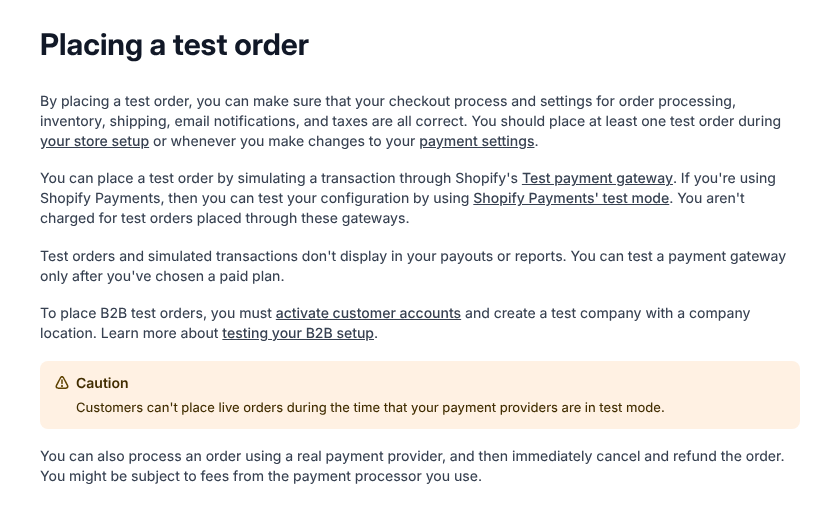
- 58. Place a real test order, refund it, and confirm test mode is off. Test mode is useful, but customers cannot place live orders while your payment providers are in test mode (Shopify). Use the order to check confirmation and shipping emails too.
- 59. Turn on accelerated checkouts. Shop Pay, Apple Pay, Google Pay, Amazon Pay and PayPal buttons appear in an express section at the top of checkout (Shopify). Shopify reports that 32% of orders over BFCM 2025 used Shop Pay (Shopify).
- 60. Show the full cost early. Among US shoppers who abandoned for a reason other than browsing, 40% said extra costs were too high and 20% said delivery was too slow (Baymard). Put shipping costs and delivery dates on product pages and in the cart.
- 61. Do not force account creation. In the same Baymard survey, 18% left because the site wanted them to create an account (Baymard).
- 62. Turn on Shop Pay Installments if you qualify. It needs Shopify Payments and Shop Pay and a business in the US, Canada, the UK or, in early access, Australia, selling in that country's currency (Shopify). Skip it if your average order sits below the eligible order range shown on that page.
- 63. Know when stock is held. Shopify checks inventory at each checkout step but holds it only when the customer submits payment (Shopify). On a doorbuster, some shoppers will reach checkout and find it gone, so say "limited stock" on the page.
- 64. Set a billing statement name customers recognise. Shopify lists an unrecognised merchant name as a common cause of chargebacks; with Shopify Payments you set the text in the admin (Shopify).
- 65. Retest checkout extensions after any app update, using the task 58 order.
Email: deliverability, segments, flows and the send plan (now)
Email is the channel you own outright, and it fails quietly: messages land in spam and nobody notices until the numbers come in. Start the volume ramp today.
- 66. Authenticate your sending domain. Google requires senders of more than 5,000 messages a day to Gmail accounts to set up SPF, DKIM and DMARC and to support one-click unsubscribe (Google). Yahoo has similar requirements and says unsubscribe requests should be processed within 2 days (Yahoo).
- 67. Keep spam complaints low. Google asks senders to keep the spam rate below 0.10% and never reach 0.30% (Google). Check it in Google Postmaster Tools before every big send.
- 68. Build engaged segments. For example, people who clicked or ordered in the last 30, 60 and 90 days. Klaviyo also suggests a "never engaged" segment to leave out of sends (Klaviyo).
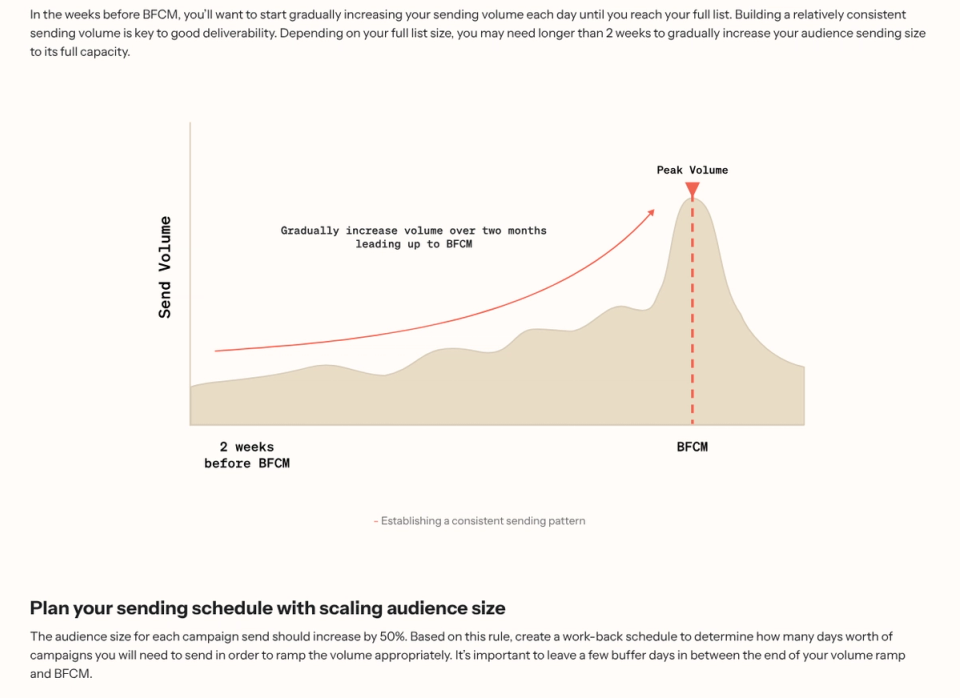
- 69. Grow volume step by step. Klaviyo's guidance is to grow each campaign's audience by 50% on the previous one until you are just under your full list, then leave a few buffer days before BFCM (Klaviyo Academy). With two weeks or less to go, send to the engaged segment today.
- 70. Do not email the dormant list to "wake it up". Klaviyo recommends a sunset flow for people with no clicks in 12 months and suggests reaching unengaged subscribers through paid ad audiences instead (Klaviyo).
- 71. Send off the hour. A Klaviyo deliverability strategist says inbox providers' servers get "absolutely hammered" at exactly 9 a.m., and that the providers suggest sending big campaigns at times such as 9:15 (Klaviyo).
- 72. Check Smart Sending before double-send days. In Klaviyo the default Smart Sending window is 16 hours for email and 24 hours for SMS, so a second Black Friday email with Smart Sending on skips anyone who got one inside the window (Klaviyo).
- 73. Write and schedule the send calendar. Teaser, early access, launch, reminder, Saturday, Cyber Monday, last chance. Different subject lines for Friday and Monday.
- 74. Turn on Shopify's abandoned checkout email if you use no other tool. Shopify's help page for its legacy abandoned checkout set-up says a checkout counts as abandoned 10 minutes after the customer enters an email and does not pay (Shopify). Shopify's checklist points to Apps > Messaging > Automations (Shopify).
- 75. Shorten abandoned cart timing for the weekend. A Klaviyo partner agency suggests the first message 1 to 2 hours after abandonment and the second after 6 to 8 hours during BFCM (Klaviyo).
- 76. Leave customers with open support tickets out of promotions. The same guide suggests a segment for this, so nobody waiting on a refund gets "ends tonight" (Klaviyo).
- 77. Check every flow that will fire. Welcome, browse, cart, checkout and post-purchase: valid codes, correct expiry dates, no old offers.
- 78. Prepare a correction email. Draft it now for a wrong code or price, so a mistake costs one send, not an afternoon.
SMS (week before)
SMS works for a few urgent messages to people who asked for them. Skip it this year if you have no SMS subscribers yet: a list built in one week will be small, and the consent rules still apply.
- 79. Send only to subscribers with SMS consent. Keep the record of when and where each person opted in.
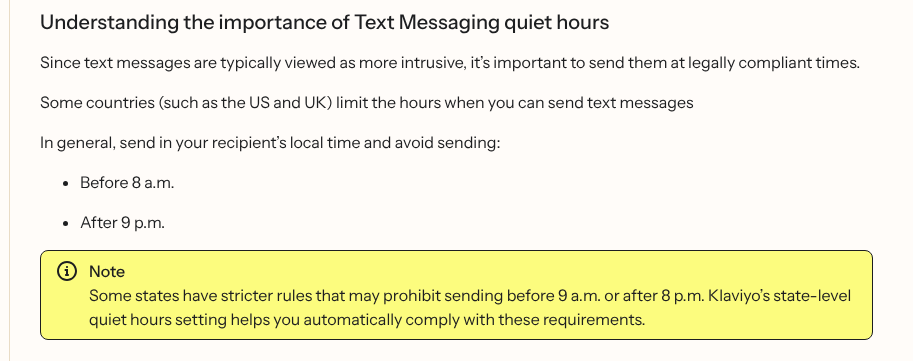
- 80. Respect quiet hours in the recipient's time zone. Klaviyo's help notes that the TCPA allows texts between 8 a.m. and 9 p.m., and that some US states are stricter, with no texts before 9 a.m. or after 8 p.m. Its state-level quiet hours setting applies those rules automatically (Klaviyo). The same page lists all-day quiet hours in Pennsylvania on Sundays and public holidays, Thanksgiving Day included, so send no texts to recipients there on 26 or 29 November.
- 81. Send fewer texts than emails. Early access, launch, last chance and the shipping cut-off are usually enough.
- 82. Help iPhones recognise you. Attentive reports that iPhone screening moves texts from unknown senders into a separate inbox, and that affected messages saw 30% to 40% lower click-through and conversion in its own data. It suggests sending a contact card in the welcome message (Attentive).
- 83. Test every SMS link on a phone. It should open the sale collection, with the offer already visible.
Paid ads and product feeds (week before)
Ads need approval time and data that matches the store. Both take longer in the week of Thanksgiving.
- 84. Submit Google Merchant Center promotions by Monday 23 November, or earlier if early access starts before Thanksgiving. Google recommends submitting at least 24 hours before the start time, during weekday business hours, and says review can take up to 72 hours (Google). If a promotion fails validation, saving your fixes triggers another review (Google), so leave room for one round of fixes.
- 85. Make feed prices match the landing page. Google asks that the sale price you submit matches the price on the landing page and at checkout (Google).
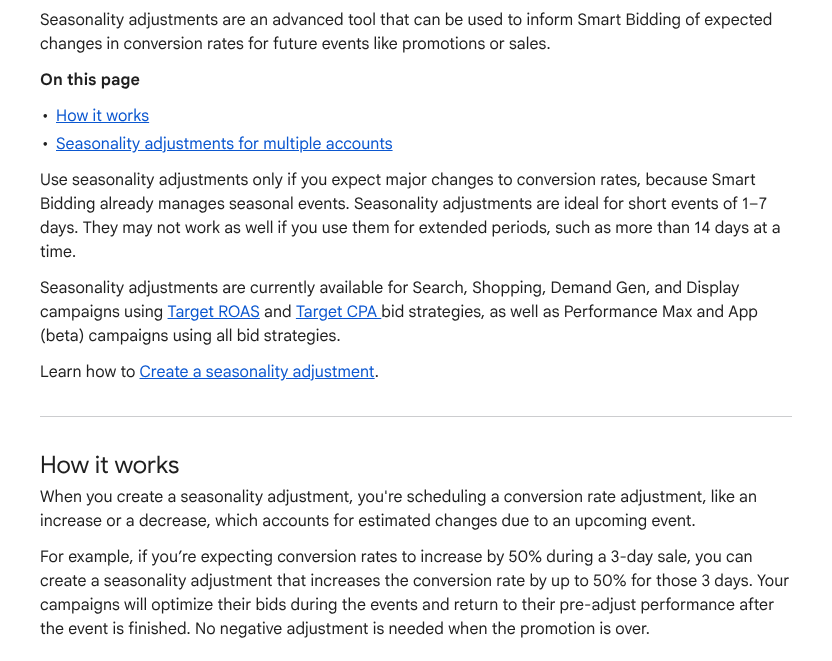
- 86. Use Google Ads seasonality adjustments only for short events. Google says they suit events of 1 to 7 days and may not work as well beyond 14 days, because Smart Bidding already handles normal seasonality (Google).
- 87. Raise budgets in steps and set a ceiling. Decide the most you will spend per day before the weekend, so a good Friday does not become an unplanned Saturday.
- 88. Upload holiday creative early. Get every ad approved before Thursday, so a rejection does not cost you Black Friday morning.
- 89. Leave your best customers out of retargeting. A Klaviyo partner agency suggests excluding its "Champions" and "Loyalists" segments from paid retargeting, because email and SMS already reach them (Klaviyo).
- 90. Pause ads for products that sell out. Check the top ad products every morning of the weekend.
Shipping, fulfilment and cut-offs (now)
Late parcels turn into support tickets, refunds and chargebacks. Publishing honest dates now prevents most of them.
- 91. Publish your Christmas shipping cut-offs. For delivery before 25 December in the contiguous US, USPS recommends sending by Thursday 17 December for Ground Advantage and First-Class Mail, Friday 18 December for Priority Mail and Saturday 19 December for Priority Mail Express (USPS). Subtract your handling time and check the dates your other carriers publish.
- 92. Show delivery dates at checkout. Shopify's manual delivery dates add your fulfilment time to the transit time. They do not work with rates provided by third-party apps (Shopify). Raise the fulfilment time for peak week if your team needs it.
- 93. Add flat rates behind carrier-calculated rates. Shopify shows backup rates only when all app or carrier rates fail, and recommends flat rates that cover the same destinations (Shopify).
- 94. Check shipping for bundles. Bundles have no shipping profile of their own; rates come from the products inside (Shopify).
- 95. Count stock on your top sellers. Fix any gap between the shelf and Shopify before the sale, not during it.
- 96. Order packaging, labels and printer supplies for peak volume. Then set a daily pick-and-pack cut-off time and staff to it.
- 97. Confirm your 3PL's cut-off and capacity in writing. Ask what happens to orders above the agreed volume.
- 98. Draft the delay message now. Shopify's chargeback advice is to contact customers when shipping is delayed and to share tracking (Shopify).
Customer service and policies (week before)
Support volume rises with orders. These tasks stop the same five questions from filling the inbox.
- 99. Now: set the holiday returns window before the first sale order. In Settings > Policies, return rules set the window, return shipping cost, restocking fee and final sale items, and changes apply only to future orders (Shopify). A longer window for gifts must be in place before they are bought.
- 100. Use return window overrides for special cases. Shopify lets you give chosen collections or products a longer or shorter window; if an item is in two overrides, the shortest applies (Shopify).
- 101. Publish holiday hours and reply times. On the contact page, in chat and in the order confirmation email.
- 102. Write saved replies for the top questions. Where is my order, the code does not work, shipping cut-offs, returns, gift receipts. Shopify Inbox calls these quick replies (Shopify). Our guide to live chat apps for Shopify compares the alternatives.
Analytics and tracking (week before)
You cannot fix what you cannot see on Friday afternoon. Get the numbers right before the traffic arrives.
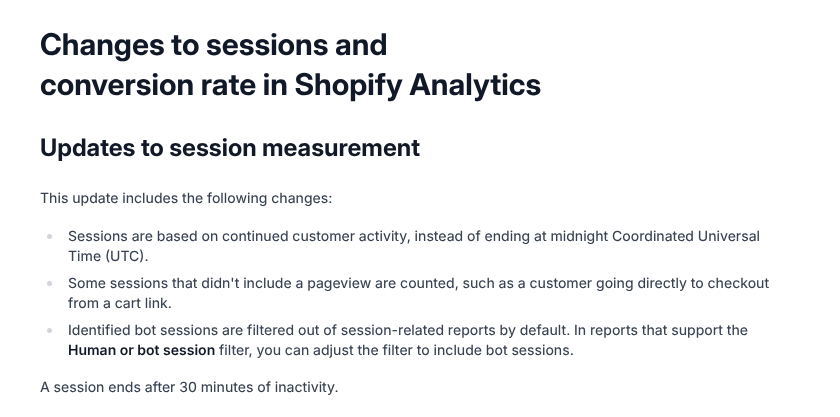
- 103. Reset your conversion-rate baseline. Shopify changed how it measures sessions in a rollout on 21 to 23 September 2026: bot sessions are now filtered out, and sessions no longer end at midnight UTC. Your conversion rate can change without any real change in customers, and add to cart and reached checkout rates can shift too (Shopify). Compare orders, sales and customers with last year, not conversion rate.
- 104. Check purchase events fire. Shopify loads app and custom pixels on the storefront, checkout, thank-you page and order status page (Shopify). Use your test order (task 58) to confirm the purchase appears in Google Analytics and your ad platforms.
- 105. Tag every email, SMS and ad link with UTM parameters. Use one naming scheme so Monday's report is a filter, not a guess. To track visits from AI assistants as a channel of their own, see our post on AI holiday shopping.
- 106. Open Live View for the weekend. Analytics > Live View shows activity in real time in your store's local time, and Shopify suggests it for BFCM (Shopify).
- 107. Agree five numbers to watch. Orders per hour, checkout errors, top-product stock, support queue and ad spend against the daily ceiling.
Fraud and chargebacks (week before)
Peak weekends attract card testing and stolen cards, and a chargeback arrives weeks after the parcel has gone.
- 108. Read the fraud analysis before you fulfil. Shopify shows indicators such as address verification and card code checks, and a recommendation on eligible orders. Shopify Payments can block some high-risk checkout attempts before an order is created (Shopify).
- 109. Automate risk with Shopify Flow. Flow is free on the Basic, Grow, Advanced and Plus plans (Shopify). Its templates can capture payment only on orders that are not high risk, or cancel and restock high-risk orders; use the "Order risk analyzed" trigger, and set payment capture to manual for the capture template (Shopify).
- 110. Install the Fraud Control app to watch your chargeback rate. With Shopify Payments, the app shows "good standing" below 0.4% of orders, "at risk" from 0.4% to 0.6% and "elevated risk" above 0.6% (Shopify).
- 111. Let Shopify Protect cover eligible Shop Pay orders. It is free and protects eligible orders against fraudulent and unrecognised chargebacks (Shopify).
- 112. Plus stores: schedule bot protection for a flash drop. It is available only on Shopify Plus, lasts at most 60 minutes and covers up to 500 products or all published products (Shopify). Plus Support must switch it on first, so ask now.
- 113. Keep tracking and delivery confirmation for every order. It is your evidence when a "not received" dispute arrives (Shopify).
Peak weekend run-sheet (26 to 30 November)
The weekend is for watching and responding, not for building. Shopify reports that sales on its platform peaked at 12:01 p.m. EST on Black Friday 2025 (Shopify), so have everyone online by late morning US Eastern time.
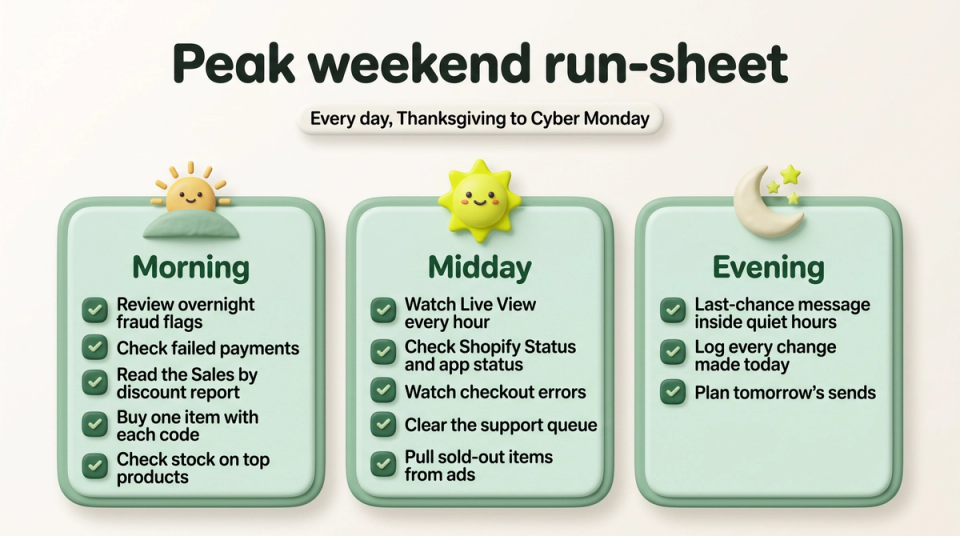
- 114. Launch check, minutes after the sale starts. Load the store logged out on a phone, apply each code, add the gift, and buy one item.
- 115. Morning: review the night. Fraud flags, failed payments, support tickets and how often each discount was used, from the Sales by discount report (Shopify).
- 116. Midday: watch the peak. Live View, Shopify Status, your email tool's status page, checkout errors and the support queue, hourly.
- 117. Swap sold-out products out of banners, emails and ads. Do it within the hour, and point traffic at what you still have.
- 118. Change the offer only if it is broken. A wrong price or a code that fails gets fixed at once. A slow hour does not.
- 119. Check the Cyber Monday switch at 00:05. If a rollout or scheduled discount changes the offer at midnight, check the store a few minutes later.
- 120. Evening: send the last-chance message inside quiet hours. Then write down tomorrow's sends and any fixes.
- 121. Keep a change log. Every change, who made it and when. It turns Monday's "what happened?" into a two-minute read.
After BFCM: Cyber Week to December (1 December onward)
The orders are in; the next job is turning bargain hunters into customers who come back at full price.
- 122. End or extend offers on purpose. Adobe expects US retail discounts of up to 10% to 15% through December (Adobe), so a smaller December offer is normal. Switch off and archive BFCM discounts by their tag (task 54).
- 123. Ship fast and keep customers informed. Send tracking for every order and contact anyone whose parcel is late (task 98).
- 124. Welcome first-time BFCM buyers differently. A Klaviyo partner agency suggests a separate welcome flow for them (Klaviyo).
- 125. Ask for reviews after delivery. The same guide suggests 7 to 10 days after delivery (Klaviyo).
- 126. Promote gift cards after the last shipping date. They are delivered as a digital code, so they work right up to Christmas (Shopify).
- 127. Count down the shipping deadlines. One email and one banner per carrier cut-off from task 91.
- 128. Refund returns quickly. Shopify lists slow refunds, the "credit not processed" reason, as a preventable cause of chargebacks (Shopify).
- 129. Write the review while it is fresh. Revenue, AOV, discount cost, new against returning customers, and what broke. Use the same template next year, and our Shopify launch checklist for any store changes you plan for January.
FAQ
When should I start preparing for BFCM?
Ideally in late summer, because list growth and email warm-up take weeks. With two weeks left, focus on what still moves the result: one tested offer, a clean engaged email segment, published shipping cut-offs and a change freeze from Tuesday 24 November. Klaviyo's own advice is that a volume ramp may need longer than two weeks, so start it today (Klaviyo Academy).
How deep should my Black Friday discount be?
Deep enough to be worth sharing and shallow enough to stay above your margin floor (task 2). For context, Adobe forecasts peak discounts at US online retailers this season of about 30% off list price for electronics and 23% for apparel (Adobe). A smaller store does not need to match a department store; a gift, a bundle or free shipping can carry the offer.
How do I stop my Shopify store from crashing on Black Friday?
Shopify runs the infrastructure and routes storefront traffic through Cloudflare's protection (Shopify). The risks you control are apps, third-party scripts, heavy pages, carrier rates and last-minute changes. Remove what you do not use, add flat backup shipping rates, freeze changes before Thanksgiving and keep a copy of the live theme you can switch back to.
What should I do when a product sells out during BFCM?
Hide it from collections or let a Flow workflow unpublish it, pull it from banners, emails and ads within the hour, and point traffic at a similar product. Offer pre-orders only if your supplier has confirmed a date you can state on the page (Shopify).
How long should Cyber Week offers run?
Give each offer a stated end time and keep it. One clean pattern is a main offer from Black Friday to Cyber Monday, then a smaller December offer; Adobe expects discounts of up to 10% to 15% through December (Adobe). Quietly extending a "final day" sale teaches subscribers to ignore your deadlines.
Your next step
Today, write your offer sentence (task 1), open Discounts in your Shopify admin and check you are inside the limits in task 46, then send your first email to your most engaged segment (task 69). Tomorrow, run the speed and checkout tasks. If you would like a second pair of eyes on your discount set-up, checkout or theme before the freeze, talk to us.