Selling Digital Products on Shopify: Ebooks, Courses, Keys and More
How to sell ebooks, templates, courses, software keys and memberships on Shopify: which kind of app fits each product, how shipping settings work, and what to check on tax, refunds and piracy.


Shopify can sell digital products without much fuss, but file or key delivery needs an app. Shopify's own route for delivery is its Digital Products app, and the right kind of app depends on what you sell: a file, a key, a course or a membership. This guide shows how to pick, how to set up the product page, and what to check on tax, refunds and piracy before you launch.
It also covers ebooks, which used to have their own post on this site. Everything about them now lives here.
Four kinds of digital product, four kinds of app
Most "digital product" questions come down to one choice: what does the buyer actually receive? Start there.
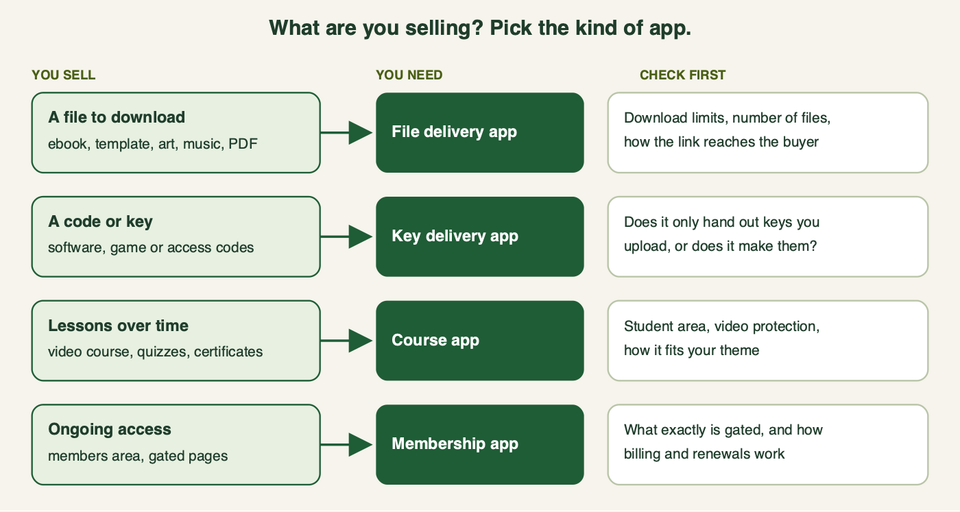
- A file to download. Ebooks, PDFs, templates, printables, digital art, music, presets. The app attaches the file to a product and sends the buyer a link.
- A code or key. Software licences, game keys, access codes. The app hands out a unique code per order.
- Lessons over time. A video course with quizzes or certificates needs a student area, not just a download link.
- Ongoing access. A members area or gated pages needs rules about who can see what, and usually recurring billing.
Many shops mix two of these. A course with a PDF workbook is a course app plus a file. A software product may need both a download and a key.
How a digital order works
The flow is the same for most apps. The buyer pays at checkout, Shopify marks the order as paid, and the app matches the product to its file or key and sends it. Some apps also show the link on the thank-you page. Whatever you add to the thank-you page, keep the download link on it.
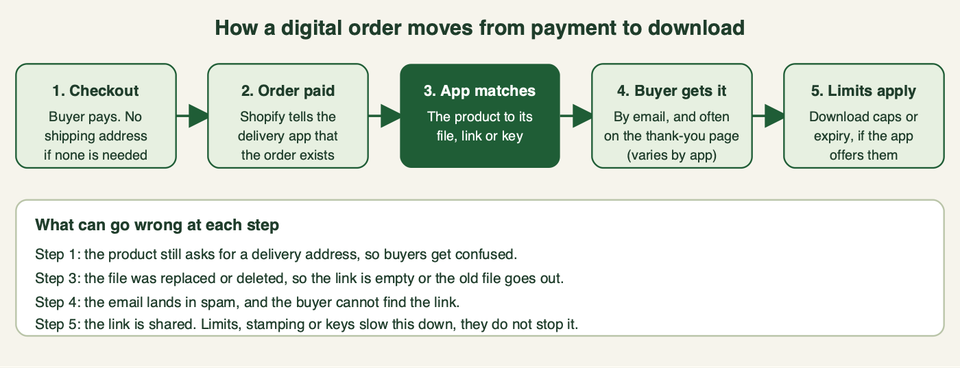
Keep this flow in mind when you test. Most digital store problems are not about Shopify. They are about step 4: the buyer cannot find the link.
Shopify's own app: Digital Products
Shopify publishes its own free app for this job. Its App Store listing is titled Shopify Digital Products, and the address still says "digital-downloads", so you may know it by the old name, Digital Downloads. The listing shows it as free to install.
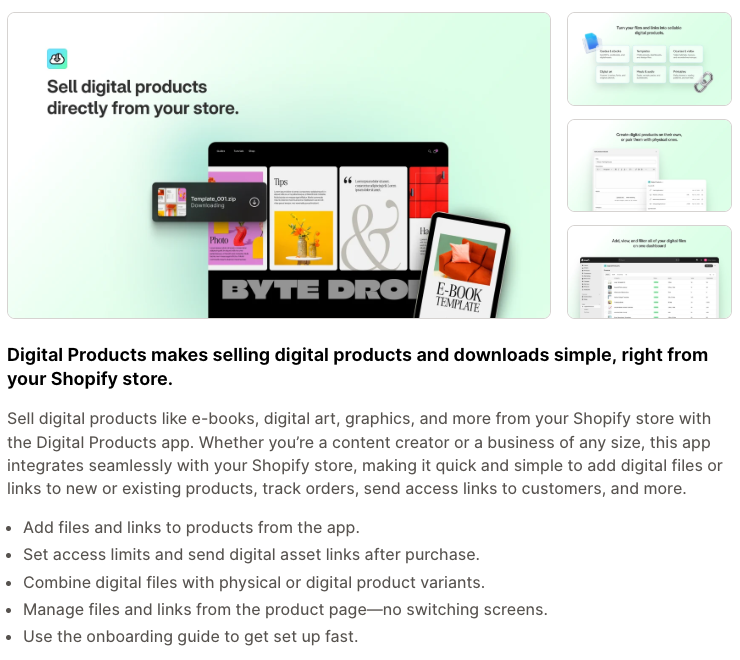
What the listing says it does:
- Add files and links to products from the app, and manage them from the product page.
- Set access limits and send the asset links after purchase.
- Combine digital files with physical or digital product variants.
- Product types it names: audio, courses, digital art, ebooks, games, PDFs, software and videos.
Pick this if you want the simplest setup, from the platform itself, for files and links. It suits ebooks, templates and printables. The variants feature is useful if you sell a printed book with a digital edition on the same product page.
Skip this if you need to hand out licence keys from a list, run a course with lessons, or restrict pages to members. Also read the recent reviews on the listing before you commit. Some merchants with many products or variants ask for bulk upload and bulk replace tools, which matters if you have hundreds of files or one PDF shared by many variants.
Other file delivery apps
You do not have to use Shopify's app. Two others that cover files and keys:
- EDP Easy Digital Products. The listing says you can upload up to 10 files to one product or variant, show download buttons on the order confirmation page, and send a customisable email. It also lists licence keys, and mentions PDF stamping and download limits as extra features. It has a free plan with limits, so read the plan details on the listing.
- GIT Digital Downloads, E-books. Listed as free. It describes automatic file delivery by email and on the thank-you page, licence key generation, and order tracking. It has few reviews, so test it hard before you rely on it.
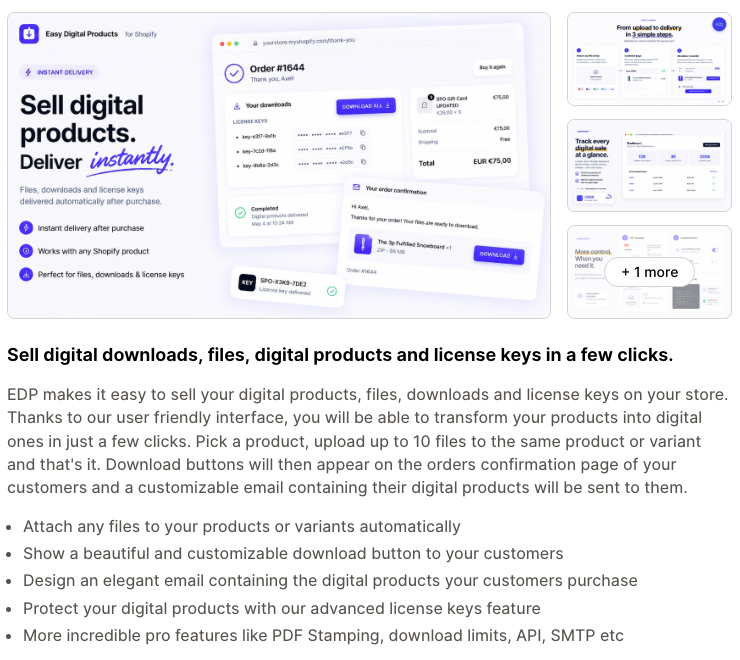
Pick EDP if you want files and keys in one app, or you want to stamp PDFs with buyer details as a deterrent. Skip it if you plan many products. The listing mentions a free plan with limits, so check the plan details first.
Apps for licence keys and codes
A key app answers one question: do you already have the keys, or does something need to make them?
- You have a list of keys (game codes, software serials, gift codes). KeyDispatch and License Keys & Codes by DPL both describe uploading codes in bulk and sending one per order. DPL adds delivery by SMS or WhatsApp, low-stock alerts and the option to hold risky orders. KeyDispatch says it prevents duplicate keys and has a free plan. We found no reviews on the KeyDispatch listing, so test it carefully.
- Your software makes its own keys. LicenseSpring Fulfillment generates keys and subscriptions on the LicenseSpring platform when an order is paid. You need a LicenseSpring account, and your product must be built to use their licensing.
Pick a bulk-upload app if the keys already exist and you only need delivery. Pick LicenseSpring if you already license your software with it. Skip all of them if your product needs activation, seat limits or revocation that your own licensing system handles. Then the Shopify app should only trigger a call to your system.
Course apps
A course needs more than a download link: lessons in order, progress, maybe quizzes and certificates. Three apps worth a look:
- Courses Plus. Builds lessons from video, audio, text, PDFs and quizzes and sells them as regular products. The listing mentions student dashboards, certificates, live lessons through Zoom or Google Meet, and migration help from other course platforms. It has a free plan.
- Chapters LMS. Courses are sold as Shopify products and students get a branded portal on your domain, with hosting and streaming included. It charges by usage rather than a flat plan, so check the current pricing before you build on it.
- LDT Courses. The listing highlights a video and audio player with watermark and subtitles, plus a PDF or EPUB viewer. It has a free plan.
Pick a course app if buyers will come back to a student area. Skip it if you just sell a PDF with a video link, since Shopify Digital Products or EDP will be simpler. Always buy your own course as a test customer and check the student view on a phone.
Membership and gated content apps
Membership means buyers pay for access to something that stays behind a login. Look at what the app can gate (products, collections, pages, content) and how it bills.
- Memberply. Paid, free, monthly, annual or one-time tiers, with gating of products, collections, pages and digital content. Its listing is as much about perks and loyalty as gating, so check the gating covers what you need.
- ECA Easy Memberships. Membership plans, page restrictions and automatic customer tags. It is listed as free and has few reviews, so test it. Its listing covers page restrictions, but we did not see video or file protection mentioned.
- Appstle Memberships. Plans, tiered perks, tagging, automated billing and a member portal. It is built around plans and billing, and access is one perk among several, so check how much gating you get.
If your "membership" is really a subscription for physical goods, read our guide to the best Shopify subscription apps instead. Gating pages is a different job from billing, so make sure you know which one you are buying.
At a glance
| Option | Best for | Pick this if | Skip this if |
|---|---|---|---|
| Shopify Digital Products | Files and links | You want a simple setup from Shopify | You need keys, courses or member pages |
| EDP Easy Digital Products | Files plus keys | You want PDF stamping or keys in one app | You plan many products |
| GIT Digital Downloads | Files plus keys | You want a free option and will test it | You need a long track record |
| KeyDispatch or DPL | Codes you already have | You have a list of keys to deliver | Your software creates its own keys |
| LicenseSpring Fulfillment | Generated software keys | You already use LicenseSpring | You do not have an account |
| Courses Plus, Chapters, LDT | Courses | Buyers return to a student area | You only sell a PDF |
| Memberply, ECA, Appstle | Memberships | You gate content behind a login | You sell physical subscription boxes |
How to choose
- Write down what the buyer receives. One file, many files, a code, lessons or access. That picks the kind of app.
- Check the delivery path. Email only, or also the thank-you page and customer account? A buyer who loses the email needs a second way back.
- Check size and storage. We could not find a current per-file size limit on the Shopify pages we could open, so look at the app's own listing or ask its support before you upload large videos. For big video, a course app that hosts or streams is safer than a download link.
- Test as a customer. Buy your own product with a real card on a cheap price, on a phone, then open the email. Refund yourself after.
- Plan the exit. Know how to export your files and customer list if you switch apps.
If you are still building the store itself, our Shopify launch checklist covers the rest. For other free helpers, see the best free Shopify apps.
Product settings: shipping and fulfilment
A digital product should not ask for a delivery address. Shopify's developer documentation describes an inventory item setting called requiresShipping, which controls whether a customer needs to provide a shipping address when placing an order with that item. In your admin, look for the product setting that says whether the product is physical or needs shipping, and turn it off for pure digital items. The wording in the admin may change, so use what you see on your product page.
Two things to test:
- A cart with only digital items should skip the shipping step.
- A cart with a physical item and a digital item should still ask for an address, because the physical one needs it.
If you sell a printed book and an ebook together, either put both on one product as variants, or use separate products and test mixed carts.
Selling ebooks specifically
Ebooks are the most common first digital product, and they are simple to get wrong.
- Choose the format on purpose. PDF opens on almost every device and keeps your layout. EPUB suits e-readers and reflows text, but layout-heavy books can look worse. You can include both in one download.
- Sell the preview. Add a free sample chapter as a separate free product, or a few pages as images on the product page. Buyers do not like paying for something they cannot see.
- Name the files clearly.
brand-guide-v2.pdfbeatsfinal-final.pdf. When you update a book, replace the file in your app and tell past buyers. - Offer print and digital together. The Shopify Digital Products listing says files can sit alongside physical variants, which works well for printed books with a digital edition.
- Put the author and your contact on page one of the file. It helps buyers find you and discourages casual sharing.
Product page checklist
Before you publish any digital product, check:
- The title and first line say exactly what the buyer gets (format, number of files, pages or hours).
- You show what is not included, such as no printed copy and no physical shipment.
- Photos or mockups are clearly previews, not the file itself.
- File type, file size and device needs are listed (for example "PDF, works on any device").
- The delivery method is stated: email, thank-you page, customer account.
- The licence is stated in one sentence: personal use or commercial use, and how many people or devices.
- The refund rule is stated on the product page, not only in the policy.
- You list what happens if the link does not arrive and how to contact you.
- Shipping is switched off and a cart with only this product skips the address step.
- You bought it yourself as a test customer on a phone and a laptop.
Licence terms for digital goods
A buyer of a template or font is buying a right to use it. Write that right down. A short licence usually answers:
- Who may use it: one person, one team, one company.
- Where: personal projects, client projects, resale, print on demand.
- What is banned: sharing the file, reselling it, putting it in a bundle.
- Updates: are they free and for how long?
Put the licence on the product page, repeat it inside the file, and keep a copy for support. For anything with real legal risk, have a lawyer write or review it.
Piracy: what you can and cannot stop
You cannot stop a determined person from sharing a file they bought. You can make it harder and more traceable:
- Limit downloads. The listings we opened for Shopify's app and for several others mention download limits or access limits.
- Use per-buyer licence keys for software, so a leaked key can be traced and, if your system allows it, revoked.
- Stamp or watermark files. EDP lists PDF stamping and LDT lists watermarks.
- Protect video by using a course app with its own video player, instead of a plain file link.
- Do not rely on hiding the URL. Treat any link as shareable.
Weigh the cost. Heavy protection annoys honest buyers, who are most of your customers.
Tax on digital goods: the short version
This is not tax advice, and the rules differ by where you and your buyer are. Do two things: read the official page for your market, and ask an accountant. A few official starting points we opened:
- EU. The European Commission's One Stop Shop page says VAT is paid where consumption takes place, and that the scheme covers supplies of services to consumers in the EU, including telecommunications, broadcasting and electronic (TBE) services. It also describes an EU-wide threshold of 10,000 euros, below which supplies may stay subject to VAT in the seller's own member state.
- UK. HMRC's guide, VAT rules for supplies of digital services to consumers, lists e-books, PDFs, music, films, games and software as electronically supplied services. It says UK sellers charge UK VAT on supplies to UK consumers, and that supplies to consumers in other countries may be liable to VAT there. The page's EU section was last updated in 2022, so confirm current EU steps with an accountant.
- US. There is no single rule. States decide. For example, Washington's Department of Revenue says sales and use tax applies to digital products, including downloads, and Pennsylvania's Department of Revenue lists e-books as taxable digital products. Other states differ.
Shopify's Help Center pages did not load for us, so check there for how your tax settings treat digital products. Then test a checkout in each region you sell to and look at the tax line.
Refunds and cancellation rules
Digital goods can be copied the moment they are delivered, so many sellers do not give refunds after download. That is allowed in some places, but not everywhere.
In the EU, the Your Europe page on returns and the right of withdrawal says the 14-day cooling-off period does not apply to online digital content, such as a song or movie, that the buyer started downloading or streaming after expressly agreeing to lose that right. We suggest making that agreement obvious: a clear tick box at checkout, not a line buried in your terms. In the UK, the government's guide to online and distance selling says there are different cancellation rules for downloads and streaming, and that you must tell customers about their right to cancel.
A sensible policy for most shops:
- Say plainly whether you refund digital items, and when.
- Always refund if the file is broken, wrong or never arrived. Fix first, refund second.
- Add the refund rule to the product page and the checkout flow, not only to the policy page.
- Keep your refund policy page and your product page consistent.
Have a lawyer check the checkout wording if you sell to the EU or the UK.
Common questions
Can I sell digital products on Shopify without an app?
We did not find a built-in way; Shopify's own route is the Digital Products app, which is listed as free. Third-party apps add keys, courses and memberships.
Do I need to collect a shipping address for digital products?
No, if you turn off the shipping requirement on the product. Test a cart with only that product to make sure the address step disappears.
How do customers get their download?
It depends on the app. The ones we looked at describe an email with a link, and several also show a download button on the order confirmation page or thank-you page.
Can I sell a physical product and a digital one together?
Yes. Shopify Digital Products says you can combine digital files with physical or digital variants. Test a mixed cart, since the address step still has to appear for the physical item.
Can I stop customers sharing my files?
Not completely. Download limits, watermarks, stamped PDFs and per-buyer keys make it harder and easier to trace. Pick the lightest protection that fits the product.
Do I charge VAT or sales tax on ebooks and downloads?
Often yes, but it depends on where you and the buyer are. The EU, UK and each US state have their own rules. Read the official pages above and ask an accountant.
Can I refuse refunds on downloads?
In some places you can, if the buyer clearly agreed before the download started. In the EU and the UK there are specific rules, so state your policy up front and check the checkout wording.
Can I sell courses on Shopify?
Yes, with a course app. Courses Plus, Chapters LMS and LDT Courses are three options. A plain file app is fine if your "course" is a PDF and a video link.
Need help?
If you want a digital product set up properly, with delivery tested and the checkout wording reviewed, talk to us. We can set this up with you.