Shopify Pre-Order Apps: What Shopify Does Natively and Which App to Pick
Shopify supports pre-orders through selling plans, but you still need an app to run them. Here is what Shopify allows, how pre-order payments work, the shipping-date rules, and seven apps compared.


Shopify can take pre-orders, but it does not give you a pre-order button out of the box. You install an app, and that app uses a Shopify feature called selling plans to handle the deposit, the due date and the stock. This guide covers what Shopify supports natively, how the money moves, the rules on ship dates, and seven apps compared. We checked every Shopify page and App Store listing named here.
What Shopify supports natively
Shopify's own help centre says it plainly: to sell pre-orders you install a pre-order app from the Shopify App Store, and you finish the setup in that app. The pre-orders overview says you can collect full, partial or no payment at the time of order, and that the customer's payment method is stored so you can collect the rest later.
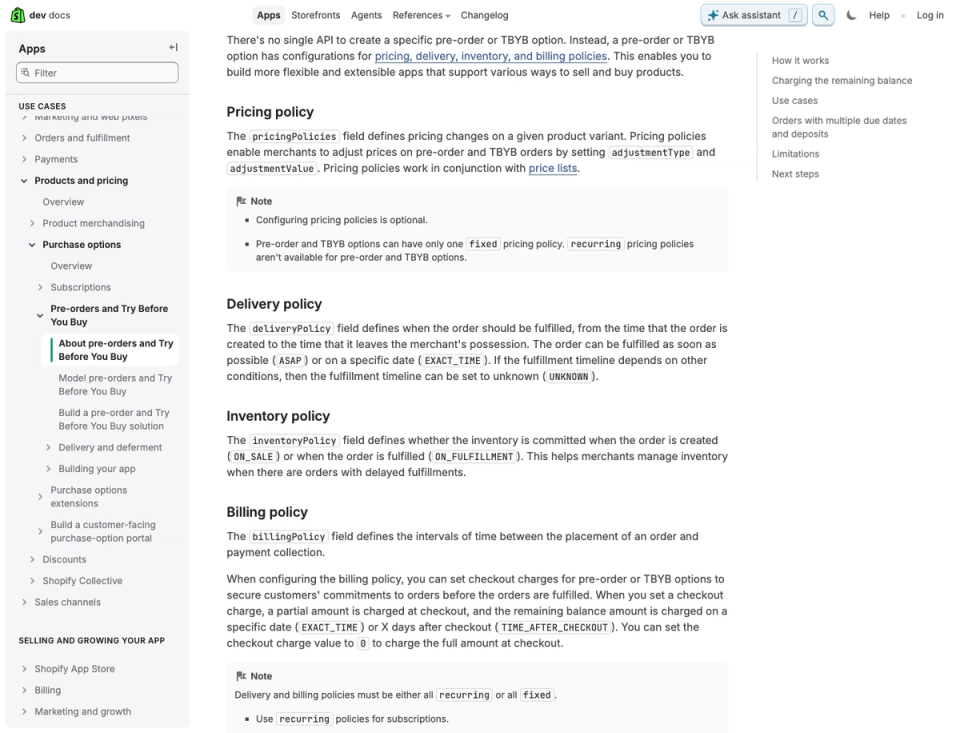
Underneath, the app uses selling plans. Shopify's developer docs describe a pre-order option as four policies on a product variant:
- Pricing: an optional price change, such as a launch discount.
- Delivery: fulfil as soon as possible, on a set date, or with the date unknown.
- Inventory: reserve stock when the order is created, or when it is fulfilled.
- Billing: how much to charge at checkout (a deposit, or the full amount) and when to charge the balance.
You do not need to know the code to use this. What matters is that these four choices are the ones every app is built on, so they are the four things to compare.
What you can do with no app at all
There is one native setting that helps. If you track inventory, you can tick Continue selling when out of stock on a product or variant. Shopify's page on selling out-of-stock products lists pre-orders as one reason to use it. It is not a pre-order feature though. It lets people buy at zero stock and nothing more. There is no "pre-order" label, no ship date, no deposit and no cap on how many you can oversell. If you go this route, you are doing all of that by hand, so it only suits a very small, short-lived drop. For stock levels in general, see our guide to inventory management apps.
Limits you must check first
Shopify's help pages list restrictions that rule out some stores before you compare any app:
- Pre-orders are not supported on stores with a customised checkout (the older checkout.liquid kind).
- Customers cannot pay for a pre-order with Shop Pay, Apple Pay or Google Pay, or with local payment methods such as Klarna or iDEAL.
- Pre-order products only work on the Online Store and custom storefront channels.
- "Buy X get Y" discounts are not supported.
- A customer cannot mix purchase options on one product, so a subscription product cannot also be a pre-order.
- Shopify's developer docs add that pre-orders do not work in Shopify POS, on draft orders, or with B2B.
Two things to treat with care. First, the two Shopify pages do not agree on payment gateways. The help page says pre-orders are only for Shopify Payments or PayPal Express. The developer page also lists Adyen on Shopify, and Stripe for some merchants. Check what your own admin allows. Second, several app listings below mention B2B pre-orders, while Shopify's developer page lists B2B as a limitation. Ask the app developer exactly what they support before you build a wholesale plan on it.
How the money moves
A pre-order app picks one of three payment shapes. Many let you choose per product.
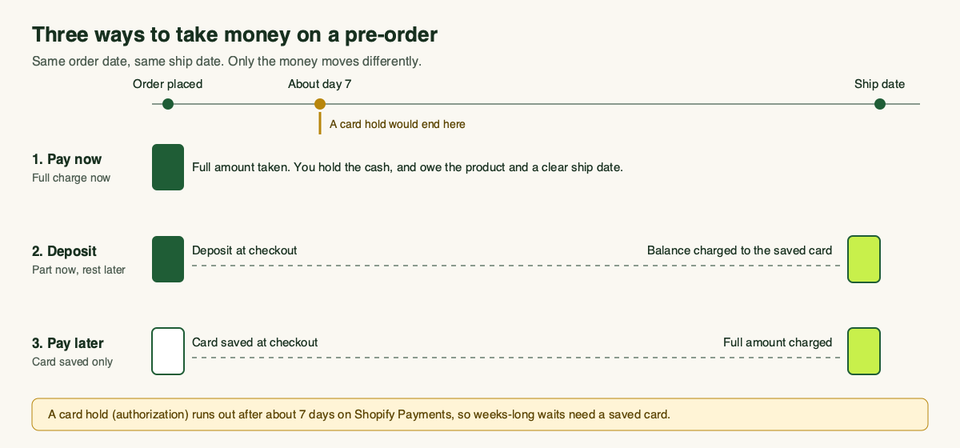
- Pay now. The full amount is taken at checkout. It is simplest, and it is the strongest commitment from the buyer. It is also the biggest promise from you.
- Deposit. Part is taken now and the balance is charged later. Shopify combines deposits when a cart holds several pre-order items.
- Pay later. Nothing is taken at checkout. The card is saved and charged at the due date or when you fulfil.
The charge-later options rely on a saved payment method, not a card hold. That matters because a hold expires. Shopify's page on payment authorization says Shopify Payments has an authorization period of 7 days, and you need to capture the payment inside that window to collect the money. Stripe's documentation on placing a hold on a card gives card-not-present windows of 5 to 7 days depending on the card brand and the type of transaction. So if your ship date is six weeks away, "authorize now, capture later" is not the answer. Shopify's developer docs say the platform stores the customer's payment method so the remaining balance can be collected without contacting them, and that it is the app's job to schedule that charge and handle failures.
Three practical points from Shopify's managing pre-orders page:
- You can collect a balance early if stock arrives early, but Shopify warns that an unexpected charge can end in a chargeback. Tell the customer first.
- If a balance payment fails, you can send the customer a link from their profile to update their card. Their bank may also ask them to confirm the payment.
- Inventory is reserved either at sale or at fulfilment. Some apps let you choose; if yours does not, ask the developer.
Ship dates, refunds and trust
Pre-orders are a promise to ship later. The rules are mostly about not making that promise lightly. This is general information, not legal advice, so check the rules for the countries you sell into.
Shopify's own pre-order rules say you need a reasonable basis for the ship time you state. If you give no date, you must reasonably believe it ships within 30 days. If you cannot ship in time, you must give a revised date and explain the customer's right to cancel or get a refund.
That matches the law behind it in two places we opened today:
- United States. The FTC's Mail, Internet, or Telephone Order Merchandise Rule, at 16 CFR Part 435, says a seller needs a reasonable basis to expect to ship within the time stated, or within 30 days if none is stated. If you cannot, you must offer the buyer a clear choice: agree to a delay with a new date, or cancel and get a prompt refund. The rule defines a prompt refund in working days, so read it before you write your policy.
- United Kingdom. GOV.UK's distance selling guide says you must tell customers before they order about delivery arrangements and how long goods will take, and about the conditions for any money paid as a deposit. It says to deliver within 30 days unless you agreed otherwise with the customer, and customers can cancel up to 14 days after delivery.
What that means for your store page:
- Put a real date on the product page. "Ships mid-November" beats "coming soon". If the date is an estimate, say so, and leave slack.
- State the payment plan in plain words. "You pay 30% today and the rest when it ships" is what the buyer should read before checkout. Shopify's checkout also makes the customer confirm they understand it is a purchase option.
- Write the refund rule down. Say what happens if you are late, and how a buyer cancels before it ships.
- Message delays early. Do not wait for the date to pass. Use order emails or your help centre, and keep a record of what you told people.
- Do not oversell the batch. Set a limit that matches what your supplier has actually promised you.
Your policy pages also need to match what the product page promises. Our launch checklist is a good place to confirm they are in place.
Seven pre-order apps
We opened each app's Shopify App Store listing on the same day. What follows is what the listing itself says, plus our view on who it suits. We did not install these apps on a store for this article, so we are not claiming test results. Treat the listing as the vendor's claim and run your own test checkout.
All seven carry the "Built for Shopify" badge on their listings. We left out ratings and prices because both change; open the listing for the current figures. Two apps from the 2023 version of this article, Pre-order Now (PreOrder Now WOD) and PreOrder Alpha, now say "This app is not currently available on the Shopify App Store", so we dropped them.
| App | Pay later or deposit | Back-in-stock alerts | Date and shipping messaging | Stock control |
|---|---|---|---|---|
| Dibs (Logbase) | Partial or full payment, book now pay later | Not mentioned | Shipping update emails, payment reminders | Checkout validation and inventory limits |
| PreProduct | Upfront, later on a saved card, or deposit | Not mentioned | Wording, customer portal, email campaigns | Fulfilment holds, auto-list as stock runs out |
| STOQ (Artos Software) | Deposits and partial payment | Yes, email and SMS | Customisable button and widget | Order limits and inventory tracking |
| Timesact (Kairock Partners) | Partial payment, split payment | Yes, waitlists | Shipping dates, countdown timers | Turns pre-orders on or off by stock level |
| Essent (Essential Apps) | Full, partial, split, deposit schedule | Yes | Customisable widget and button | Prevents mixed carts, inventory and fulfilment rules |
| Bat Preorders | Partial payment with a deposit | Yes, Klaviyo sync | Countdown timer, low-stock counter | Split shipping, inventory tracking |
| PreOrder Globo (Globo.io) | Partial payment, auto discounts | Yes | Delivery note, start and end dates | Order tags, stock counter |
Dibs: Preorders and Backorders
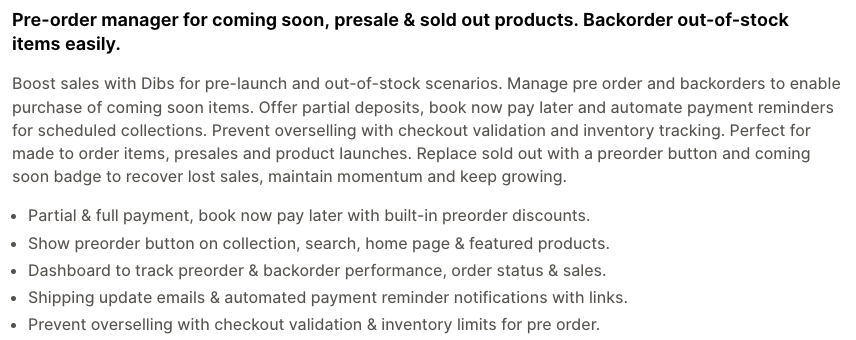
Dibs is built around pre-orders and backorders. Its listing describes partial deposits, book now pay later, payment reminders and "checkout validation" to prevent overselling. Dibs sends shipping update emails, and it can replace a sold-out button with a pre-order button and a "coming soon" badge.
- Pick this if your problem is overselling and you want one app for both pre-orders and backorders.
- Watch for: the listing does not mention back-in-stock alerts, and it lists English as the only language.
PreProduct
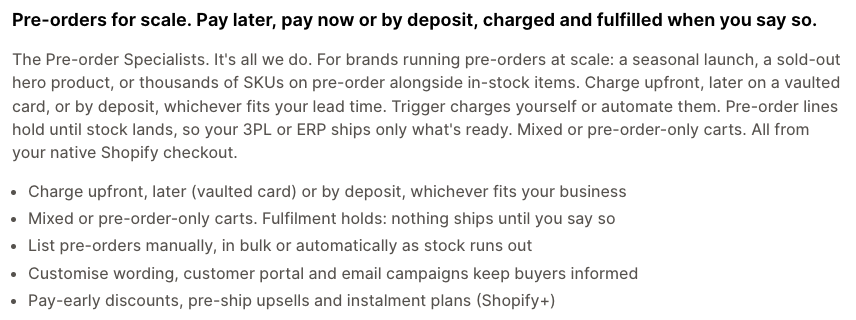
PreProduct calls itself a pre-order specialist. The listing covers charging upfront, later on a saved card, or by deposit, with fulfilment holds so nothing ships until you say so. It can list pre-orders by hand, in bulk, or automatically when stock runs out. A customer portal and email campaigns keep buyers informed. It works with Shopify Flow, Klaviyo and Gorgias, among others.
- Pick this if you run many SKUs on pre-order next to in-stock items, and your 3PL or ERP must only ship what has landed.
- Watch for: the entry plan is "free to install" but the listing shows a share of paid pre-order revenue as the fee, so model that against your volume. Back-in-stock alerts are not mentioned.
STOQ: Preorder, Back In Stock
STOQ pairs a pre-order widget with "notify me" waitlists. The listing mentions deposits and partial payments, payment reminders, back-in-stock alerts by email and SMS, Klaviyo sync, and multi-location support. A free plan is listed.
- Pick this if you want a waitlist for sold-out items and pre-orders from the same tool.
- Watch for: usage limits on the free and low tiers (preorders per month). Check what happens when you pass them.
Timesact: Preorder Now Presale
Timesact lists partial payments collected on a set shipping date, an inventory manager that turns pre-orders on or off by stock level, back-in-stock emails, and a long list of languages. A free plan is listed, and it is capped by orders per month.
- Pick this if you sell in several languages and want pre-orders to switch on and off with stock automatically.
- Watch for: branding on the free plan, per the listing, and the monthly order cap.
Essent: Preorder Back in Stock
Essent offers pay in full, partial, split and deposit with a payment schedule. It can prevent mixed carts, run pre-orders per Shopify Market, and apply inventory and fulfilment rules. It also does back-in-stock notifications and works with Shopify Flow. A free plan is listed.
- Pick this if you sell across Shopify Markets and need tight control over what can sit in the same cart.
- Watch for: the B2B claim. Shopify's developer page lists B2B as a limit for pre-orders, so ask before you rely on it.
Bat Preorders
Bat Preorders covers pre-orders, partial payments and back-in-stock alerts, with countdown timers and a low-stock counter for urgency. The listing mentions split shipping, Klaviyo and other email tools, and ten languages.
- Pick this if you want urgency tools on the product page and several languages in one app.
- Watch for: the listing says it is built for B2B pre-orders. Same note as above: confirm it against Shopify's limits.
PreOrder Globo: Back in Stock
PreOrder Globo can turn on a pre-order button for out-of-stock products or any product. It supports partial payment and automatic discounts, a custom delivery note such as "Delivery in 21-30 days", start and end dates, and order tagging with "preorder" or "shipping date". A free plan is listed.
- Pick this if the delivery note and scheduling are what you care about most.
- Watch for: the listing shows six languages, and deposits are not named, only partial payment. Check that it matches the payment pattern you want.
Other listings we looked at
Three more apps appear in the pre-orders category and are worth a look if the above do not fit. Amai PreOrder Manager + Notify lists pre-order scheduling by date or stock level, split payments and back-in-stock alerts. Advanced PreOrder (Partial Pay) adds a try-before-you-buy option and a request-a-quote feature. PreOrder Me is variant-based and can switch pre-orders on by product tag. None of these three show the "Built for Shopify" badge in the listing text we read.
How to choose
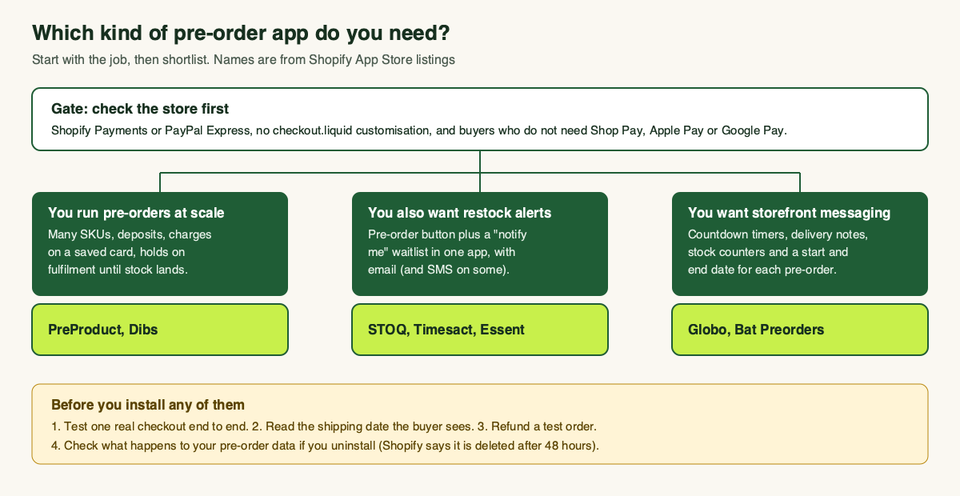
Do these in order:
- Check the gate. Payment gateway, checkout type and wallet buttons. If you rely on Shop Pay or Apple Pay for most orders, expect to lose some of them on pre-order products.
- Decide the payment shape. Full payment now is least work. Deposits and pay-later need an app that charges the saved card and handles a failed charge.
- Decide the stock rule. Reserve at sale (safer against overselling) or at fulfilment. Set a hard limit.
- Decide if you want alerts. If sold-out products are your main loss, a pre-order plus waitlist app saves you running two apps.
- Run a test order. Place one, read the checkout text, check the email, then refund it. Do this before launch, not after.
Our shortlist logic: PreProduct or Dibs for control over payments and stock, STOQ, Timesact or Essent when restock alerts matter, Globo or Bat when product-page messaging matters most. Listings change often, so read the live page before you decide.
If pre-orders are part of a bigger plan, like a drop with theme changes, a custom flow or an inventory sync, that is the kind of project we take on. Talk to us and we will tell you honestly whether an app is enough.
Frequently asked questions
Can I take pre-orders on Shopify without an app?
Not properly. Shopify's help centre says you need a pre-order app. You can tick "continue selling when out of stock", which lets people buy at zero stock, but you get no label, date, deposit or limit.
Do pre-orders work with Shop Pay, Apple Pay and Google Pay?
No. Shopify's help page says customers cannot pay for pre-orders with those accelerated checkouts, or with local methods such as Klarna and iDEAL.
Should I charge the full price or a deposit?
It depends on your lead time and your risk. Full payment is simplest. A deposit lowers the cost of refunds if a buyer cancels and keeps the commitment real. That is our view, not a Shopify rule. Whatever you choose, state it in plain words before checkout.
How long can I wait to charge the balance?
Shopify does not give one limit in the pages we read. A card hold is short (7 days on Shopify Payments), so pre-order apps charge a saved payment method on the due date. Tell the customer the date, and expect some failed charges.
What if I cannot ship by the date I promised?
Tell the buyer before the date passes, give a new date, and offer a refund. Shopify's pre-order rules and the FTC rule both expect this, and the UK guide expects clear delivery information.
Can I mix pre-order and in-stock items in one order?
You can put different products in one cart, and Shopify has rules for due dates and deposits when pre-orders are mixed. The earliest due date applies to all, and "due on fulfilment" takes priority over a set date. Some apps can block mixed carts if you prefer to ship separately. You cannot sell the same product as both a pre-order and a subscription in one checkout.
What happens to my pre-orders if I uninstall the app?
Shopify says pre-order data created in the app (excluding customer payment information) is deleted after 48 hours, unless the app has a backup you can restore from. Export what you need and talk to the developer first.
Do pre-orders work on POS, draft orders and B2B?
Shopify's developer page says no to all three. Some app listings say they support B2B. Ask the developer to confirm in writing how it works with your setup.