Why choose Shopify? The reasons, the limits and who it fits
Why brands pick Shopify, what it does not do well, how it compares with WooCommerce, Adobe Commerce, BigCommerce, Wix and Squarespace, and a short test for whether it fits your store.

Choose Shopify when you want a hosted store that your own team can run, with checkout, payments and hosting handled for you and room to add apps or custom code later. Skip it when you must own the servers, when your site is mostly articles with a small shop on the side, or when single products need more than three options. This guide gives the reasons, the limits and a short test, using the vendors' own documentation.
We are a Shopify agency, so we lean towards the platform. We have tried to write the page we would want to read before choosing: every claim about a product comes from a page we opened, and the section on who should not use Shopify is as long as the section on why you should.
What is Shopify, in plain words?
Shopify is a cloud-based, hosted platform for selling online and in person. Shopify describes it that way itself: you reach your admin and data from any device with an internet connection, and Shopify runs the servers behind it. You do not install the software, patch a server or pick a host.
What you do instead is work inside an admin: add products, set up payments and shipping, pick a theme, install apps from the Shopify App Store, and edit pages. A blogging engine comes built in with the online store. Developers can go deeper through themes, apps and APIs, which we cover below.
If you have never set one up, our step-by-step guide to setting up a Shopify store walks through the first day.
Why choose Shopify? Eight reasons
1. It is hosted, so you do not run servers
The biggest practical difference from self-hosted platforms is who looks after the machine. With WooCommerce, your host must meet the software requirements set by WooCommerce, which today means specific versions of WordPress, PHP and MySQL or MariaDB, HTTPS and a minimum memory limit. With Adobe Commerce installed on your own infrastructure, Adobe's documentation says you host and manage your own servers, hosting environments and system maintenance.
On Shopify those jobs are not on your list. That does not make a store maintenance free (apps, themes and content still need care), but the layer underneath is not yours.
2. Payments and card security are part of the platform
Shopify says it is certified Level 1 PCI DSS compliant, which is the card industry's security standard for handling card data. It also has its own payment service, Shopify Payments, which sets you up to accept all major payment methods when you create your store.
Two limits matter here. Shopify Payments is only available to online stores in certain countries and regions, and the supported countries list shows whether yours is one. And the compliance statement covers Shopify's platform. Your staff passwords, the apps you install and the data you export are still your responsibility.
3. One store for online, in person and several markets
Shopify's point of sale lets a physical shop, a pop-up or a market stall sell from the same admin as your online store. For selling in other countries, Markets lets you tailor currency, language, pricing and theme content for different audiences from one store.
If you want Shopify to handle the hardest parts of selling abroad, Managed Markets is a service run with a partner, Global-e, that handles duties, import tax and local payment methods on your behalf. It has its own terms, so read them before you rely on it.
4. Apps and themes cover the gaps
Most stores need something the base platform does not do: reviews, subscriptions, loyalty, wholesale, shipping rules. On Shopify you add these from the App Store without touching code. Themes work the same way. You pick one, then change sections and blocks in the theme editor.
The honest catch is that apps stack up. Each one adds a monthly bill, a login and sometimes page weight. Our guides on choosing a theme and theme performance show how to keep that under control.
5. The search basics are built in
Shopify's own SEO guide says online stores have SEO features built in. In practice you can edit page titles and meta descriptions, set image alt text, create 301 redirects when you move or retire a product, and submit your store's sitemap.xml to Google Search Console. Themes made by Shopify are built with proper heading structure in mind.
That covers the basics. It does not do the hard work for you: writing pages worth ranking, a sound product-data set and a fast theme are still your job. We cover the machine-readable side in our schema and entity page.
6. Developers can go further when you need it
Shopify exposes more than themes. Checkout and backend logic can be extended with apps. Shopify Functions let developers customise backend logic, with examples in its docs such as bundles and choosing a different order location at checkout. If you want a fully custom storefront, headless commerce lets you build your own front end, with Shopify's Hydrogen framework or your own stack, and keep Shopify for products, cart and checkout.
There is a plan boundary here, which we describe under the limits. For the plan differences, see Shopify vs Shopify Plus.
7. It is moving fast on AI shopping
Shopify has an AI assistant in the admin, Sidekick, which can give guidance, generate content, build apps and complete tasks in plain language. We have a separate guide on what Sidekick does and does not do.
On the selling side, Shopify's Agentic Storefronts page says products can show up in AI chats such as ChatGPT and Gemini, and that the feature is enabled automatically for eligible stores, with terms applying. Treat this as Shopify's description, not a measured result. We have not tested how many orders it produces, and eligibility rules apply. If you want to understand what makes a product easy for an AI assistant to recommend, start with our AI shopping page and the AI for ecommerce guide.
8. You can leave if you need to
Lock-in is a fair worry with any hosted platform. Shopify lets you export your products to a CSV file, and its help page lists a backup and moving to a new store among the uses. We only checked the products export. Orders, customers and theme code are separate jobs, so if exit planning matters to you, test each export on a copy before you commit.
How does Shopify compare with WooCommerce, Adobe Commerce, BigCommerce, Wix and Squarespace?
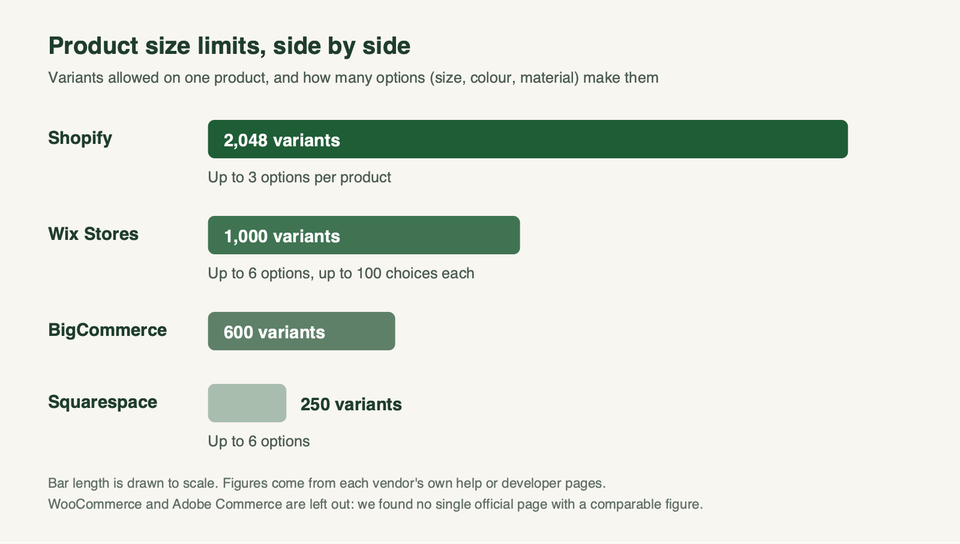
Platforms differ most on who runs the servers and how big a single product can get. This table sums up what each vendor's own pages say. Only the right-hand column is our reading, not a vendor claim.
| Platform | How it is delivered | Product limits on its own help pages | Our read |
|---|---|---|---|
| Shopify | Cloud-based, hosted by Shopify | 2,048 variants, up to 3 options | Strong default for a team that wants a hosted store |
| WooCommerce | Open-source, runs on WordPress with your own host | We found no single official figure | Good if your team already lives in WordPress |
| Adobe Commerce (Magento) | On-premises: you host and manage your servers | We found no single official figure | For teams with developers and a reason to self-host |
| BigCommerce | A SaaS product, per its developer site | 600 variants per product | The closest like-for-like alternative to Shopify |
| Wix | An ecommerce website builder | 1,000 variants, up to 6 options | Fine if your products stay inside its limits |
| Squarespace | An ecommerce website builder | 250 variants, up to 6 options | Design-led stores with simple products |
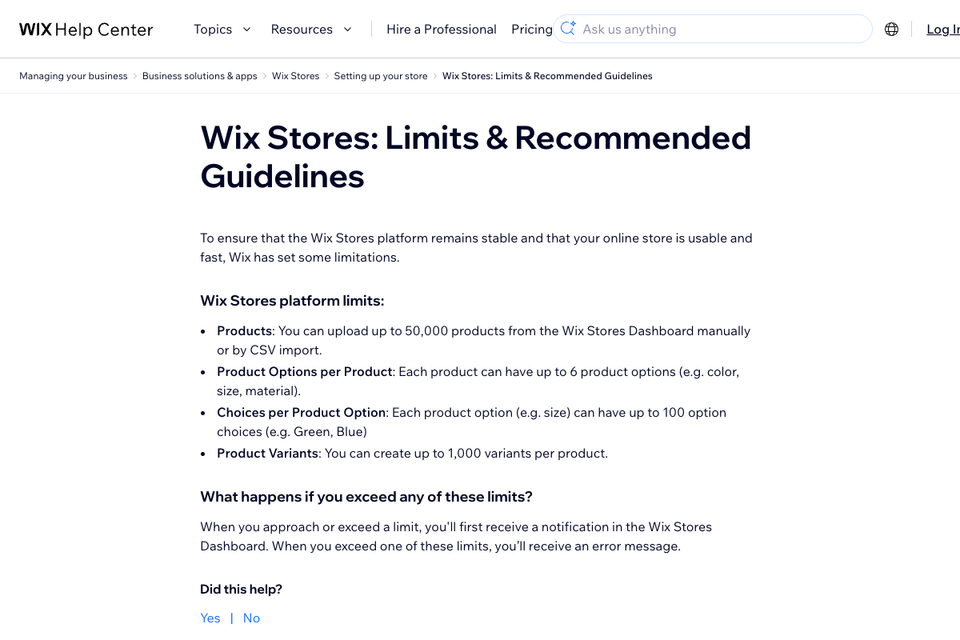
The variant numbers deserve a closer look because most posts get them wrong. Shopify's historical limit was 100 variants per product. Its changelog, dated 15 October 2025, says all merchants can now create products with up to 2,048 variants, and the Help Center adds that each product can have up to three options. Wix lists 1,000 variants and six options per product. Squarespace says each product can have up to six options and 250 variant combinations. BigCommerce's help center says a single product can have a maximum of 600 SKUs or variants. We found no single official figure for WooCommerce or Adobe Commerce.
If you are weighing a move from one of these, we have dedicated pages for WooCommerce, Magento, BigCommerce, Wix, Squarespace and custom builds. For a wider look at other options, see our guides to Shopify alternatives and Magento alternatives.
What does Shopify really cost?
We do not quote prices because Shopify changes them, and an out-of-date number misleads. What we can do is list the layers, so you budget for all of them and not only the plan.
- The monthly plan itself.
- Payment processing on each sale.
- A transaction fee when you use a payment provider other than Shopify's own.
- Paid apps and a paid theme if you want one.
- Developer or agency time for anything beyond the editor.
On the fee layer, Shopify's help page says there are no third-party transaction fees on orders processed through Shopify Payments, Shop Pay and Shop Pay Installments, and none on manual methods such as cash on delivery and bank transfer. If you use Shopify Payments alongside a third-party provider, the fees apply. That is why the country question in reason 2 changes your real cost. Our post on whether Shopify takes a percentage of sales goes through the rates that Shopify publishes, with the region and the source for each.
Who should not choose Shopify?
This is the section most agency posts leave out. Each point below rests on documentation, and each ends with what to do instead.
You need to own the servers or the checkout code
Shopify is hosted. If a legal, security or technical rule says you must run your own infrastructure, you are looking at a self-hosted platform. Adobe Commerce on-premises is built for that, and so is WooCommerce on your own host. The price is the work and the risk that come with running the machine.
Your site is mostly articles with a small shop
Shopify has a built-in blog, but a store is its main job. If a WordPress team publishes all day and the shop is a side line, moving everything to Shopify is a large project for a small gain. Look at WooCommerce, or keep the publishing site where it is and put only the shop on Shopify. Our guide to blogging on Shopify shows what the built-in blog can and cannot do.
One product needs more than three options
Shopify allows 2,048 variants but only three options per product. A made-to-order product with size, colour, material and finish does not fit as one product. Shopify's variants page names the workarounds: a third-party app, or custom theme code that collects the extra choices as line item properties. Both add cost and complexity. Test your hardest product before you sign anything. Wix and Squarespace allow six options, with lower variant totals.
You need custom logic in the checkout on a standard plan
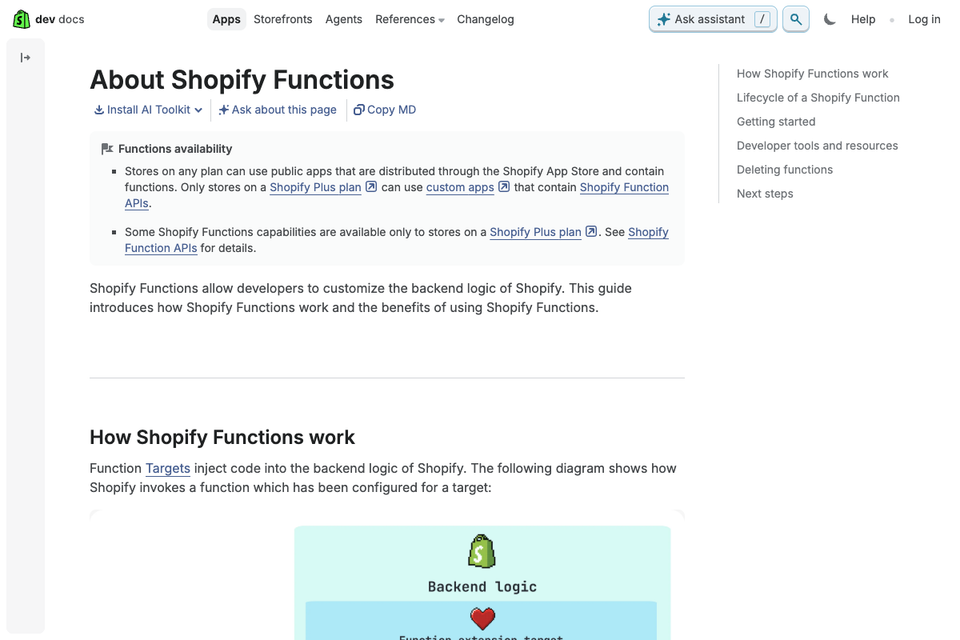
Shopify's developer docs say checkout UI extensions for the information, shipping and payment steps are available only to stores on the Plus plan. Shopify's own blog adds that merchants on all plans can customise the Thank you and Order status pages. And on Functions, stores on any plan can use public apps that contain functions, but only Plus stores can use custom apps that contain Shopify Function APIs.
If you need that level of control, budget for Plus or choose a platform where you own the code. The plan differences are covered in Shopify vs Shopify Plus.
Your old URLs need careful redirects
On Shopify, the /products and /collections paths are fixed Shopify paths and cannot be redirected. The same page says you can redirect only from broken URLs, those that show a Page not found error, and sets a maximum of 100,000 redirects on standard plans and 20,000,000 on Plus. If your old store used a different URL pattern, build the full redirect list before launch and check that every old address lands on the right new page. A large catalogue needs that list checked against the cap.
Shopify Payments is not available in your country
If it is not, you can still use third-party providers, but the transaction fee layer becomes part of your costs. Check Shopify's supported countries list before you start.
Why do brands move to Shopify, and what can go wrong?
Brands usually move for the reasons in this guide: less infrastructure to run, a team that can change the store without a developer, and a large app and developer ecosystem. We are not going to give you a percentage for any of that, because we did not find a source we trust.
What goes wrong in a move is predictable. Old URLs are not redirected, so rankings drop. Data does not map cleanly between platforms. Plugins that did a job on the old platform have no direct replacement and the work gets lost. Redirects only work from URLs that no longer load, so the list has to be built before launch. We wrote a page on keeping rankings through a migration, and our migration overview lists the platforms we move from.
How do you decide in ten minutes?
Ask the four questions in this order. A yes points you to where to look, and a no moves you down.
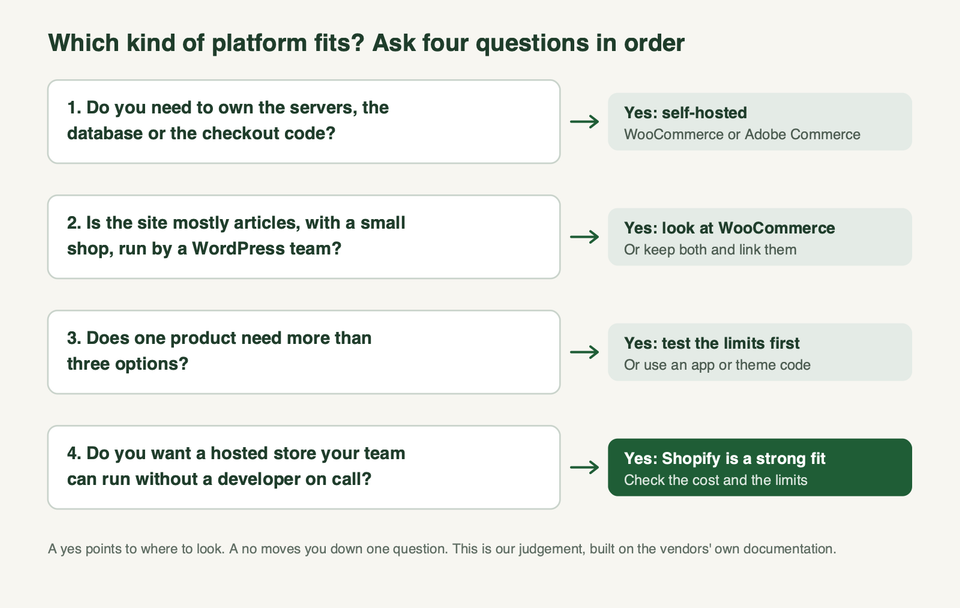
Then do two quick checks. Open your hardest product and count the options it needs. Then read your country's page for Shopify Payments, so you know your fee layer before you pick a plan.
If you want a second opinion on the decision, or a plan for the move, talk to us. You can also see what we do and our work.
Frequently asked questions
Is Shopify worth it?
For most stores that sell ordinary products and want to avoid running servers, yes. It is worth less when you need more than three product options, your own server, or checkout control on a standard plan. Run the four-question test above and price all the cost layers, not only the plan.
Is Shopify good for beginners?
It suits people who do not want to manage hosting, because Shopify runs the servers and you work in an admin. There is still a learning curve: payments, taxes, shipping and theme choices all need decisions. Our launch checklist lists them in order.
Is Shopify good for SEO?
It gives you the basics: editable titles and meta descriptions, alt text, redirects and a sitemap you can submit to Google Search Console. Ranking still depends on your content, product data and speed. Shopify's redirect tool works only from URLs that return a Page not found error, so plan your redirect list before a move.
Does Shopify charge transaction fees?
It depends on how customers pay. Shopify's help page says there are no third-party transaction fees on Shopify Payments, Shop Pay and Shop Pay Installments orders, or on manual methods such as cash on delivery. If you use a third-party provider alongside Shopify Payments, fees apply. Check Shopify's current pricing page for the rates.
Is Shopify secure?
Shopify says it is certified Level 1 PCI DSS compliant, which covers how card data is handled on its platform. Security on your side still depends on strong staff passwords and two-step sign-in, careful choice of apps and limited staff permissions.
Can I sell internationally on Shopify?
Yes. Markets lets you set currency, language, pricing and theme content for different audiences from one store. Shopify Payments is only available in certain countries, so confirm that your country is on the list. Managed Markets, run with a partner, handles duties, import tax and local payment methods, with its own terms.
Can I move my store to Shopify without losing traffic?
You can protect it, but not guarantee it. The key steps are a redirect from every old URL, matched titles and descriptions, and a check of Search Console after launch. Read our rank preservation page before you start.
Can I leave Shopify later?
You can export products to CSV, and a headless build lets you change the front end without changing the back end. Orders, customers and theme code are separate exports, so test each one before you commit.
Do I need a developer to use Shopify?
Not to open a store. You can run a store from the admin with a theme and apps. You will want a developer for custom themes, custom integrations, checkout work and migrations. We cover each on our services page.