Best Free AI Content Generators for Shopify Stores
Which free AI writing tools are worth using for Shopify product descriptions, emails, ads and blog drafts, what "free" costs you in limits and data, and how to edit AI drafts safely, including supplement and skincare claims.


If you run a Shopify store, the best free AI writer is probably the one already inside your admin: Sidekick, which writes product descriptions, blog posts, pages and marketing emails. Add one free general assistant for ad lines and rewrites, and use a Shopify app with a free plan only if you have a lot of products to write. "Free" nearly always means a sample or a cap, and the real cost is the time you spend checking the output.
We checked every tool below on its own page. Free plans change often, so read the current page before you rely on one. For the wider picture, see our guides toAI for ecommerce and AI for marketing.
What changed since the 2023 version of this list
The old version of this post ranked eleven writing tools. Three of them have moved on, going by their own sites today:
- Copy.ai now describes itself as a go-to-market AI platform for sales and marketing workflows, not a free writer.
- Writesonic's pricing page now leads with tracking your brand in AI answers, with AI articles as one feature.
- Rytr's site now leads with a product for relationships and follow-through. Writing is the second pillar, though a free plan still exists.
We did not re-check the other tools from the 2023 list. Instead we rebuilt this guide around the jobs a store owner has: product descriptions, emails, ads and blog drafts.
How to choose
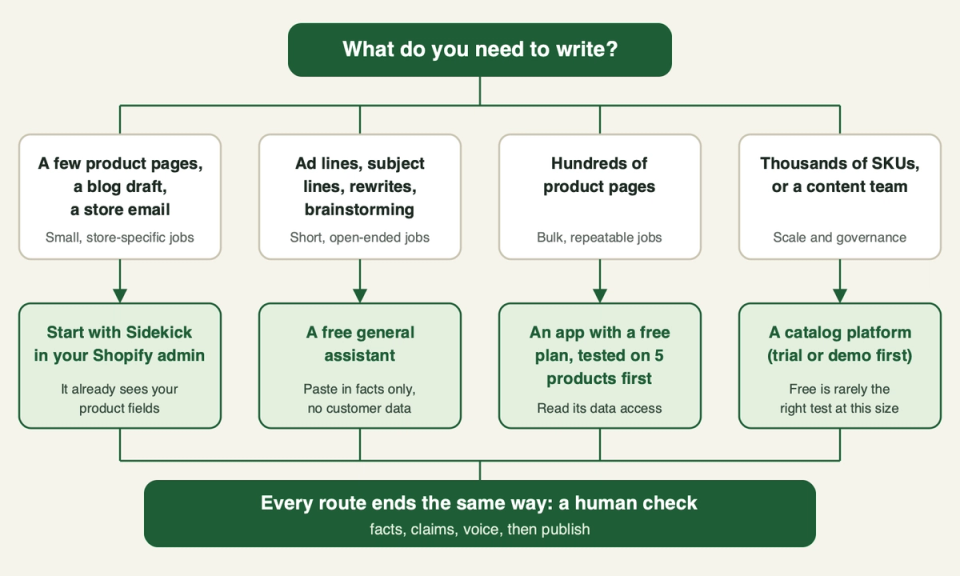
Here is the short version, job by job.
| Job | Where to start | Why |
|---|---|---|
| Product descriptions, a few to a few dozen | Sidekick in your admin | It works inside the product page |
| Product descriptions, hundreds | An app with a free plan, tested on five products | Bulk tools save clicks, not checking time |
| Store emails | Sidekick (Shopify Messaging) or a general assistant | Both can draft from your notes |
| Ad lines and subject lines | A free general assistant | Short, open-ended, easy to compare |
| Blog drafts | Sidekick or a general assistant, then heavy editing | Drafts need your own facts added |
Start with what is already in your Shopify admin
Shopify's help centre says Sidekick writes text inside the pages you edit. Click the generate-text icon and it writes for blog posts, online store pages, product descriptions, Shopify Messaging emails and content in the theme editor. Sidekick is also a chat assistant for the rest of your admin, which we cover in our Sidekick guide.
For product descriptions, Shopify's page on automatically generating product descriptions says to give Sidekick a product title and at least two features or keywords. It suggests adding who the product is for, materials, intended use and any brand words you want kept. You edit the result and save it. The same page says the text generator is not supported on iPhone or Android, so use a desktop browser.
Two lines on that page matter more than the rest. Shopify says you are responsible for the accuracy of anything you publish, and that generated text can include benefits you did not list, and facts taken from other published content about similar products. We come back to that in the claims section.
On cost, Shopify's AI tools page says many AI features are available at no additional cost, but availability can vary by plan, device and language. Check your own admin before you plan around it.
Pick this if: you have a small catalog, want drafts next to your real product fields, and would rather not give a new app access to your store.
Skip this if: you need to rewrite hundreds of products in one run, or you want a different model or a fixed brand voice across a team. We did not find a bulk-run option on the pages we read.
Free general assistants
A general chat assistant is the flexible option for short jobs: ad lines, subject lines, rewrites and brainstorming. It does not see your store, so you paste in the facts. We did not run a head-to-head writing test for this guide, so we do not rank them on quality.
Claude. Anthropic's pricing page lists a Free plan with chat on web, desktop and mobile, web search, file creation, memory and Artifacts. It says usage limits apply and that plans can change. On data, Anthropic's privacy centre (article dated 16 March 2026) says it uses consumer chats to improve its models if you choose to allow that, or if a chat is flagged for safety review. It says incognito chats are not used.
Pick this if: you want a free general assistant for drafting and rewriting. Skip this if: you want it to read your catalog or write to your store.
Gemini. Google's Gemini plans page lists a free plan with a Google account, using a Flash-Lite model, with image creation and editing, Deep Research, Canvas and Gems. Paid plans raise the usage limits. On data, Google's Gemini Apps privacy notice says human reviewers read some chats, asks you not to enter confidential information, and says reviewed chats are kept for up to three years even if you delete your activity.
Pick this if: you already live in Google's tools. Skip this if: you would paste in anything you would not want a reviewer to see.
ChatGPT. OpenAI's pricing and help pages refused our automated requests today, so we did not read them and say nothing about ChatGPT's free tier here. Check OpenAI's page directly, and see our ChatGPT alternatives guide for a wider comparison.
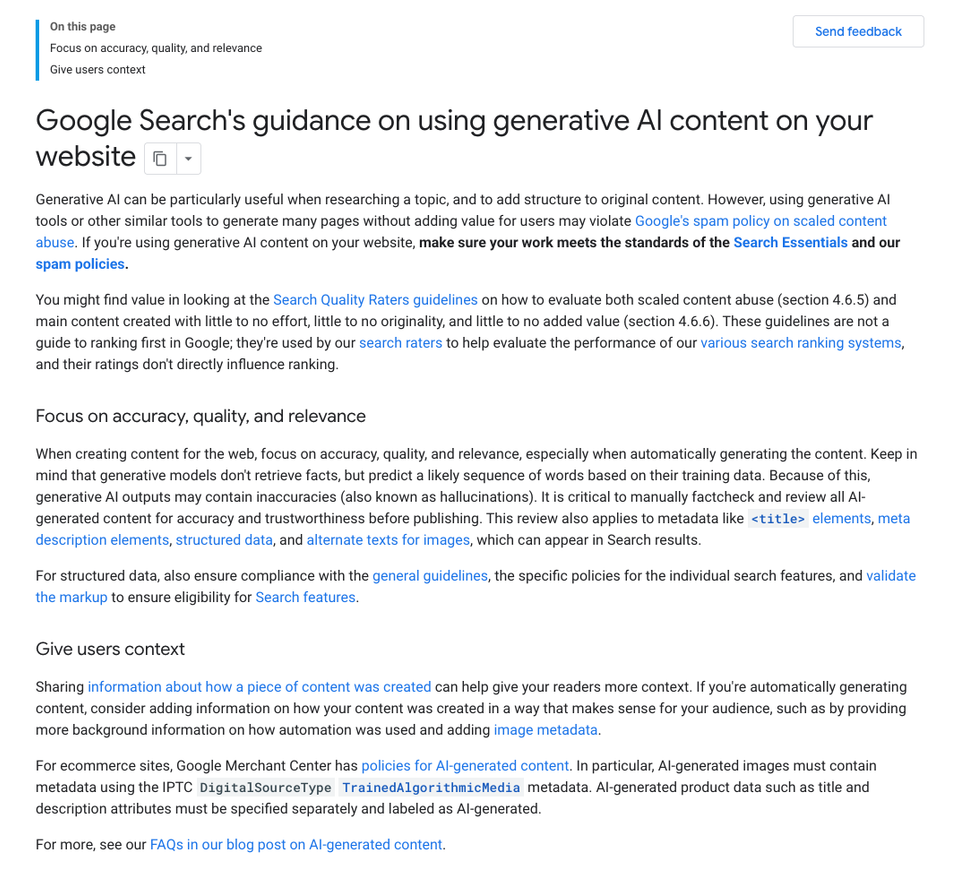
Shopify apps with a free plan
These suit stores with many products. Each listing below was. We quote free allowances only as the listing words them today, and we leave prices out.
AI Product Description-ChatGPT (Profitonium). The listing says a free plan is available, with 200 credits every month, and warns that credit use varies by AI model and feature. It writes descriptions, titles and SEO text in bulk, can generate text automatically for new products, and lists ChatGPT, Gemini, Claude and Grok models. It carries a Built for Shopify badge on its listing. Its data-access list is long: it covers store owner contact details, blog contributor details, products, online store pages, theme, files and market settings. Part of that is because it also does SEO tools, redirects and blog scheduling. Read the "why" in its privacy policy before you install.
Pick this if: you want bulk drafts plus the SEO extras. Skip this if: you want a narrow tool with minimal access.
Elliott (Standard Retail). The listing's free plan gives 20 credits a month, which it equates to 20 product descriptions. It lists descriptions, titles, SEO fields, alt text, collection descriptions and FAQs, and says it works with ChatGPT. The free plan's feature list does not mention custom prompts; the paid plans' lists do. The listing showed no reviews when we opened it.
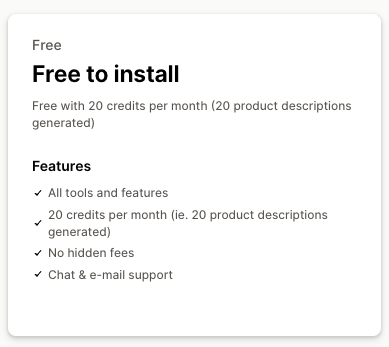
Pick this if: you want to try AI descriptions on a small batch for no charge. Skip this if: you need track record, because the listing has none yet.
StoreGPT (Nick Friedrich). The listing says a free plan is available and shows "20 free AI generations" under a plan labeled Free Trial. It does not say that allowance refills each month. It lists eight languages, over twelve writing styles, bulk editing and a live preview before you publish. It also showed no reviews on our visit.
Pick this if: a preview step matters to you. Skip this if: you need a free allowance that renews.
Tako SEO Description AI writer (Hypotenuse AI). The listing's free plan gives 20 free credits on install, with pay-as-you-go credit packs and limited platform access. It lists product descriptions, blog posts, category descriptions, social captions and ads, in 20+ languages. Hypotenuse's own site is aimed at larger catalogs: product data enrichment, brand guidelines, bulk workflows and a Shopify integration, with a Basic plan marked "Try for free".
Pick this if: you want a vendor that also has a catalog-scale product when you outgrow the app. Skip this if: you want something that stays free.
Rytr. Rytr's pricing page says Free is "Free forever", with a limit of 10,000 characters a month and a list of 40+ writing use cases in 30+ languages. It has no Shopify connection that we saw. Pick this if: you want a free scratchpad for short emails and ad lines. Skip this if: you want store-aware product copy.
Free trials that are not free plans
Three well-known tools offer a trial rather than a free tier, going by their pricing pages today.
- Jasper advertises a free 7-day trial on its per-seat plan. It is built for marketing teams, with brand voice settings and agents. It is more than a solo store owner with thirty products needs.
- Writesonic says "Start free. No credit card needed" and shows a 7-day free trial. It now centers on AI search visibility tracking, so check that its writing features fit what you want.
- Copy.ai shows a "Try for free" button on its pricing page, but we could not tell from the page what the button unlocks. It is a sales and marketing workflow platform now.
If you are comparing paid options, our ecommerce tools guide is a better starting point than this list.
Compared at a glance
| Option | Best for | Free offer as described on 17 Oct 2026 | Watch for |
|---|---|---|---|
| Sidekick | Descriptions, blog posts, pages, emails | Shopify says many AI features have no added cost; varies by plan | Invented benefits; desktop only for text |
| Claude | Rewrites, ad lines, drafts | Free plan with usage limits | Chat data and training settings |
| Gemini | Drafts, research, images | Free plan on a Flash-Lite model | Human review of chats |
| AI Product Description-ChatGPT | Bulk descriptions plus SEO | Free plan, 200 credits a month | Wide data access; credits vary |
| Elliott | Small test batches | Free plan, 20 credits a month | New listing, no reviews |
| StoreGPT | Bulk with preview | Free plan, 20 free generations | Unclear if it renews |
| Tako (Hypotenuse AI) | Descriptions, blogs, ads | Free plan, 20 credits on install | Limited platform access |
| Rytr | Short copy scratchpad | Free forever, monthly character cap | Not store-aware |
What "free" really costs
A cap, not a catalog. The free allowances above run from a one-off 20 to a monthly 200 credits, and credits do not always equal one description. A free plan is a way to test. It rarely covers a catalog.
Your data. Anything you paste into a general assistant may be used to improve models or be read by reviewers, depending on the provider's settings. Apps ask for access to your store. Keep customer details, supplier contracts, unreleased products and anything health-related out of free tools unless you have read their data terms.
Lock-in and clean-up. A bulk run writes into your product records. Take a backup of your product data first. Look for a preview step (StoreGPT's listing mentions one) or a revert option (the AI Describer listing mentions one). Test on five products before running five hundred.
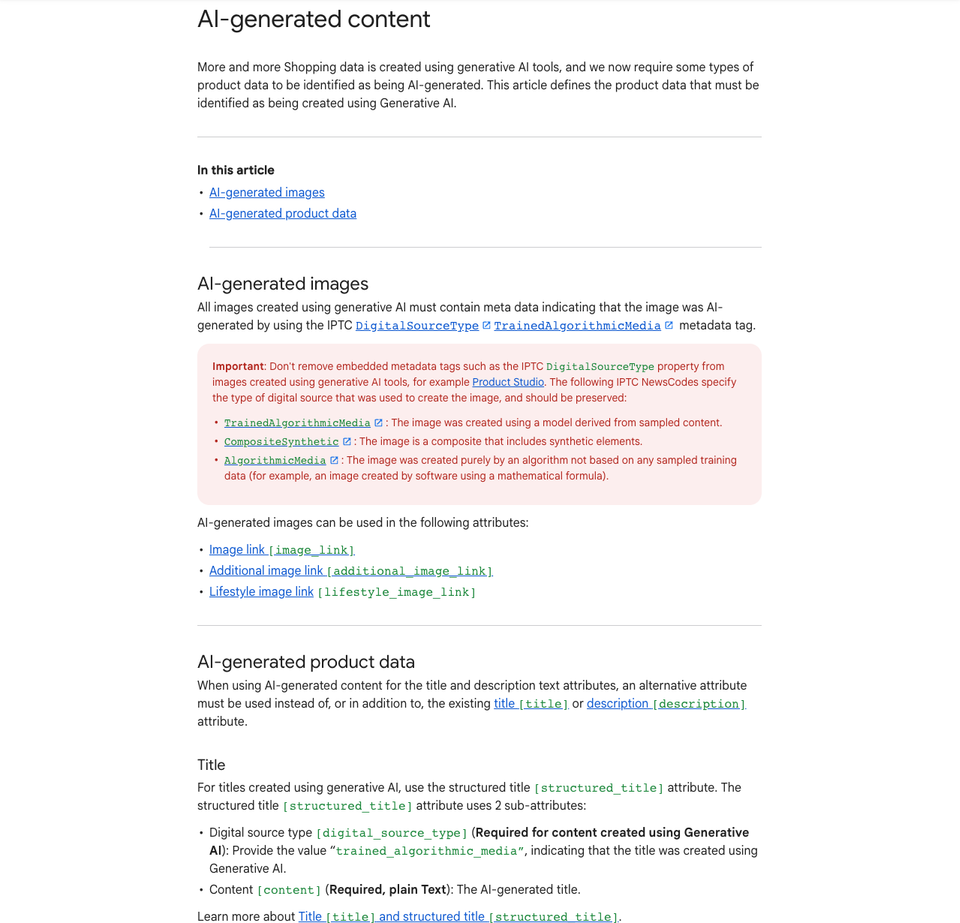
Labels and metadata. None of the text-tool pages we read mentioned watermarks on written output. For images it is different: Google's Merchant Center says AI-generated images must keep their IPTC metadata, so do not strip it.
What Google says about AI-written content
We opened Google's guidance on generative AI content. The page shows it was last updated on 1 October 2026. In plain terms:
- AI is not banned. Google says generative AI can help when researching a topic and when adding structure to original content.
- Volume without value is the problem. Using AI to generate many pages without adding value for users may violate its scaled content abuse policy, which covers many pages made mainly to manipulate rankings, however they are created.
- You must check the facts. Google notes that generative models predict likely word sequences rather than retrieving facts, so they can be wrong, and says to manually fact-check AI content before publishing. That includes titles, meta descriptions, structured data and image alt text.
- Context helps readers. Google suggests considering a note on how content was created.
For ecommerce there is one more rule. Google's Merchant Center policy on AI-generated content says AI-generated product titles and descriptions must be supplied in separate structured attributes, labeled as AI-generated, and AI-generated images need the IPTC metadata tag. If you send your product feed to Google, check how your feed app handles that before you bulk-publish AI descriptions.
Claims and compliance: supplements and skincare
An AI tool does not know your product. It knows what descriptions of similar products usually say, and Shopify's own help warns that it may add benefits you never listed. In most categories that gives you a bland sentence. In supplements and skincare it can give you a regulatory problem. We are not lawyers, and this is not legal advice, but here is what the official pages say.
Dietary supplements (US). FDA's page on structure/function claims says these claims describe an effect on the normal structure or function of the body, with examples such as "calcium builds strong bones". They are not pre-approved by FDA, but the maker must have substantiation that the claim is truthful and not misleading, and must notify FDA within 30 days of marketing with the claim. The label needs a disclaimer, including that the product is not intended to diagnose, treat, cure or prevent any disease, because only a drug can legally make that kind of claim. An AI draft that says your product "helps with" a named condition has crossed that line.
Skincare and cosmetics (US). FDA's guide to cosmetics and drugs says a product's intended use decides whether it is a cosmetic or a drug, and that intended use can be shown by claims on the label, in advertising or on the internet. Its examples of claims that can turn a cosmetic into a drug include restoring hair growth and reducing cellulite. Moisturizing is a typical cosmetic claim. So a product page, a product title and an ad written by AI all count.
EU and UK. The European Commission says nutrition and health claims on food fall under Regulation (EC) No 1924/2006, with a public register of permitted nutrition claims and authorised and non-authorised health claims. We did not read UK sources for this guide, so we say nothing about UK rules. Ask a specialist.
Practical rules that follow from this:
- Give the AI a claims list. Paste in only claims you can back up, taken from your approved label or substantiation file, and tell it to use nothing else.
- Ban the risky words in your prompt: disease names, "cure", "treat", "prevent", "clinically proven" and any number you did not supply.
- Never let AI write customer reviews, testimonials or "doctor recommended" lines.
- Have someone who knows the rules read every page in a regulated category. A tool cannot do that for you.
If you sell in these categories and want a second pair of eyes on a store-wide content process, talk to us. We build the store side; claims review belongs with a qualified specialist.
A short workflow for editing AI drafts
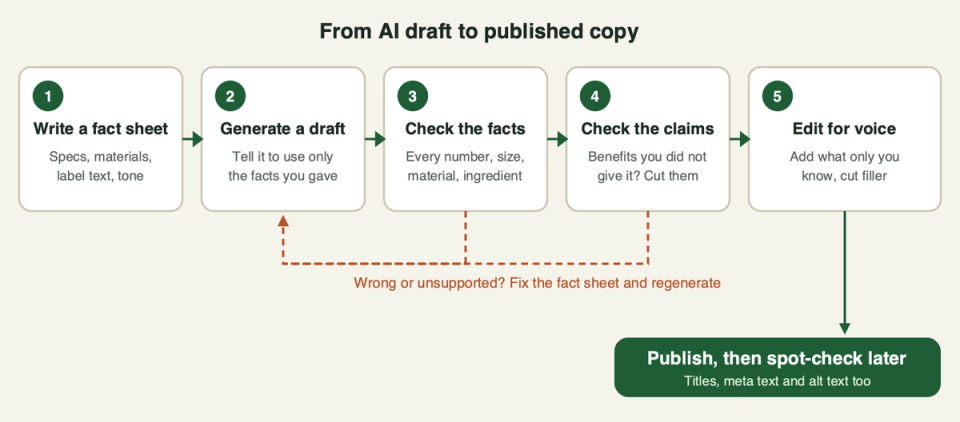
- Write a fact sheet first. Specs, materials, sizes, label text, who it is for, and the tone. Paste only this.
- Generate a draft. Tell the tool to use only the facts you gave. Shopify's own advice is to be specific about goal, data, limits and format, and to review before applying.
- Check every fact. Numbers, sizes, materials, ingredients, care instructions, shipping and returns. Anything not on your fact sheet comes out.
- Check every claim. Remove benefits you did not supply. Run regulated copy past someone who knows the rules.
- Edit for voice and add what only you know. A customer question you hear often, how it is made, why you chose it. Cut filler openings.
- Do not publish near-identical pages. If twenty product pages read the same, rewrite them.
- Check the small stuff. Titles, meta descriptions and image alt text, which Google says need the same fact-check.
- Spot-check after publishing. Reread a sample a week later with fresh eyes.
Frequently asked questions
Is there a completely free AI content generator?
Not for unlimited use. Every free plan we read has a cap or a usage limit. Shopify says many of its AI features have no added cost, but availability varies by plan, device and language.
Is Shopify's built-in AI free?
Shopify says many AI features in the admin are available at no additional cost, and that availability varies. Check your admin to see what your plan includes.
Will Google penalize AI-written product descriptions?
Google's guidance does not ban AI content. It warns against generating many pages without adding value, and says to fact-check everything. Descriptions that are accurate and useful are the goal; copied, thin or repeated ones are the risk.
Can I just rewrite my supplier's descriptions with AI?
Be careful. Google's spam policy lists scraping content and running it through automated transformations such as synonymizing as an example of scaled content abuse when little value is added. Use the supplier's facts, then add your own details.
Do I have to say a description was written by AI?
Google says to consider adding context on how content was created, in a way that suits your audience. Separately, Merchant Center requires AI-generated titles and descriptions to be labeled in your product data.
Which free tool is best?
We did not run a quality test, so we will not name a winner. Match the tool to the job: Sidekick for store content, a general assistant for short copy, and an app only for bulk work.
Is it safe to paste product or customer data into a free tool?
Product facts are usually fine. Customer data, supplier contracts and unreleased products should stay out unless you have read the tool's data terms. Providers differ on training and human review.
Can AI write supplement or skincare copy?
It can draft it. It should not publish it. Regulators look at your claims, and AI tends to add benefits. Give it an approved claims list and have a specialist check the result.